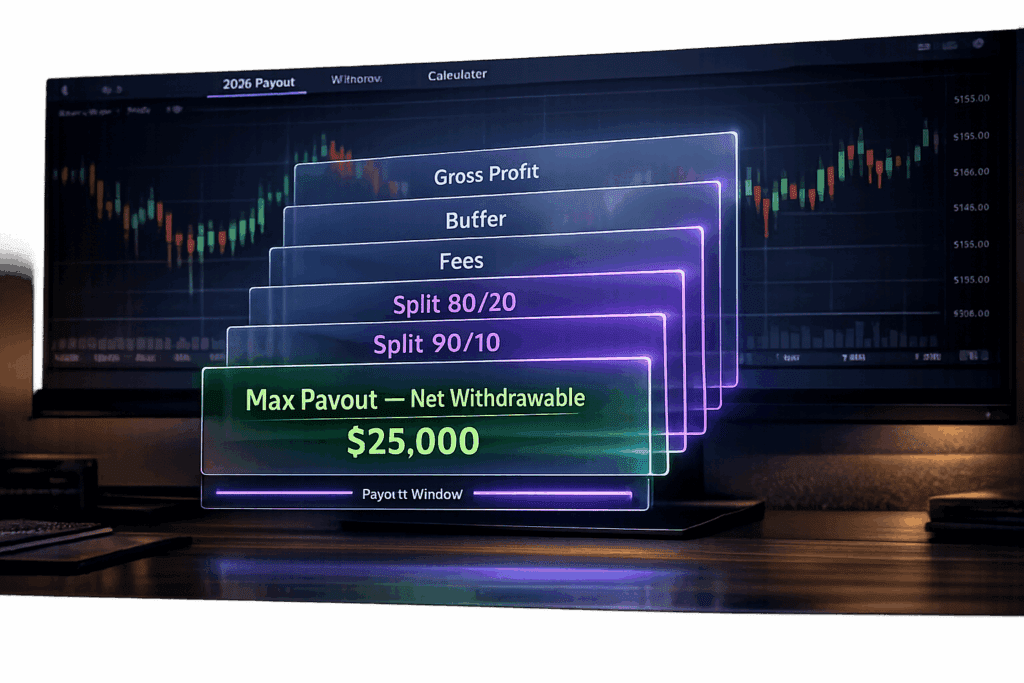
Take Profit Trader’s payout system is straightforward, but there are some key rules you need to know before you start pulling profits. PRO accounts require you to hit a “buffer” (starting balance + max drawdown) before you can withdraw anything. For example, on a $50,000 account with a $2,000 drawdown, your buffer is $52,000. You can only withdraw profits above that. PRO+ accounts skip the buffer entirely and let you withdraw from day one.
The profit split is 80/20 for PRO accounts and 90/10 for PRO+. Withdrawals over $250 are fee-free, but anything $250 or less gets hit with a $50 fee. Timing matters. Don’t let fees eat into your profits. Processing takes 2–4 business days, depending on your payment method.
Here’s everything you need to know about how Take Profit Trader handles payouts and how to maximize what you take home.
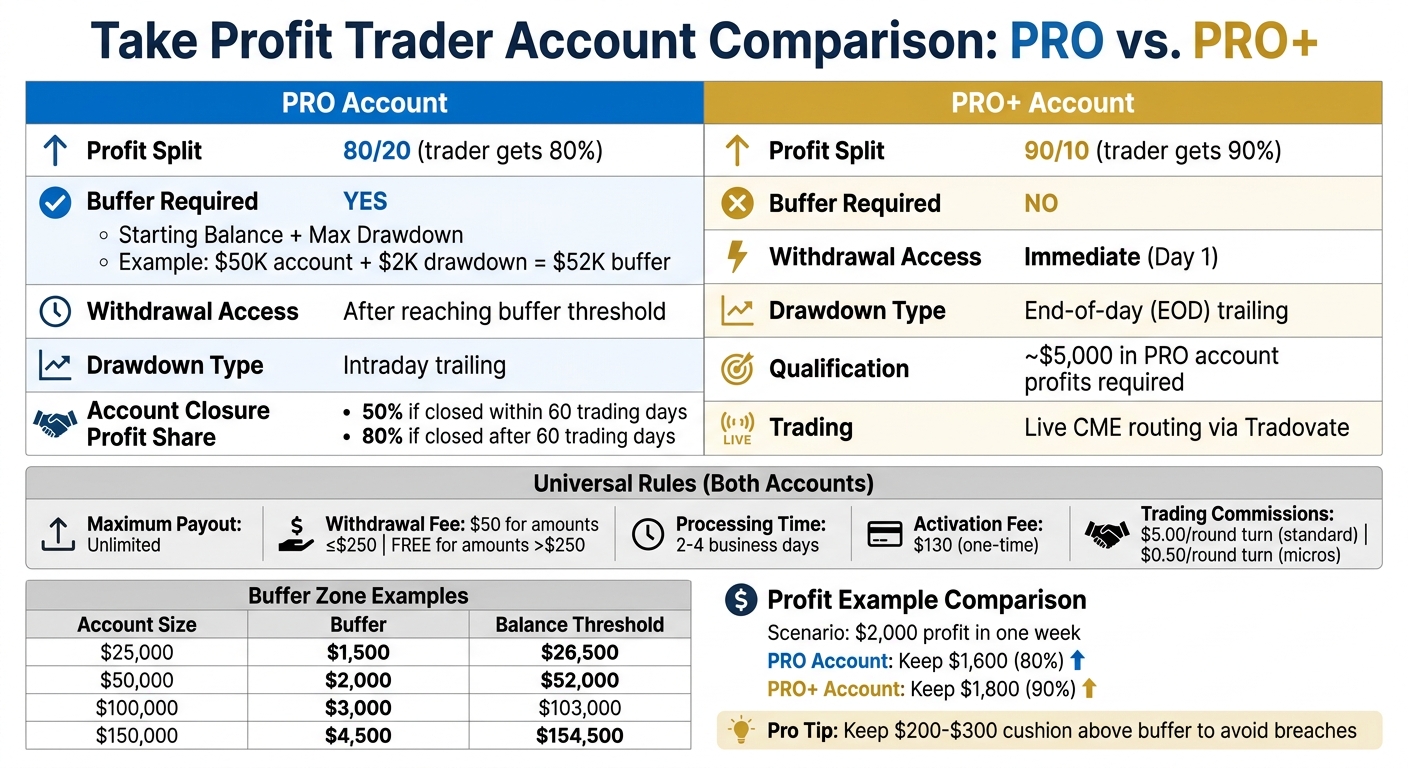
Take Profit Trader Account Comparison: PRO vs PRO+ Payout Rules
Take Profit Trader‘s Payout Structure Explained
What ‘Max Payout’ Means
Take Profit Trader offers unlimited withdrawals once you’re above the buffer. As noted in our Take Profit Trader review, they don’t put a cap on how much you can take out. Unlike many competitors, they don’t put a cap on how much you can take out. As they explain:
There’s no restrictions on your profits above the buffer. No minimum profitable trading days required, no maximum amount you can withdraw, and no waiting for some random ‘payout window’
[4].
The buffer is essentially your starting balance plus the maximum drawdown. For example, on a $50,000 account with a $2,000 max drawdown, your buffer is $52,000. Any profit above that is yours to withdraw whenever you want, in whatever amount.
If you’ve got a PRO+ account, the rules are even better. Since these accounts are tied to live-market performance, there’s no buffer to worry about. You can start withdrawing profits from day one.
Now, let’s break down how these rules impact your trading and withdrawal strategy.
How Payout Rules Affect Your Trading
The unlimited withdrawal policy is great, but the buffer requirement changes how you manage your account. You can’t let your balance drop to your initial starting point – you need to keep that buffer intact. For instance, if your $50,000 account grows to $55,000, you can only withdraw $3,000 ($55,000 minus the $52,000 buffer).
Most traders leave a small cushion, around $200–$300 above the buffer, to handle any losing trades without risking a breach of the account requirements [1].
It’s also worth noting that withdrawal fees can cut into your profits. For details on fees and payment options, check out the section below.
sbb-itb-46ae61d
Profit Splits: Your Share of the Earnings
Let’s break down how profit splits work, building on the payout rules we covered earlier.
Standard Plan: 80/20 Split
With PRO accounts, you’re looking at an 80/20 profit split. This kicks in once you pass the evaluation and start trading in the simulated (SIM) environment. Before you can withdraw profits, you’ll need to build a buffer.
For example, on a $50,000 account with a $2,000 max drawdown, your buffer is $52,000. Let’s say you grow the account to $55,000 – that’s $3,000 in profit. You’d take home $2,400 of that, keeping 80%. Here’s the catch: if you close your PRO account while your profits are still within the buffer, your share drops to 50% if you’ve been active for 60 trading days or less. After 60 days, you’re back to the 80% split [2][3].
Want to keep more of your earnings? That’s where the PRO+ plan comes in.
PRO+ Plan: 90/10 Split
The PRO+ account ups your profit split to 90/10. To qualify, you’ll need consistent performance – usually around $5,000 in profits on a PRO account. When you upgrade, $5,000 of your previous profits is locked as a safety margin.
Unlike the PRO plan, PRO+ doesn’t require a buffer. Trades route directly to the CME via Tradovate, and you can withdraw profits immediately. For instance, earning $2,000 in a week means you’d pocket $1,800 in a PRO+ account compared to $1,600 in a PRO account. Another bonus? PRO+ accounts use an end-of-day (EOD) trailing drawdown, which is far more forgiving than the intraday, EOD, and static drawdown rules used in PRO accounts [2][3].
How to Withdraw Your Profits
Getting your profits out is a two-step process: first, move the funds to your TPT Wallet, then transfer them to your bank or payment provider.
Requirements for Your First Withdrawal
Before you can request your first payout, there are a few things you need to take care of. First, your account balance must be higher than your starting balance plus the maximum drawdown; otherwise, no profits can be withdrawn [3].
You’ll also need to close any open positions before submitting a withdrawal request. If you have active trades, your request will be denied. You should also use a consistency calculator to ensure your trading volume stays within the required limits for a successful payout. On your first withdrawal, you’ll be required to complete a tax form (W-9 for U.S. traders or W-8BEN for international traders) and verify your identity. This step involves a pop-up, so make sure your browser allows pop-ups to avoid delays.
Lastly, keep in mind that withdrawals under $250 come with a $50 processing fee, so plan accordingly.
Once you’ve checked all these boxes, the next step is understanding how long it’ll take to get your money.
How Long Payouts Take to Process
Transferring funds from your PRO account to your TPT Wallet usually takes about 24 hours. After that, admin approval for moving the money to your bank or payment provider typically takes up to 12 business hours.
The timing from there depends on your payment method. If you’re a U.S. trader using Plaid, you might get your funds instantly or within 1–2 business days via ACH. International traders using Wise or PayPal usually receive their money within 12 business hours, though it could take 1–2 business days for the funds to show up in your account. Overall, the entire process typically takes 2–4 business days.
Account Size and Buffer Zone Rules
Your account size plays a big role in determining the mandatory profit reserve – also known as the buffer zone – that you need to maintain to qualify for withdrawals. This reserve matches your account’s maximum drawdown [5].
What the Buffer Zone Is
The buffer zone is essentially a locked-in profit reserve that must stay in your PRO account at all times. To keep your withdrawal eligibility intact, your account balance has to stay above your starting balance plus the buffer amount [5].
For example, if you’re trading with a $50,000 account, the buffer is $2,000 (your max drawdown). That means your balance needs to hit $52,000 before you can withdraw any profits [5].
Profits within the buffer zone are treated differently. They’re off-limits for withdrawals unless you close your account. If you decide to close your account within the first 60 trading days, you’ll get 50% of the buffer. Stick around for more than 60 trading days, and that percentage bumps up to 80% [5].
Pro Tip: Keep a little extra cushion – about $200 – above the buffer threshold. This way, you won’t accidentally fall below it with a single loss.
Max Payout Examples by Account Size
Here’s how the buffer zone works across different account sizes:
| Account Size | Buffer Zone | Balance Threshold | Max Drawdown |
|---|---|---|---|
| $25,000 | $1,500 | $26,500 | $1,500 |
| $50,000 | $2,000 | $52,000 | $2,000 |
| $75,000 | $2,500 | $77,500 | $2,500 |
| $100,000 | $3,000 | $103,000 | $3,000 |
| $150,000 | $4,500 | $154,500 | $4,500 |
If you upgrade to a PRO+ account, the buffer zone is no longer an issue. PRO+ accounts come with a 90/10 profit split, and you get immediate access to all your earnings without needing to maintain a reserve. PRO+ is invitation-only or earned through top-tier performance, making it a solid option for traders looking to maximize their payouts [5].
Fees, Payment Methods, and Other Factors
When calculating your net withdrawals, you’ve got to factor in fees and payment logistics. These details go beyond just the profit split and buffer zone – they directly impact how much cash actually lands in your account.
Fees That Cut Into Your Payout
There’s a $130 one-time activation fee you’ll pay after passing the evaluation to unlock your PRO account. Think of it as a replacement for the monthly subscription you paid during the evaluation phase. Once you’re funded, there are no recurring charges[5].
On top of that, trading commissions will chip away at your profits: $5.00 per round turn for standard contracts and $0.50 per round turn for micros on platforms like Tradovate or NinjaTrader[5]. These costs can add up fast if you’re an active trader.
Withdrawal Options and Processing Times
Take Profit Trader offers two main withdrawal methods: PayPal and Wise. PayPal is the faster option, with funds typically processed within 12 business hours. Wise takes a bit longer – anywhere from 1 to 5 business days, depending on your bank’s processing speed[5]. Keep in mind, third-party platforms like PayPal might tack on extra fees.
Before you can make your first withdrawal, you’ll need to complete identity verification and submit tax forms. U.S. residents file a W-9, while international traders submit a W-8 BEN[5]. These steps are mandatory to ensure your payouts go through smoothly.
FAQs
How do I calculate my buffer on a PRO account?
To figure out your buffer on a PRO account, just add the maximum drawdown to your account size. For instance, if you’ve got a $50,000 account with a $2,000 max drawdown, your buffer is $52,000. You can start pulling profits only after your balance goes above this number. This keeps your account safely above the drawdown limit.
How much should I leave above the buffer before withdrawing?
Keep at least $2,000 above your buffer zone. In simple terms, your account balance has to equal your starting balance plus the maximum drawdown amount before you’re eligible to withdraw profits. Make sure your balance hits this mark to stick to the payout rules.
What happens if I withdraw and later fall below the buffer?
If you take profits while you’re in the buffer zone, you’ll only be able to withdraw after your account is terminated. The payout split depends on how long you’ve been trading in the buffer: 50% if it’s been less than 60 days, or 80% if it’s over 60 days. Make sure to double-check the firm’s rules so you’re clear on the payout terms.