Scaling with Apex Trader Funding is all about growing your trading account responsibly. Here’s the gist:
- Start Small: Funded accounts begin with half the maximum contracts allowed.
- Grow Gradually: Scale up contracts as your account balance surpasses specific thresholds. For example, a $50,000 account starts with 5 contracts but can increase to 10 once the balance hits $53,300.
- Stay Compliant: Violating rules like trailing drawdown or the consistency rule can lead to account suspension or payout denial.
- New 2026 Updates: EOD and Intraday accounts now allow passing evaluations in just one day, with no minimum trading days required. The consistency rule also shifts from 30% to 50%.
This approach ensures traders increase their trading size only after demonstrating consistent growth and risk management.
Apex Trader Funding Contract Scaling Rule Explained
sbb-itb-46ae61d
Moving from Evaluation to Performance Account
Transitioning from an evaluation account to a funded Performance Account happens once you hit your profit target without breaking any drawdown rules. Starting March 1, 2026, Apex offers two evaluation programs: EOD (End of Day) Trailing Drawdown and Intraday Trailing Drawdown. Both programs let you pass in just one day if you meet the profit target – there’s no minimum trading days requirement anymore.
Once you pass, you’ll need to activate your Performance Account within 7 calendar days to lock in your funded opportunity. It’s also essential to review the specific profit targets and time limits for your chosen account size.
Profit Targets and Trading Days Requirements
The profit target you need to hit depends on your account size. For example:
- A $50,000 account requires $3,000 in profit.
- A $100,000 account needs $6,000.
- A $150,000 account has a target of $9,000.
You’ll have 30 calendar days to complete the evaluation from the start date – extensions are not an option.
| Account Size | Profit Target | Max Drawdown (EOD/Intraday) | Daily Loss Limit (EOD Only) | Max Contracts |
|---|---|---|---|---|
| $25,000 | $1,500 | $1,000 | $500 | 4 |
| $50,000 | $3,000 | $2,000 | $1,000 | 6 |
| $100,000 | $6,000 | $3,000 | $1,500 | 8 |
| $150,000 | $9,000 | $4,000 | $2,000 | 12 |
The main difference between the two programs lies in how the drawdown is calculated. EOD Trailing Drawdown updates once daily at market close, while Intraday Trailing Drawdown updates in real time based on your peak balance, including unrealized profits. If you prefer a more stable threshold that doesn’t change mid-session, EOD might be the better choice.
With these targets and rules in mind, make sure your trades stay compliant to avoid disqualification.
Avoiding Rule Violations During Evaluation
Sticking to the rules is critical for a smooth transition to a funded account. Violations can result in a reset fee – $80 for Rithmic or $100 for Tradovate – or require you to restart the evaluation altogether. The most common mistakes include breaking drawdown limits, missing trade closure deadlines, and using prohibited strategies or failing to use a trade copier correctly when managing multiple accounts.
Here are key rules to follow:
- Close all positions and cancel working orders by 4:59 PM Eastern Time every trading day. Missing this deadline results in an immediate violation.
- Every trade must include a mandatory stop-loss before execution. Trading without one will disqualify you.
- Avoid trading during restricted times around major economic events, such as FOMC announcements, CPI releases, or Non-Farm Payrolls. Specifically, don’t open or close positions within two minutes before or after these events. Check the economic calendar daily to stay compliant.
For EOD evaluations, hitting the Daily Loss Limit (DLL) will pause your trading for the rest of the session but won’t fail your account. However, reaching the EOD Threshold at any point results in immediate failure. On the other hand, Intraday evaluations don’t have a DLL, but touching the Intraday Threshold – even briefly – will fail the account instantly.
Certain strategies are off-limits. These include fully automated bots, high-frequency trading (HFT), and hedging (e.g., holding long and short positions in correlated instruments like ES and NQ simultaneously). While ATM strategies are allowed, you must actively monitor your trades – “set-and-forget” automation is not permitted.
One advantage of evaluation accounts is that they don’t have a consistency rule. Your only focus should be on hitting the profit target while staying within drawdown limits.
Trailing Drawdown and Scaling Buffers Explained
Grasping the concept of trailing drawdown is essential if you want to maximize your contract sizing potential. This process is a cornerstone of Apex Trader Funding’s approach to scaling accounts, ensuring that risk stays in check as trading capacity grows. It determines when you can scale up and how much breathing room you have before hitting the liquidation threshold.
How Trailing Drawdown is Calculated
The way trailing drawdown is calculated depends on your account type:
- Intraday Trailing Drawdown: This adjusts based on the highest unrealized equity peak while your positions are open.
- End-of-Day (EOD) Trailing Drawdown: Here, the threshold updates once daily at 4:59:59 PM Eastern Time, based on your closing balance. The new threshold applies to the next trading session.
When you transition to a Performance Account, the trailing drawdown continues to rise until it reaches your starting balance plus $100. At this point, it becomes a fixed floor. For example, in a $50,000 account, the drawdown locks at $50,100 once the peak balance hits $52,600. This locked threshold ensures your account can’t fall below $50,100 without triggering liquidation.
One common issue with intraday accounts is letting trades hit a high unrealized profit, only for them to retrace to break-even. When this happens, the trailing drawdown retains the higher peak, shrinking your profit buffer – even if the trade closes at break-even. This is a frequent cause of evaluation failures. If you are starting over, check for an Apex Trader Funding discount to reduce your reset costs.
To fully unlock contract sizing in a Performance Account, your balance must exceed the locked trailing drawdown level by the required buffer. For instance, with a $100,000 account, you’d need to hit a balance of $103,100 to trade the maximum allowed contracts.
Once your drawdown parameters are clear, following these strategies can help you maintain your levels and scale up gradually.
Managing Drawdown Effectively
Keeping a consistent cushion above your liquidation threshold is critical. Aim for a $100 to $300 buffer above the drawdown level to guard against minor market swings or slippage. On Rithmic, you can monitor this in RTrader Pro under the "Auto Liquidate Threshold" field. On Tradovate and TradingView, check the account dropdown menu for this information.
Incorporate risk management by ensuring your stop-loss doesn’t exceed five times your profit target. For example, if you’re targeting a 10-tick gain, your stop-loss should be capped at 50 ticks. This 5:1 risk-to-reward ratio helps protect your profit cushion and limits your losses.
Be cautious with position sizing, especially early in a Performance Account. Jumping straight to maximum contract sizes can lead to payout denial or even account termination. Instead, scale up gradually as your balance grows and your drawdown threshold locks in. Daily tier updates, based on the previous session’s closing balance, allow you to adjust contract sizes incrementally.
For intraday accounts, it’s often better to close trades when profits are near their peak instead of risking deep pullbacks. Trailing stops can help secure gains, but avoid moving stops backward, as this increases your risk and eats into your safety cushion.
The Consistency Rule and Account Scaling
Once you’ve got a handle on managing drawdowns, the next step in scaling your account involves understanding the consistency rule. This rule plays a key role in how you request payouts and structure your daily trading.
The 30% Consistency Rule Explained
The 30% Consistency Rule ensures that no single day’s profit can exceed 30% of your total accumulated profit at the time of a payout request. This rule applies exclusively to Performance Accounts and resets after each approved withdrawal. It’s worth noting that the rule typically no longer applies after your sixth successful payout or when you move to a Live Prop Account.
"The Apex Trader Funding consistency rule mandates that your single best trading day’s profit must not exceed 30% of your total accumulated profit at the time of a payout request." – Ngan Pham
Here’s how it works: divide your top profit day by 0.3 to determine the minimum total profit needed. For instance, if your best day brought in $1,200, your total profit must reach at least $4,000 ($1,200 ÷ 0.3) before you can request a payout. If your best day was $1,500 but your total profit sits at $4,000, you’ll need to keep trading until your total hits $5,000 before making a withdrawal.
Important Update: Starting March 1, 2026, new EOD and Intraday Trailing Drawdown accounts will follow a 50% consistency rule instead of 30%. This adjustment allows traders greater flexibility with their highest profit days.
While this rule helps balance your profit profile, maintaining steady contract sizes is just as critical.
Maintaining Consistent Contract Sizing
Apex also keeps an eye on your contract sizing to ensure it aligns with consistent trading practices. For example, jumping from trading 10 contracts one day to just 2 contracts the next might signal erratic behavior, which could lead to payout issues or even account suspension.
A good starting point is to trade 50% of your maximum allowed contracts until your account balance surpasses the Safety Net threshold. This threshold is calculated as your Initial Balance plus the Drawdown amount plus $100. For a $50,000 account, this means beginning with 5 contracts (half of the maximum 10) until your balance reaches $52,600. Once you hit this level, you can gradually increase to the full contract limit.
To stay on track, aim for realistic daily profit targets that result in a balanced profit distribution. Instead of chasing a $2,000 day followed by several $200 days, try setting a steady daily goal of $400–$600 toward a $3,000 overall target. This strategy prevents any single day from dominating your profit profile and reflects the disciplined risk management Apex looks for in funded traders.
Scaling Strategies Within Apex Rules
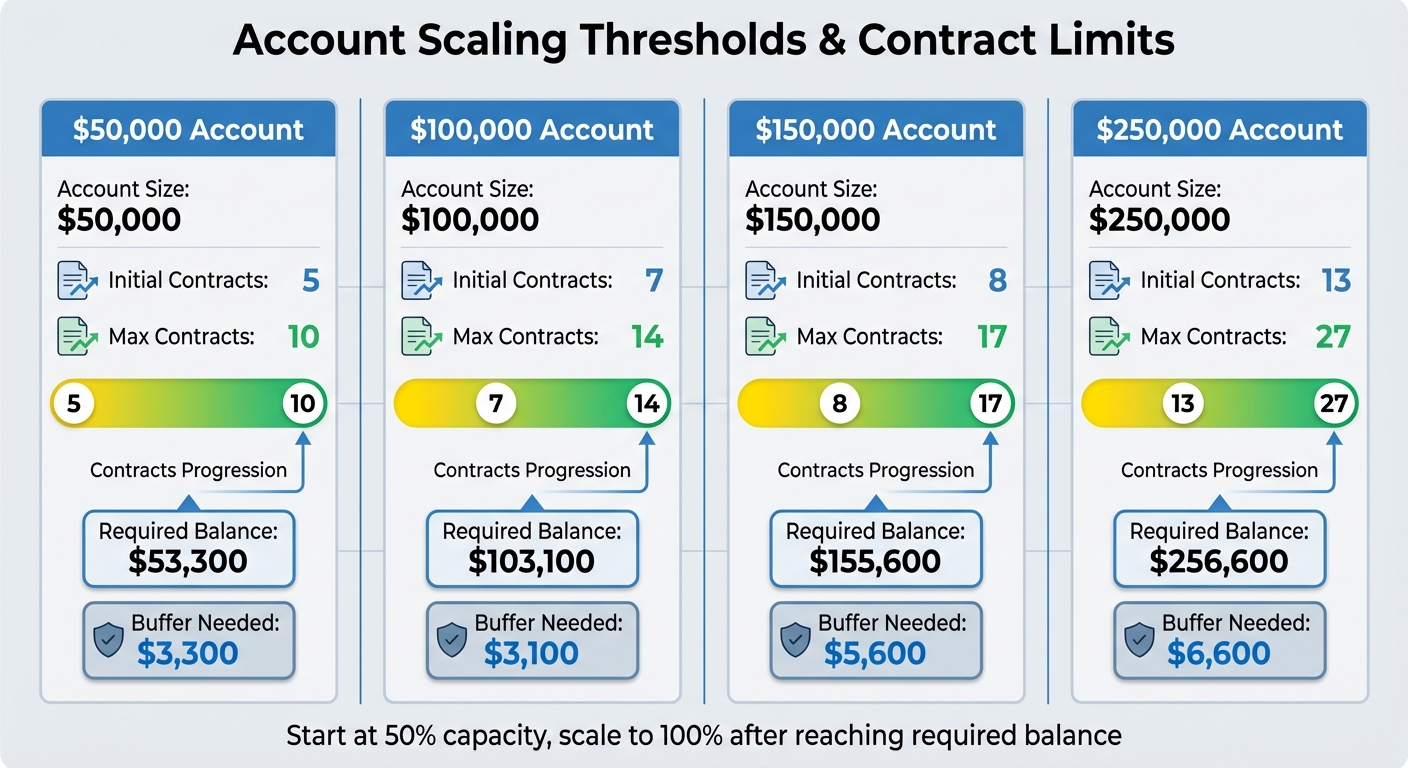
Apex Trader Funding Account Scaling Thresholds and Requirements by Account Size
Scaling Buffers by Account Size
Knowing how scaling thresholds vary by account size is crucial for planning your journey to full contract capacity. Each account tier comes with specific balance requirements to unlock the maximum number of contracts, and these thresholds determine the profit buffers you’ll need to achieve.
| Account Size | Initial Contracts | Max Contracts | Required Balance | Buffer Needed |
|---|---|---|---|---|
| $50,000 | 5 | 10 | $53,300 | $3,300 |
| $100,000 | 7 | 14 | $103,100 | $3,100 |
| $150,000 | 8 | 17 | $155,600 | $5,600 |
| $250,000 | 13 | 27 | $256,600 | $6,600 |
Interestingly, larger accounts often need smaller incremental profit increases to scale. For example, a $100,000 account requires a $3,100 buffer to unlock full scaling, slightly less than the $3,300 needed for a $50,000 account. However, larger accounts like $150,000 and $250,000 demand higher buffers, meaning you’ll likely spend more time trading with fewer contracts before reaching full capacity.
These buffer requirements work in tandem with Apex’s trailing drawdown rules, helping traders navigate the scaling process more efficiently.
Risk Management While Scaling
Once you understand the scaling thresholds, the next step is implementing strong risk management practices to protect your account. After reaching the scaling milestones, it’s essential to stick to disciplined risk controls. This includes adhering to the 5:1 risk rule for stop-loss settings and ensuring every trade has a clearly defined stop loss. Many traders rely on automated tools like "ATM" (Auto Trail Modify) strategies in platforms such as NinjaTrader. These tools automatically set stop losses as soon as a position opens, which is especially helpful when managing multiple accounts.
Apex allows up to 20 active Performance Accounts to be traded simultaneously using trade-copying software like TradeSyncer or TradersPost. While these tools can streamline your strategy across multiple accounts, you’ll need to monitor execution closely to ensure each account stays within its contract limits.
It’s also critical to adopt a "payout-adjusted" mindset. Once you request a payout, consider those funds as withdrawn. If your balance falls below the required threshold before the payout is processed, Apex will deny the request. This approach helps prevent overtrading and ensures you stay aligned with the firm’s risk parameters during the scaling process.
Key Takeaways
Under the updated 2026 rules, you can pass your evaluation quickly – sometimes in just one day – since there are no minimum trading days required for EOD and Intraday accounts. Once you pass, activate your Performance Account immediately. You’ll start trading at half your maximum capacity until you reach the required profit buffer.
The 30% consistency rule (50% for new 2026 accounts) ensures that your best trading day’s profit remains a manageable portion of your overall earnings. To stay compliant, aim for daily profit targets between $400 and $600 to avoid exceeding the threshold. You can use a futures trading profit calculator to plan these targets precisely.
Risk management is equally important. Every trade must include a stop-loss, and your risk-to-reward ratio cannot exceed 5:1. Make sure stop-loss orders are in place as soon as you open a position. If you request a payout, continue trading as if the funds are already withdrawn – if your balance drops below the required level before the payout is processed, Apex will deny the request.
Apex also allows up to 20 active Performance Accounts to be traded simultaneously using trade-copying software like Replikanto or the Apex Trade Copier. This approach lets you scale your payouts while staying within the contract limits of each account. To stay on track, maintain a daily checklist that monitors your trailing drawdown, contract limits, and consistency metrics.
These rules are designed to help traders grow steadily within Apex’s framework. With over $500 million paid out to traders who follow these guidelines, the results speak for themselves. Be sure to incorporate payout rules into your strategy from the very beginning.
FAQs
When does my trailing drawdown stop moving and lock in?
When your account balance surpasses the trailing drawdown threshold by $100, the trailing drawdown locks in place. From that point on, it becomes fixed and no longer adjusts downward, regardless of any further account activity.
How do I calculate the balance I need to scale up contracts?
To figure out how much balance is required to scale up contracts with Apex Trader Funding, you need to factor in three key elements: your current account balance, the trailing drawdown, and Apex’s scaling thresholds. You can fully utilize contracts only when your account balance goes beyond the trailing drawdown by at least $100. Keep a close eye on your account to ensure it meets this threshold, which allows you to increase your contract size in line with Apex’s scaling guidelines.
What can cause a payout request to be denied after I qualify?
If your payout request gets denied, it might be due to breaking scaling rules – like trading beyond half of your maximum allowed contracts. Another reason could be not adhering to risk management guidelines, such as the 50% consistency rule, which requires that no single profitable day accounts for 50% or more of your total profit.