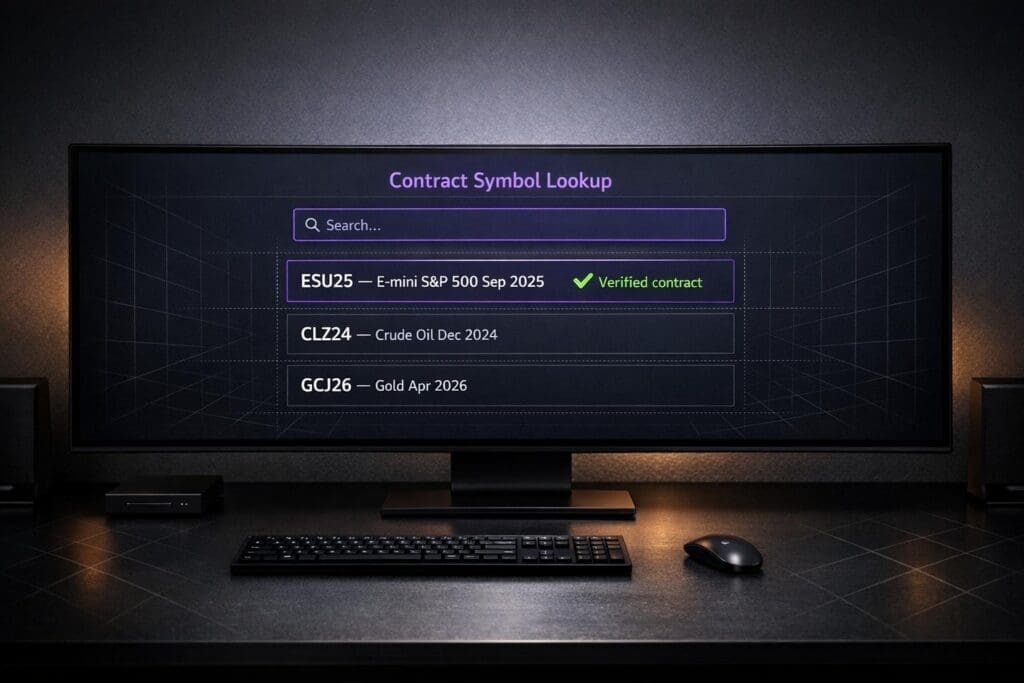
Futures contract symbol lookup tools help traders quickly find the right futures contracts by combining a root symbol, a month code, and a year code. For example, /ESM26 refers to the E-mini S&P 500 expiring in June 2026. These tools are essential for avoiding mistakes, such as trading illiquid contracts or confusing futures with stocks that share similar tickers (e.g., "CL" for Colgate-Palmolive vs. "/CL" for Crude Oil futures). Platforms like Thinkorswim, NinjaTrader, and Interactive Brokers offer built-in lookup tools that simplify this process.
Key takeaways:
- Futures symbols consist of three parts: root symbol (e.g., ES), month code (e.g., M for June), and year (e.g., 26 for 2026).
- Lookup tools prevent errors like selecting the wrong expiration month or confusing stocks with futures.
- Each platform (e.g., TradeStation, CME Group, Interactive Brokers) has unique search features, such as filters for asset class or trading venue.
- Always verify you’re trading the correct contract, not a continuous data series meant for analysis.
Futures Contract Trading Codes Explained | EdgeShorts: Futures, Fast & Simple
sbb-itb-46ae61d
How Futures Contract Symbols Are Structured
Futures Contract Symbol Structure and Month Codes Reference Guide
The 3 Parts of a Futures Symbol
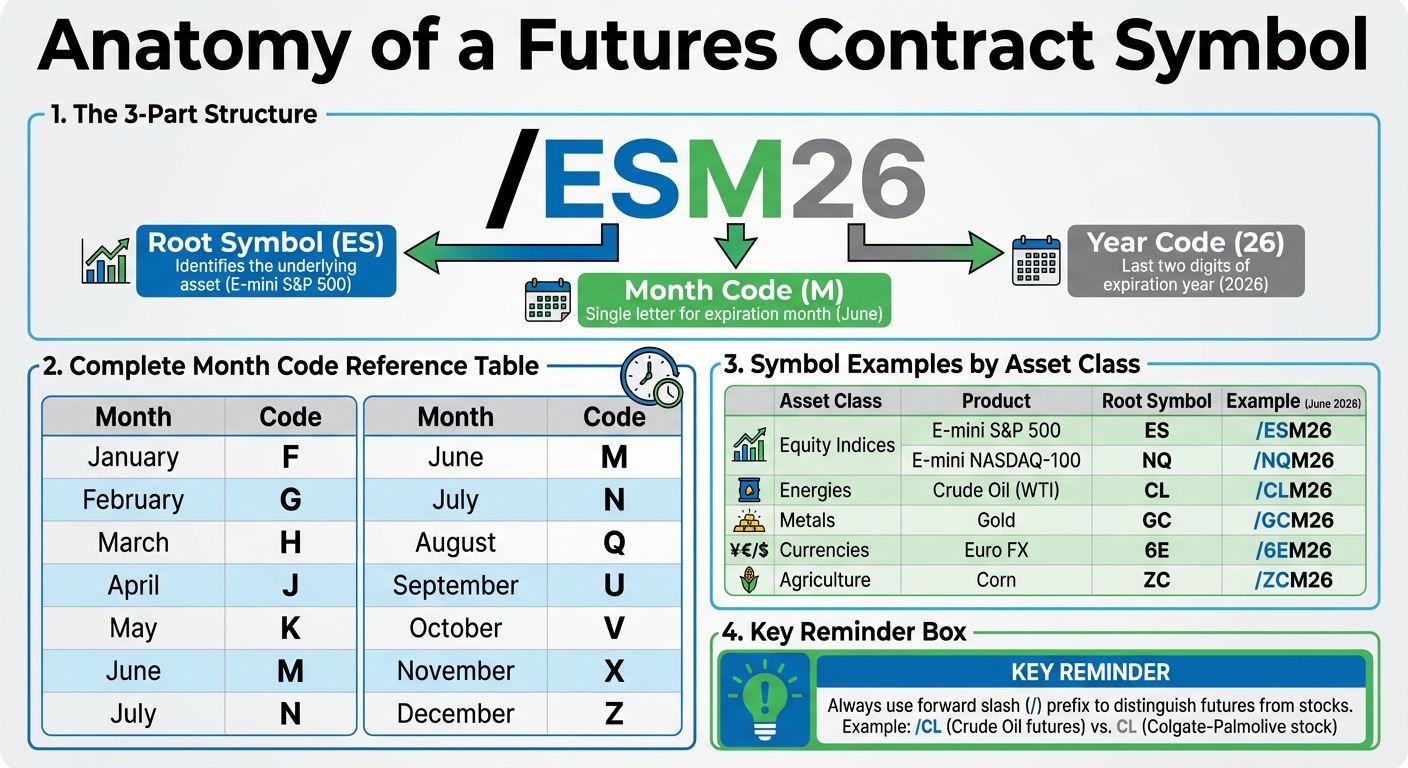
Futures contract symbols are made up of three key components: the root symbol, a month code, and a two-digit year code. Here’s how it works:
- Root Symbol: This identifies the underlying asset. For example, ES represents the E‑mini S&P 500, while CL stands for Crude Oil. The root symbol remains the same regardless of the contract’s expiration month.
- Month Code: A single letter indicates the contract’s expiration month. These codes are standardized across exchanges. For instance, January is F, February is G, March is H, and so on, ending with December as Z.
- Year Code: The final part is the last two digits of the expiration year. For example, "24" refers to 2024, and "26" corresponds to 2026.
When combined, these elements form a complete symbol. For instance:
- /ESM26: This breaks down as ES (E‑mini S&P 500) + M (June) + 26 (2026).
- /CLZ24: This represents Crude Oil with an expiration in December 2024.
"The forward slash keeps everything clear, especially when searching or building a watchlist… CL is the root symbol for Crude Oil, but it’s also the stock ticker for Colgate-Palmolive." – MetroTrade
It’s worth noting that some platforms use a single-digit year format, like ESM4 instead of ESM24, so double-check the format your trading platform uses. Many traders prefer using TradingView prop firms for their intuitive symbol search and charting capabilities. Additionally, certain contracts may include extra details, such as the expiration day. For example, /BFFV2411 refers to a contract expiring on October 11, 2024.
Understanding this structure is key when using trading platform lookup tools to ensure you’re selecting the correct contract.
Symbol Examples by Asset Class
The three-part structure applies across various asset classes, but the root symbols differ depending on the market. Here’s how it looks:
- Equity Index Futures: These use two-letter codes like NQ for the E‑mini NASDAQ‑100 or MYM for the Micro E‑mini Dow.
- Currency Futures: These often combine a number and a letter, such as 6E for Euro FX or 6B for British Pound.
- Commodity Futures: Codes often hint at the physical product, such as GC for Gold, SI for Silver, ZC for Corn, ZS for Soybeans, and NG for Natural Gas.
- Micro Contracts: Smaller versions of standard futures often add an "M" prefix, like MES for Micro E‑mini S&P 500 or M6E for Micro Euro FX.
Here’s a quick reference table for different asset classes:
| Asset Class | Product | Root Symbol | Example (June 2026) |
|---|---|---|---|
| Equity Indices | E‑mini S&P 500 | ES | /ESM26 |
| Equity Indices | E‑mini NASDAQ‑100 | NQ | /NQM26 |
| Energies | Crude Oil (WTI) | CL | /CLM26 |
| Metals | Gold | GC | /GCM26 |
| Currencies | Euro FX | 6E | /6EM26 |
| Agriculture | Corn | ZC | /ZCM26 |
These standardized symbols are essential for quickly filtering contract options and managing expiration cycles across asset classes using the best trade copying platforms for futures. Trading platforms rely on this structure to help traders navigate the wide range of available futures contracts effectively.
How to Use Symbol Lookup Tools on Trading Platforms
Finding Lookup Tools on Thinkorswim, NinjaTrader, and Interactive Brokers
Once you understand how futures symbols are structured, using lookup tools on trading platforms becomes much easier. These tools are designed to help you pinpoint the exact contract you need. For example, on Interactive Brokers, you can access the "Symbol and Exchange Search" feature from the Trading menu on their main website. Within the platform, the Contract Information Center or Symbol Directory lets you search by symbol, description, or security ID. Given that Interactive Brokers connects to 170 markets across 40 countries and 29 currencies, using filters to narrow your search by market center can save a lot of time.
TradeStation users can find the lookup tool under "Data > Add Symbol" or by clicking the Symbol Lookup icon on the main toolbar. If you don’t know the exact root symbol, you can use the wildcard character (*). This feature displays all matching descriptions, making it easier to find what you’re looking for.
For platforms like Thinkorswim and NinjaTrader, lookup tools are built directly into the order entry and watchlist modules. These tools include drop-down menus that help you select the correct expiration month, which reduces errors from manual typing. To search for futures symbols, start with a forward slash (/) to ensure clarity.
Once you locate the tool, its features make selecting the right contract straightforward.
Standard Features in Lookup Tools
Most lookup tools used by the best futures prop firms let you filter by criteria like asset name, root symbol, product type, region, market center, and currency. Many platforms also highlight the front-month contract – the one closest to expiration and typically the most liquid. This makes it easier to choose the most actively traded instrument. Depending on your needs, you can often filter for only electronic contracts or include expired ones for historical analysis.
Interactive Brokers enhances the experience with a "Quote Details" page in its Client Portal, offering detailed product information. A "Quick Trade" slide-out ticket is also available from any page for seamless order entry. On TradeStation, you can sort results by Symbol, Exchange, and Currency, making it simple to organize and find what you need.
Always verify that the symbol in your order entry module corresponds to a specific, tradable contract (e.g., ESU24) rather than a continuous data series, which is meant for charting and analysis only. This step ensures accuracy in your trades and avoids potential confusion.
How to Use the CME Group Contract Symbol Lookup Tool

Step-by-Step Guide to the CME Group Tool
The CME Group’s Contract Symbol Lookup tool is a go-to resource for traders seeking accurate contract codes. This tool, available on the CME Group website, is the official directory for products traded on CME, CBOT, NYMEX, and COMEX. It’s not just about finding symbols – it also provides detailed contract specifications like tick sizes, trading hours, margin requirements, and expiration dates. Whether you’re trading electronically on Globex, clearing through ClearPort, or using open outcry on the Floor, this tool simplifies the process.
To get started, head to the CME Group Product Code Lookup page. In the search box, type at least three characters – this could be part of a product name (like "Crude Oil") or a known symbol. If you’re unsure of the exact name, entering a partial term like "Eurodollar" will still generate a list of possible matches.
Once results appear, you can refine your search using filters. Options include Asset Class, Exchange, Venue, and Cleared As. For electronic trading, look for the Globex code. Choosing an Asset Class – such as Agriculture, Energy, Equities, FX, or Interest Rates – opens up additional filters like Category and Sub-Category. These filters help pinpoint the exact contract month you need, aligning with the earlier discussion on symbol structure.
After narrowing down your search, click on a product to view its full details, including specifications for Product, Price, Trade, and Time. For more in-depth information, use the "View Expirations" feature. This will show all active contract months, along with their specific symbols and expiration dates, ensuring you have everything you need for precise trading.
Common Mistakes to Avoid When Using Symbol Lookup Tools
Understanding the structure of trading symbols is just the beginning. To make accurate trades, it’s equally important to steer clear of common pitfalls.
Misreading Symbol Components
It’s surprisingly easy to trade the wrong contract due to a simple symbol error. A common issue is mixing up month codes – like using "M" for June instead of "N" for July. These codes don’t align intuitively with month names, so manual entry errors happen more often than you’d think. Another frequent mistake is selecting a contract that’s nearing expiration instead of the active front-month contract. This can leave you stuck with an illiquid position and wider bid/ask spreads.
"Misreading the expiration symbol could mean holding a soon-to-expire (and possibly illiquid) contract, which can have unexpected consequences for your trades and strategies." – Funded Futures Network
To avoid this, always double-check contract volume and open interest to confirm you’re trading the liquid front-month contract. Keeping a quick reference table for month codes nearby can also save you from making costly errors.
Another trap is confusing continuous charts with tradable contracts. Continuous charts are meant for analysis, not trading. For example, entering "@ES" instead of selecting a specific expiration month might cause an error or lead to trading the wrong contract.
Once you’ve mastered the basics of interpreting symbols, it’s crucial to understand that formatting rules vary depending on the platform you’re using.
Platform-Specific Symbol Differences
Each trading platform has its own quirks when it comes to symbol formatting, which can trip up even seasoned traders. For instance, while the S&P 500 E-mini contract is typically labeled as "ES", CQG uses "EP" instead. Some brokers, like Robinhood and MetroTrade, require a forward slash prefix (e.g., /ESZ24), while Interactive Brokers uses an "@" symbol for continuous contracts (e.g., @ES).
"Because futures contracts trade in a different market than stocks, it’s possible that a futures contract’s root symbol and a company’s stock ticker symbol are the same 2 or 3 letters." – Robinhood Learn
Year formatting is another area where platforms differ. Some use a single-digit format (like ESM6 for 2026), while others require two digits (like ESM26). The easiest way to avoid mistakes here is to rely on your platform’s built-in lookup tool, which ensures the correct formatting for your broker.
Lastly, pay attention to ticker overlaps. For example, "CL" might refer to Crude Oil futures on one platform but Colgate-Palmolive stock on another. Using platform-specific prefixes can help avoid confusion and ensure you’re trading the right instrument.
Using DamnPropFirms for Futures Trading Resources
Once you’ve got a handle on futures contract codes, the next step is finding a prop firm that matches your trading goals. This is where DamnPropFirms comes into play. The platform provides verified reviews, clear cost breakdowns (including details on Total Cost of Funding), and tools to help you grow as a trader.
One of the standout features of DamnPropFirms is its focus on Total Cost of Funding (TCF). TCF covers evaluation fees, activation fees, and reset costs, giving you a complete picture of what you’ll actually spend. For instance, a firm might advertise low fees but tack on hefty activation costs later. Knowing these hidden fees upfront can save you a lot of money.
Top-Rated Futures Prop Firms
DamnPropFirms showcases some of the best futures prop firms in the industry. For example, Tradeify stands out as the highest-rated firm of 2025, boasting a 4.8-star average rating from 131 verified reviews. What makes Tradeify appealing is its elimination of activation fees and its use of End-of-Day (EOD) drawdown calculations. This approach shields traders from being liquidated by sudden intraday volatility.
If instant funding is a priority, firms like Lucid Trading, Tradeify, Legends Trading, and Purdia Capital are worth exploring. These firms allow skilled traders to bypass traditional evaluations and access funding immediately for a one-time fee.
Other notable firms include Apex Trader Funding, which supports up to 20 accounts for simultaneous management and copy-trading, and Topstep, a firm with over 10,000 funded traders and a 4.3-star Trustpilot rating based on 11,500+ reviews. Additionally, Take Profit Trader, FundedNext Futures, and Alpha Futures bring their own unique offerings and pricing models to the table. These reviews provide a solid foundation for selecting the right firm for your needs.
Trading Tools Available on DamnPropFirms
DamnPropFirms doesn’t just stop at reviews; it also equips traders with essential tools. One example is the Consistency Rule Calculator, which helps you adhere to daily profit limits – typically between 30% and 40%, depending on the firm. Violating these limits can disqualify you from payouts, even if you’ve been overall profitable, making this tool invaluable.
Another key feature is trade copying solutions via TradeSyncer. This tool allows you to scale multiple accounts at the same time, boosting your profit potential. It’s especially beneficial if you’re working with firms like Apex Trader Funding, where you can manage up to 20 accounts simultaneously. With these tools and detailed reviews, DamnPropFirms ensures you have everything you need to find a firm that matches your trading style and goals.
Conclusion
Understanding futures symbols – like /ESH26 for the E-mini S&P 500 expiring in March 2026 – is key to executing accurate trades. It helps avoid placing orders on illiquid contracts and prevents confusion between stocks and futures. Platforms such as Thinkorswim, NinjaTrader, and the CME Group website offer lookup tools that make it easier to identify the front-month contract with the most trading volume. This ensures tighter bid-ask spreads and quicker execution. Always double-check that you’re trading the active contract to maintain precision.
Getting the symbol right is just the beginning. Partnering with a reliable proprietary trading firm can further enhance your trading journey. DamnPropFirms simplifies this process by providing verified reviews, detailed Total Cost of Funding breakdowns, and helpful tools like the Consistency Rule Calculator. For example, you might explore Tradeify with its 4.8-star rating or consider instant funding options from Lucid Trading. The platform equips you with everything you need to make informed choices.
With accurate symbol knowledge and access to top-tier trading resources, you can trade more efficiently and scale your strategy with confidence. Keep your lookup tools within reach, stay aware of rollover dates, and rely on platforms like DamnPropFirms to find firms that align with your trading objectives.
FAQs
What do futures month codes mean?
Futures month codes use single-letter abbreviations to represent the expiration month of a futures contract. For instance, F stands for January, G indicates February, and H corresponds to March. When paired with the year, these codes specify a particular contract. Knowing these codes is key to navigating the futures market with confidence.
How do I find the most liquid contract?
To find the most liquid futures contract for your chosen asset, look for the one with the highest trading volume and open interest. These two factors are key indicators of market activity and liquidity. On many trading platforms, the most active contract is often highlighted with a symbol like a question mark (e.g., <symbol>?). Paying attention to these markers helps ensure you’re trading the contract with the most activity, making it easier to enter and exit positions efficiently.
Why won’t a continuous symbol trade?
Continuous symbols are not tradable because they serve as theoretical tools for charting and analysis. Unlike individual contract symbols, which represent specific, tradable contracts, continuous symbols merge data from multiple contracts. This makes them helpful for identifying trends over time, but they aren’t tied to any particular tradable contract.