Tradeify offers access to five trading platforms – Tradovate, NinjaTrader, TradingView, TradeSea, and WealthCharts – each catering to different trading needs. These platforms connect to your funded account via Tradovate, Rithmic, or WealthCharts, and your account metrics like balance, drawdown, and P&L are updated in real time on the Tradeify dashboard. Here’s a quick breakdown:
- Tradovate: Cloud-based, beginner-friendly, supports multiple devices, and includes features like Market Replay and Group Trading. Free for Tradeify users.
- NinjaTrader: Best for high-speed futures trading with tools like SuperDOM and Advanced Trade Management. Free for Tradeify users but requires Windows or a VPS for Mac users.
- TradingView: Ideal for technical analysis with advanced charting and Pine Script tools. Requires a subscription starting at $12.95/month for real-time data.
- TradeSea: Browser-based with built-in copy trading and AI-powered risk management tools. Free for Rithmic users on Tradeify.
- WealthCharts: Introduced in 2026, this platform offers advanced risk tracking, journaling, and over 200 technical indicators. Subscription starts at $97/month.
Choosing the right platform depends on your trading style, device preferences, and need for specific tools. Below is a quick comparison to help you decide:
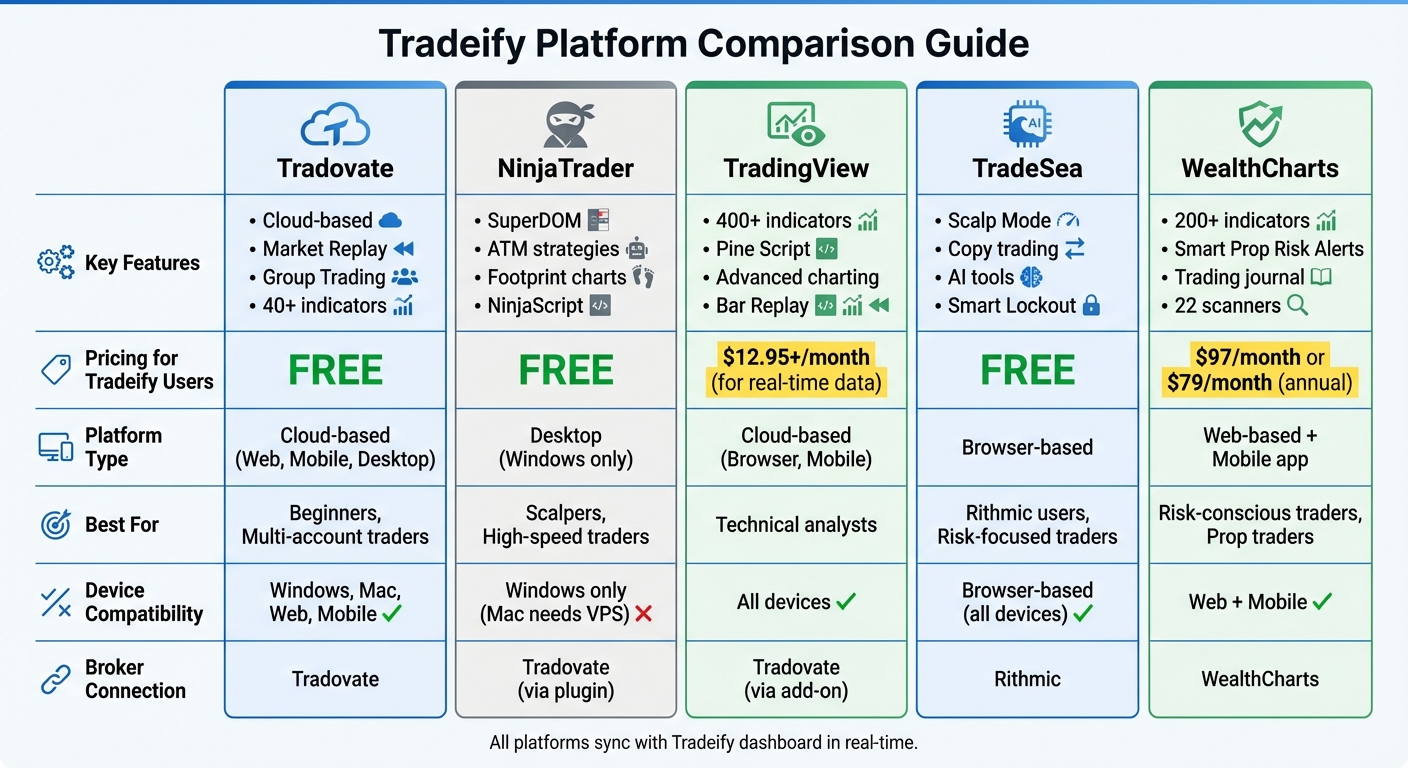
Tradeify Trading Platforms Comparison: Features, Pricing & Best Use Cases
Quick Comparison
| Platform | Key Features | Pricing (Tradeify) | Target Users |
|---|---|---|---|
| Tradovate | Cloud-based, Market Replay, Group Trading | Free | Beginners, multi-account traders |
| NinjaTrader | SuperDOM, ATM strategies, Footprint charts | Free | Scalpers, high-speed traders |
| TradingView | Advanced charting, Pine Script tools | $12.95+/month for data | Technical analysts |
| TradeSea | Copy trading, browser-based, AI tools | Free | Rithmic users, risk-focused traders |
| WealthCharts | Risk alerts, journaling, 200+ indicators | $97+/month | Risk-conscious traders |
Each platform offers unique strengths, so start with a simple option like Tradovate and explore others as your trading skills develop.
sbb-itb-46ae61d
1. Tradovate
Futures Trading Features
Tradovate is a cloud-based platform designed to keep your orders running smoothly, even during internet or computer outages. Its high-speed Depth of Market (DOM) tool allows for one-click order entry and supports server-side bracket orders with up to 10 target and stop levels. The platform also boasts over 40 technical indicators and advanced charting tools like TPO Profile and Volume Profile. All workspaces, quotes, and positions sync automatically across Windows, Mac, web browsers, and mobile devices, making it a versatile option for traders.
One standout feature is Market Replay, which lets users revisit past trading sessions – perfect for analyzing key moments like Federal Reserve announcements. This feature runs at speeds up to four times normal without requiring large file downloads. As Tradovate describes it:
The Tradovate platform was built from the ground up for speed and integrated multi-device trading using technology designed for active futures traders.
This feature-rich platform integrates seamlessly with Tradeify’s unified account system.
Compatibility with Tradeify
Tradovate serves as the default platform in the Tradeify environment and connects effortlessly with NinjaTrader 8 and TradingView through a single login. By selecting Tradovate at checkout, users gain instant access to both platforms – a feature exclusive to Tradovate accounts. Additionally, the platform’s native Group Trading tool simplifies managing multiple accounts by allowing real-time execution across several funded accounts. This makes Tradovate a popular choice within the Tradeify community.
Pricing Structure
Tradovate offers a cost-effective pricing model for Tradeify users, with no platform fees or monthly subscriptions. Level 1 market data is free after signing the Non-Professional Data Agreement. In comparison, retail traders outside of Tradeify pay $99 per month or a one-time fee of $1,499 for lifetime access. This pricing structure makes it an attractive option for both beginners and experienced traders.
Target User Base
Tradovate’s cloud-based design and zero-installation setup make it highly accessible for beginners. According to the Tradeify Help Center:
a great starting point – it’s cloud-based, works on any device, and gives you access to NinjaTrader and TradingView.
With its multi-device functionality and Group Trading feature, Tradovate is also well-suited for traders managing multiple accounts or those new to futures trading.
2. NinjaTrader
Futures Trading Features
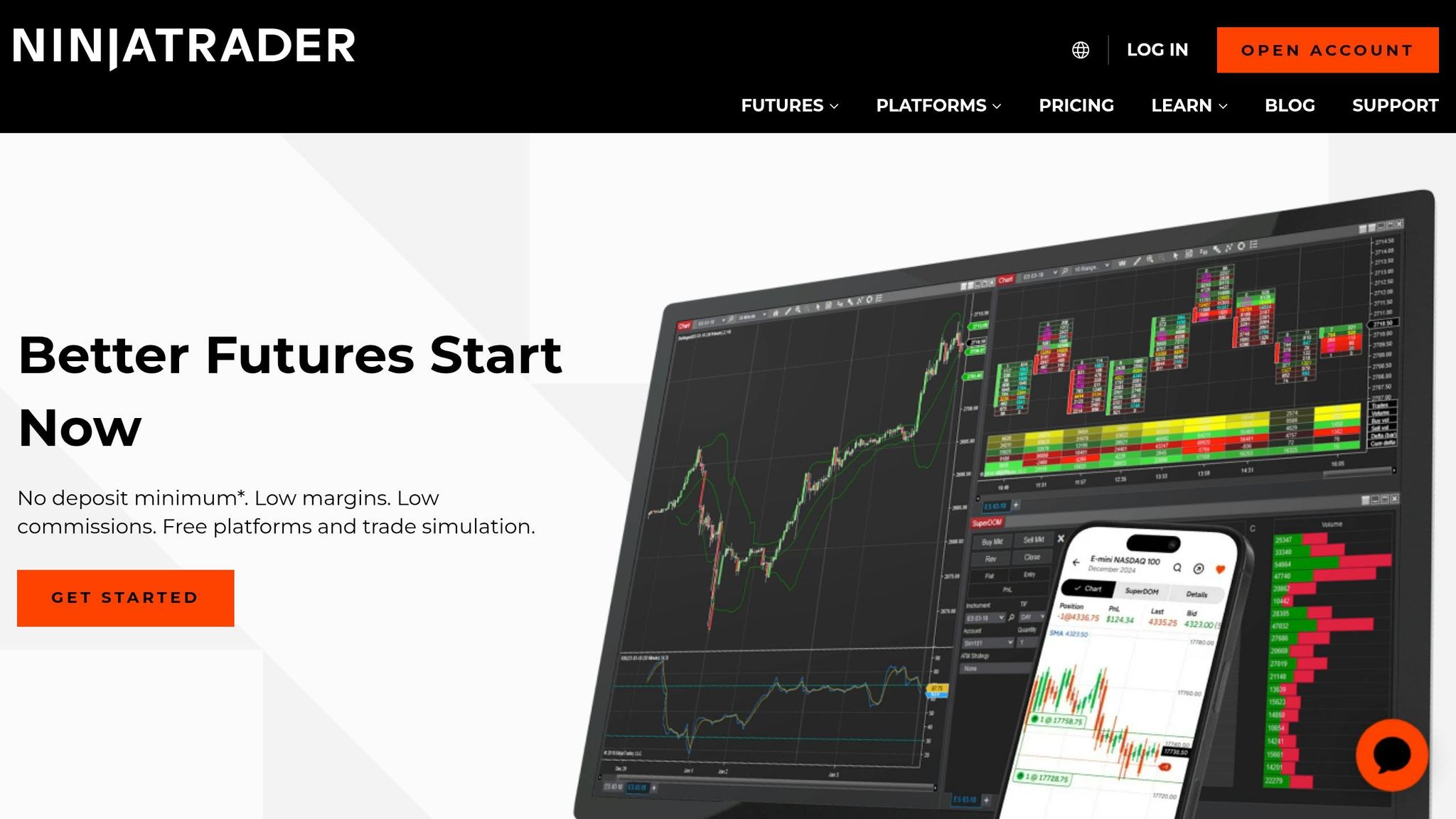
NinjaTrader stands out for its focus on order flow analysis and execution, making it a go-to option for scalpers trading ES and NQ within the Tradeify ecosystem. Its SuperDOM (Super Depth of Market) interface is designed for fast order entry – a crucial feature for high-speed trading. As Paul from PropTradingVibes puts it:
"For order entry speed and ATM execution on ES and NQ, NinjaTrader’s SuperDOM is the strongest option on Tradeify’s platform lineup."
The platform’s Advanced Trade Management (ATM) system allows users to set up bracket orders with pre-defined stop losses and profit targets, simplifying the process of creating protective orders. NinjaTrader also offers tools like Footprint charts, Volume Profile, and the ability to create custom indicators or automated strategies through NinjaScript.
Another standout feature is Market Replay, which lets traders practice with tick-by-tick accuracy for a more realistic trading experience. By 2026, NinjaTrader had supported over 2.5 million accounts and facilitated $12.06 billion in 24-hour futures trading volume.
With these features, NinjaTrader integrates smoothly into Tradeify, offering seamless real-time account monitoring across platforms.
Compatibility with Tradeify
NinjaTrader operates within Tradeify’s unified account system, offering specialized tools for high-speed trading. Using a Tradovate plugin, NinjaTrader 8 securely connects to Tradeify accounts, syncing key metrics like balance, profit and loss, and drawdown in real time. This allows traders to execute orders in NinjaTrader while keeping an eye on their accounts through Tradovate or TradingView.
To access live data, users must sign the Non-Professional Data Agreement, which activates within 15–30 minutes. However, NinjaTrader is a Windows-only platform, so Mac users will need a VPS or virtualization software like Parallels to run it effectively. Additionally, Tradeify users must use the license provided in their dashboard, as personal NinjaTrader licenses are not compatible.
Pricing Structure
For Tradeify users, NinjaTrader 8 is completely free – there’s no platform fee or monthly subscription. Once the data agreement is signed, Level 1 market data is also included at no extra cost. This is a stark contrast to the retail version, which charges $720 annually or $1,099 for a lifetime license.
The free version covers core features like SuperDOM, ATM strategies, and charting tools. However, advanced features, such as premium indicators or certain historical data packs, may require a paid license. Mac users should also factor in an additional $10–$50 per month for VPS or Parallels to run the platform.
Target User Base
NinjaTrader is designed with Tradeify’s active futures traders in mind, prioritizing speed and precision. It has earned accolades such as "#1 Futures Broker" by BrokerChooser.com in 2026 and the Stocks & Commodities Readers’ Choice Award for Best Trading Software in 2024.
While its features are powerful, the platform’s complexity can be intimidating for beginners, especially when compared to Tradovate’s more user-friendly web interface. Still, NinjaTrader is highly favored by scalpers and algorithmic traders for its charting capabilities and SuperDOM speed. For traders managing up to five funded Tradeify accounts, NinjaTrader can display multiple account balances, though a third-party trade copier is necessary for synchronized execution.
It’s worth noting that the platform can be demanding on older hardware and lacks a native mobile version, which may be a drawback for some users.
3. TradingView

Futures Trading Features
TradingView is a powerful tool for Tradeify traders, offering advanced chart-based analysis and trade execution. With over 400 built-in technical indicators and access to thousands of Pine Script tools created by a community of more than 100 million traders, it provides the resources needed for deep research and pattern recognition.
For futures traders, TradingView supports key order types such as Market, Limit, Stop-Loss, Take-Profit, and Trailing Stops. Its multi-leg order execution feature allows traders to combine entry, stop-loss, and profit targets into a single command, streamlining risk management. The platform also includes a Bar Replay feature, which lets users backtest strategies using historical price data without risking actual funds.
As Paul from Pineify puts it:
Tradovate is your execution engine, while TradingView is your analysis powerhouse.
These capabilities are further enhanced by TradingView’s seamless integration with Tradeify.
Compatibility with Tradeify
TradingView’s integration with Tradeify ensures a smooth connection between analysis and execution. By using a Tradovate add-on, TradingView links directly to Tradeify accounts, enabling two-way synchronization. This means trades placed in TradingView show up instantly on both the Tradovate and Tradeify dashboards, keeping positions, balances, and drawdown metrics in sync. With this unified setup, traders can conduct detailed analysis on TradingView while monitoring their funded account metrics through Tradovate, all without impacting drawdown calculations or payout eligibility.
To connect, users need to enable the TradingView add-on in their Tradovate settings and authenticate with credentials provided by Tradeify. Once the data agreement is signed, real-time data activation typically takes 10 to 90 minutes. Selecting "Non-Professional" status can help avoid data fees that may reach up to $300 per month. Many Tradeify traders rely on TradingView for analysis while using other platforms for execution.
Pricing Structure
TradingView uses a tiered subscription model. While the Tradovate integration is included with Tradeify, accessing advanced features and broker integration typically requires a paid TradingView plan. Subscription options include the Pro plan at $12.95/month and the Premium plan at $59.95/month, with a free tier available that includes ads and limited functionality. For non-professional users, real-time market data costs range from $1 to $15 per month per exchange.
As noted by the Pineify Blog:
The Tradovate TradingView add-on creates a seamless connection… you can analyze the markets, plan your next move, and execute trades – all from within the TradingView interface.
Target User Base
TradingView is ideal for Tradeify traders who prioritize detailed graphical analysis and cloud-based flexibility. Its browser-based design ensures that layouts remain synchronized across devices like laptops, tablets, and smartphones without requiring any installations. Traders can also adjust stop-loss and take-profit levels directly on the charts, simplifying risk management.
However, for traders focusing on ultra-fast order execution – such as scalping ES or NQ contracts – NinjaTrader’s SuperDOM is often preferred for its speed. Still, when it comes to in-depth analysis and accessibility, TradingView stands out as a top choice for Tradeify users.
4. TradeSea
Futures Trading Features
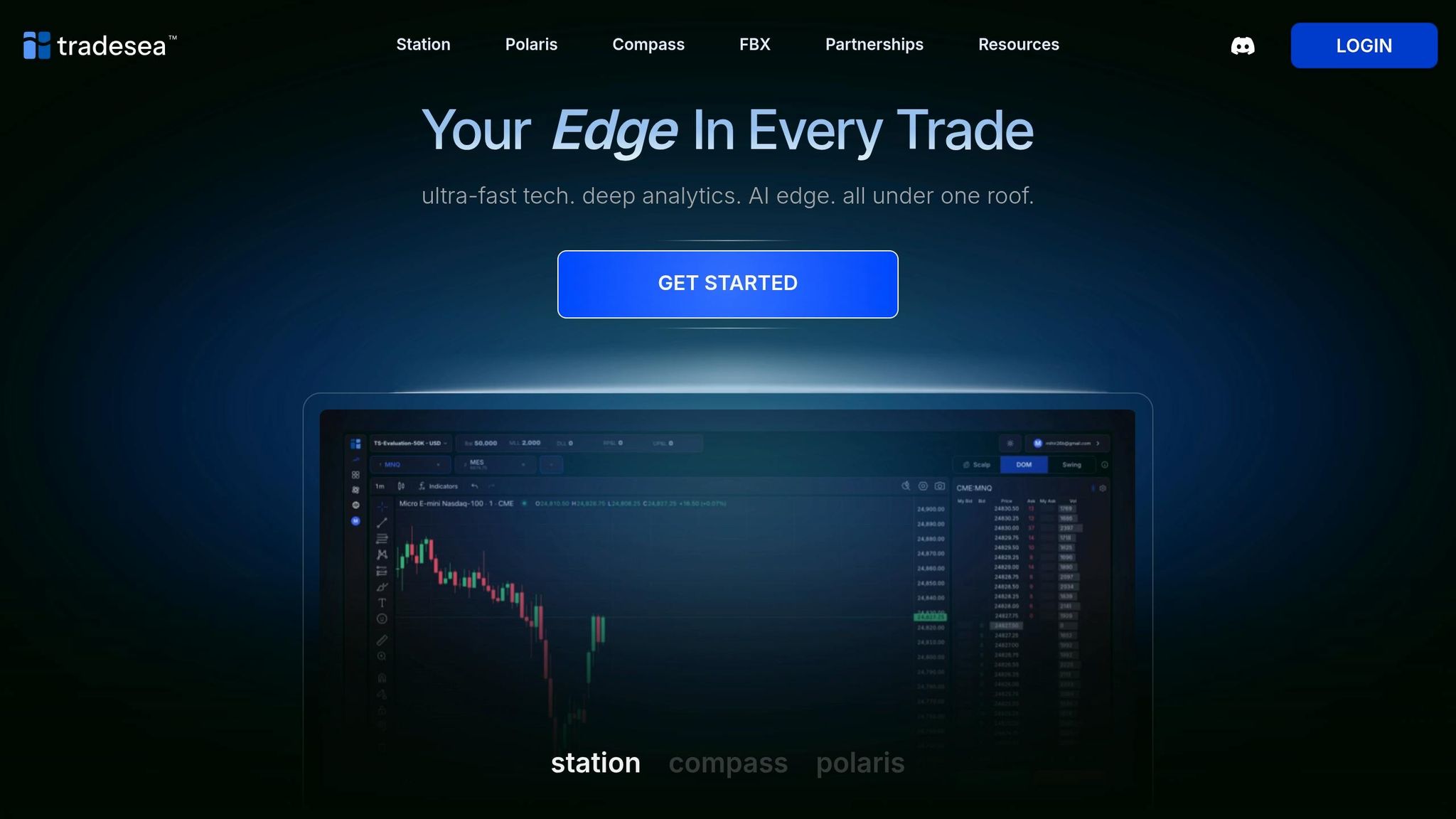
TradeSea Station provides tools tailored for precision and control in futures trading. It includes three distinct order interfaces – Scalp Mode, DOM view, and a standard Order Mode – to accommodate various trading styles and needs. The platform also incorporates built-in copy trading, eliminating the need for external tools. With integrated TradingView™ charts, traders can analyze markets and execute trades seamlessly in one place. Features like multi-chart layouts, customizable hotkeys, and automated tools such as position brackets and bracket orders further streamline risk management.
Risk management is a cornerstone of TradeSea. The platform includes features like Daily Loss and Profit Limits, Position Risk Settings, and Personal Lockouts to curb overtrading and help traders adhere to funded account guidelines. These tools align with Tradeify’s focus on disciplined and rule-compliant trading. The system integrates smoothly with Tradeify accounts, ensuring a cohesive experience.
Compatibility with Tradeify
TradeSea connects effortlessly to Tradeify accounts through a Rithmic broker connection, which users select during checkout. As the primary web-based solution for Rithmic users, it offers an alternative to the TradingView integration available for Tradovate accounts. Fully browser-based, TradeSea delivers professional-grade execution tools without requiring any desktop installation. It also allows traders to switch between Rithmic-compatible platforms without additional registrations. Metrics like account balance and drawdown update in real time across all connected platforms, maintaining alignment with the Tradeify dashboard. Features like Smart Lockout controls and AI tools further support disciplined trading and compliance with funded account rules. Best of all, this connectivity comes at no additional cost, as detailed in the pricing section below.
Pricing Structure
TradeSea is included at no extra charge for users selecting the Rithmic broker option during checkout. Traders simply choose their preferred broker connection to gain access to the platform.
Target User Base
TradeSea is designed for experienced traders who demand advanced tools for execution and risk management. It is particularly suited for Rithmic users who want a modern, browser-based interface without the hassle of installing desktop software. For traders who value the TradingView charting experience but require Rithmic data feeds, TradeSea offers an ideal solution. Its specialized features, such as Scalp Mode and native copy trading, make it a compelling choice for active traders focused on speed and automated risk management.
5. WealthCharts

Futures Trading Features
WealthCharts debuted on the Tradeify platform on February 22, 2026, taking the place of the now-retired ProjectX platform. It offers a Futures Trading DOM (Depth of Market) tool that provides real-time market depth, drag-and-drop order management, and quick adjustments at critical price levels. The platform also supports advanced multi-bracket orders, enabling traders to set multiple profit targets and stop-loss levels simultaneously. This feature is especially useful for managing risk when trading volatile contracts like ES and NQ.
The WealthTracker dashboard and Smart Prop Risk Alerts – features exclusive to the Tradeify integration – help traders stay on top of their performance and risk. These tools track essential metrics like profit and loss (PnL), win/loss ratios, average trade duration, and stop/target levels in real time, ensuring traders remain within their rule limits.
WealthCharts also boasts over 200 technical indicators and 22 specialized scanners, including the AlgoHunter and Smart Money Scanner. To complement these tools, the platform includes InvestPulse AI for market scanning and an educational chatbot to assist with strategy building. As Sean O., a verified user, shared:
I rely on the Champion Trend and Breakout Forecaster indicators for intraday futures trading.
All these features are seamlessly integrated into Tradeify’s unified system.
Compatibility with Tradeify
WealthCharts is one of three primary broker options available on Tradeify, alongside Tradovate and Rithmic. To start using WealthCharts, traders can select it at checkout and will receive unique credentials for the platform. It ensures real-time updates to key account metrics, and users can switch to WealthCharts mid-funded-cycle without impacting their account status, payout eligibility, or drawdown calculations.
The platform is entirely web-based and includes a mobile app with a trading DOM and a community chat feature.
Pricing Structure
Tradeify maintains consistent pricing across all its broker options, including WealthCharts. However, WealthCharts requires an additional subscription:
- Monthly Plan: $97 per month.
- Annual Plan: $79 per month, billed at $948 for the year. This plan includes phone support and priority access to new feature requests, offering a savings of $216 compared to monthly billing.
Target User Base
WealthCharts aligns with Tradeify’s mission to simplify trading workflows. Designed for futures traders who need a comprehensive platform, it consolidates tools like seasonality tracking, scanners, and research features that often require separate subscriptions elsewhere.
John S., an annual subscriber, highlighted its value:
WealthCharts is so much more comprehensive than any of the other subscriptions that I have tried in the past and I have tried a lot!
The platform is particularly attractive to prop traders, thanks to its built-in journaling and automated performance tracking, which are especially useful during evaluation phases.
Pros and Cons of Each Platform
Each platform in Tradeify’s lineup caters to specific trading needs, offering distinct advantages and limitations. Here’s a closer look at what each platform brings to the table:
Tradovate is all about simplicity and accessibility. Its zero-setup, cloud-based approach makes it the go-to for many traders. It’s free to use, works across devices, and even supports Group Trading for managing multiple accounts. The downside? It lacks some advanced order flow tools that experienced traders might rely on.
NinjaTrader is favored by order flow traders thanks to its SuperDOM for fast execution and support for custom NinjaScript indicators. However, it’s limited to Windows users and requires a setup process, including signing a Non-Professional Data Agreement, which can take 15–30 minutes. While the basic version is free, unlocking advanced features means purchasing a license.
TradingView appeals to technical analysts with its sleek charting interface and cloud synchronization, especially for Mac users. However, accessing real-time data requires a subscription starting at $12.95/month. A notable limitation is that switching brokers necessitates buying a new account.
TradeSea builds on TradingView’s intuitive design by adding AI-powered tools and smart lockout features to help traders avoid overtrading. It’s web-based and optimized for Rithmic connections, but it only works with Rithmic, so changing brokers means opening a new account.
WealthCharts stands out with features like Smart Prop Risk Alerts and a built-in trading journal, both included at no extra cost. While it offers excellent risk management tools, new users may find it less intuitive compared to the straightforward setup of Tradovate.
Understanding these strengths and weaknesses can help you choose the platform that best aligns with your Tradeify trading strategy.
Conclusion
Choose your trading platform based on where you are in your trading journey and how you like to execute trades. For many users of Tradeify, Tradovate Web is a great starting point. It’s almost effortless to set up – no complicated installation – and works smoothly across all your devices. This platform is beginner-friendly and meets most evaluation requirements.
As you grow and refine your trading style, your platform should adapt to your needs. NinjaTrader 8, for example, offers advanced tools like SuperDOM order execution and Footprint charts, but it’s designed for Windows users or those using a VPS on a Mac. For swing traders or those who rely heavily on technical analysis, TradingView stands out with its sleek charting tools and cloud synchronization. Real-time data is available through a subscription starting at around $12.95 per month. Meanwhile, WealthCharts offers unique features like built-in journaling and Smart Prop Risk Alerts, which help track account drawdowns in real-time.
"The platform decision has far less impact on results than strategy, discipline, and risk management." – Paul, PropTradingVibes
Each platform brings something different to the table, but all align with Tradeify’s focus on consistent account metrics and effective risk management. For traders managing multiple funded accounts, Tradovate’s Group Trading feature makes it simple to execute synchronized trades across 3–5 accounts simultaneously.
Start with a straightforward platform and upgrade only as your trading strategy matures. Tradeify’s platform options – supported by over $110 million in trader payouts and a 4.7/5 rating on Trustpilot – are designed to grow with you, no matter your trading style.
FAQs
Which platform should I start with on Tradeify?
The right platform for you depends on your trading approach. Tradovate is a solid choice for beginners or anyone looking for an easy-to-use, web-based platform that works seamlessly across desktop, web, and mobile. If you’re after detailed charting tools and in-depth analysis, NinjaTrader stands out. For those who appreciate social trading features and syncing across devices, TradingView is an excellent pick. If you’re just starting with futures trading, Tradovate offers a straightforward and beginner-friendly experience.
What’s the difference between Tradovate and Rithmic connections?
The main distinction lies in their target audience and priorities. Rithmic is tailored for professional and algorithmic traders who require high-speed, low-latency data and direct market access for precise trade execution. In contrast, Tradovate caters to retail traders, offering a cloud-based platform with a user-friendly interface that works seamlessly across devices and includes built-in tools. While Rithmic focuses on delivering top-tier performance, Tradovate centers on making trading more accessible and convenient.
Can I switch platforms without affecting my funded account status?
Yes, you can move between Tradeify-supported platforms without affecting your funded account status, as long as you follow the correct setup steps. To ensure everything runs smoothly, keep your account active and follow Tradeify’s rules, like completing any necessary agreements. Your payouts and account progress depend on your trading activity and compliance with the rules – not the platform you use. So, switching platforms won’t reset or risk your status if handled properly.