Futures trading bots can simplify your life by automating trades, managing risk, and keeping emotions out of the equation. But not all bots are created equal. Some won’t work with your favorite futures prop firm, while others might lack the features you need to stay compliant or profitable. Whether you’re trading ES on CME or crypto futures on Binance, this guide breaks down what to look for in a bot, from exchange compatibility to risk management tools. Let’s dive in and make sure you pick the right tool for the job.
Check Market Compatibility
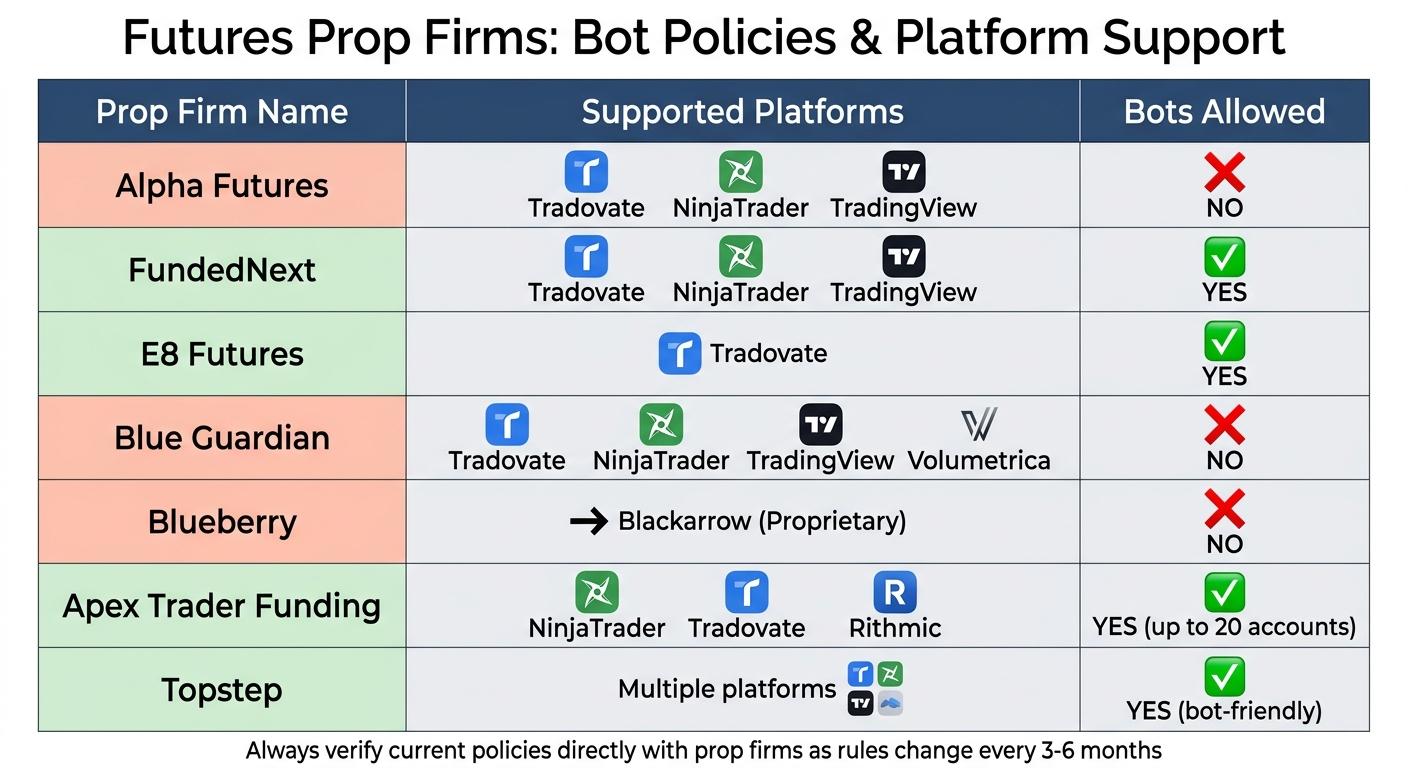
Futures Prop Firms Bot Policies and Platform Compatibility Comparison
Before you let your bot loose in the markets, make sure it’s compatible with the exchange you’re trading on. A bot designed for crypto exchanges like Binance or Bybit won’t cut it if you’re trading futures contracts like ES, NQ, or CL on traditional exchanges.
Futures Exchange Support
For traditional futures, bots usually connect to major exchanges through platforms like NinjaTrader or Tradovate, which provide API access to markets such as CME. On the crypto side, bots like Gunbot and 3Commas can handle derivatives trading on exchanges like Binance (USD-M and COIN-M), Bybit (USDT and Inverse Perpetuals), OKX, and Kraken Futures. Some newer bots even support trading on decentralized exchanges (DEXs) like dYdX or Hyperliquid. Always check the bot’s documentation to confirm which exchanges it supports and ensure it aligns with your prop firm’s approved platforms [6].
Before launching the bot, double-check any exchange-specific settings. For instance, Binance Futures often requires "One-way Mode" or "Single-Asset Mode" to be enabled. Also, see if the bot supports "Stoploss on Exchange", a feature offered by Binance, Bitget, and Bybit that keeps orders active even if the bot disconnects. For exchanges like Gate.io, make sure your API keys include "Perpetual Futures" read/write permissions.
Once the exchange setup is squared away, focus on ensuring the bot can handle your specific contracts.
Contract Coverage
Your bot needs to support the exact contract symbols you trade (e.g., ES, NQ, YM, CL, GC). It’s also crucial that it handles tick sizes correctly, applying price offsets that match the instrument’s decimal increments. Some bots rely on continuous futures symbols like "ES1!" for charting, but these can cause issues during contract rollovers. To avoid problems, hard-code specific contract symbols (e.g., "MNQU2025") into your bot alerts instead of using generic placeholders.
Contract rollover is usually up to the trader, but some platforms can automatically switch to the next contract a couple of days before expiration, making the process smoother.
Once you’ve confirmed contract precision, the next step is to ensure the bot integrates seamlessly with your prop firm’s platform.
Prop Firm Platform Integration
If you’re working with a prop firm, the bot needs to comply with their platform and rules. For example, Alpha Futures outright bans bots, while FundedNext Futures allows them on Tradovate, NinjaTrader, and TradingView. Topstep is very bot-friendly, and Apex Trader Funding permits bots but requires strict adherence to their trailing drawdown rules.
| Prop Firm | Supported Platforms | Bots Allowed |
|---|---|---|
| Alpha Futures | Tradovate, NinjaTrader, TradingView | No |
| FundedNext | Tradovate, NinjaTrader, TradingView | Yes |
| E8 Futures | Tradovate | Yes |
| Blue Guardian | Tradovate, NinjaTrader, TradingView, Volumetrica | No |
| Blueberry | Blackarrow (Proprietary) | No |
Bots usually connect through APIs, webhook bridges, or trade copiers. Look for a "Prop Firm Mode" in your bot that lets you input firm-specific rules like profit targets, daily loss limits, and consistency requirements. Also, pay attention to whether the firm uses intraday trailing drawdown (like Apex Trader Funding) or end-of-day drawdown, as bots need different settings for each scenario.
sbb-itb-46ae61d
Review Strategy and Customization Options
After confirming platform compatibility, make sure your bot’s trading strategies can be adjusted to fit your trading style and your firm’s rules. A bot locked into one rigid strategy won’t work if you need to handle different market conditions or test multiple approaches across various prop firm accounts.
Available Trading Strategies
The best bots come with a range of core strategies. Here are some of the most popular ones:
- Trend following: Relies on moving averages and momentum indicators. This works well for commodities and index futures like ES and NQ [5].
- Mean reversion: Exploits price deviations from historical averages. It’s particularly effective for instruments that tend to revert to supply-and-demand balance [5].
- Grid trading: Places buy and sell orders at fixed intervals. This strategy pairs well with futures due to their standardized contract sizes and high liquidity [5].
- Scalping: Aims for small, quick profits from high-volume trades. Be cautious, though – many prop firms ban "microscalping" (trades under two minutes), so check futures prop firm reviews for specific rules [6].
- Momentum trading: Focuses on "buying high and selling higher." It shines with energy and agriculture futures, especially during supply disruptions or seasonal shifts [5].
Some bots also support arbitrage, which takes advantage of price gaps across exchanges or between spot and perpetual futures [5], and market making, which profits from the bid-ask spread while providing liquidity [5].
"Currency pairs often show strong mean-reversion tendencies, unlike some equity indices, making market selection a key factor" [5].
This quote highlights why having access to multiple strategies is crucial. A method that works for one type of contract might fail miserably with another.
Adjustable Parameters
The real power of a bot lies in how much you can tweak it. Look for bots that allow you to adjust key indicators like RSI, MACD, moving averages, and Bollinger Bands. This flexibility lets you align the bot with your risk tolerance and market outlook. If you’re not into coding, drag-and-drop interfaces can make life easier, while programmable options let you hard-code firm-specific rules directly into the bot.
Beyond the indicators, ensure you can fine-tune position sizing, stop-loss levels, take-profit targets, and trailing stops. These granular adjustments help you match the bot to both your trading style and any compliance requirements.
Backtesting Tools
Before risking actual money or a prop firm evaluation, backtest your bot using historical tick data. Good backtesting simulates real trading conditions as closely as possible. High-quality data – whether tick-level or high-resolution minute data – is essential to avoid misleading signals [3][5]. Platforms like MetaTrader, NinjaTrader, and Tradovate offer solid integrated backtesting tools.
One emerging trend for 2026 is walk-forward optimization. This approach lets bots continuously update their parameters based on recent market conditions instead of relying on outdated historical data [5]. It helps prevent "curve-fitting", where a strategy looks flawless in backtests but flops in live trading. When transitioning from backtests to live trading, start with micro contracts like MES or MNQ. These allow you to test the bot in real markets with lower financial risk [3].
Next, make sure your bot has solid risk management tools in place to protect your trades.
Examine Risk Management Tools
Once you’ve confirmed your bot can adapt to different strategies, the next step is to ensure it has solid risk management features that meet the requirements of your prop firm. Without the right safeguards, even a great strategy can blow through your daily loss limit or hit a drawdown threshold in just one session. This is especially important when dealing with strict evaluation rules from prop firms.
Core Risk Features
Your bot must have key risk controls like automated stop-loss orders, real-time trailing drawdown protection, and position sizing limits. These tools act as a safety net when the market gets choppy or your bot faces unexpected price swings. Make sure it lets you set hard caps on the maximum contract size and total exposure across all open trades. These risk features aren’t just about protecting your account – they’re also essential for smooth execution, managing multiple accounts, and maintaining consistent trade performance.
Prop Firm Rule Compliance
Your bot also needs to align with the specific drawdown rules of your prop firm. For example, a bot optimized for static drawdowns might fail in an intraday trailing setup, where the drawdown floor moves up in real time as your equity peaks. To avoid surprises, paper trade for at least a week using the firm’s exact rules, including their daily loss limits and market close times. Some bots even allow you to program a stop once you’ve hit a certain percentage of your profit target for the day, helping you avoid breaking consistency rules that many firms enforce.
Here’s a quick breakdown of how different drawdown types impact bot risk management:
| Drawdown Type | Mechanic | Risk Level for Bots |
|---|---|---|
| Static | Floor stays fixed at starting balance; doesn’t move. | Lowest; easiest for bots to handle. |
| End-of-Day (EOD) | Floor updates only at market close based on closed PnL. | Moderate; allows for intraday swings. |
| Intraday Trailing | Floor moves in real time with equity peaks. | Highest; bots can breach mid-session. |
If you’re trading with firms like Apex Trader Funding or Topstep, double-check that your bot supports their specific drawdown mechanics and consistency rules. Getting this right ensures your bot stays compliant, even under shifting market conditions.
Multiple Account Support
Scaling up to multiple accounts adds another layer of complexity. You’ll need your bot to maintain independent risk controls for each account. Many pro traders use trade copiers to replicate strategies across funded accounts. If this is part of your plan, look for top trade copying platforms that can handle multiple accounts seamlessly. A newer option is 100% cloud-based trade copiers, which don’t require a VPS and can execute trades in milliseconds across multiple platforms. This setup is perfect for managing accounts with firms like FundedNext Futures or Tradeify while keeping risk limits in check for each account.
Now, make sure your bot is ready to perform efficiently in live trading conditions.
Test Execution and Performance
Once you’ve confirmed your bot has the right risk controls in place, it’s time to see if it can handle the chaos of live markets. A bot might look perfect on paper, but if it can’t execute trades fast enough or struggles with real-time data, it won’t last in the fast-paced world of futures trading. This phase is all about testing speed, tracking actual results, and ironing out any issues before putting real money on the line.
Track Record and Metrics
Start by asking for verified backtest results and live trading performance data from the bot provider. Key metrics to focus on include win rate, average profit per trade, maximum drawdown, and total return over a set period. Make sure you get full performance reports that include both winning and losing streaks. Advanced traders often go a step further by running their bot in a simulated "Incubator" account. Using live market data, this setup lets you monitor intra-trade drawdown (Max MAE) and see how the bot handles execution and volatility before risking real funds [11]. This is where you’ll find out if the bot sticks to its programmed risk limits when the market gets wild.
Order Execution Speed
Next, run forward testing with live market data, but without placing real trades [1]. Pay close attention to slippage and execution costs – delays in data or order processing can lead to bad entry prices and higher costs [2]. To cut down on latency, consider using a Virtual Private Server (VPS) near your trading exchange [1]. VPS plans tailored for trading start at about $28 a month, while general cloud hosting options range from $10 to $100 a month, depending on your needs [1].
Here’s a quick breakdown of two popular data feeds for futures trading bots:
| Feature | Rithmic | CQG |
|---|---|---|
| Execution Speed | Faster; great for scalping | Slightly slower |
| Stability | High | Very high during news/volatility |
| Primary Use | Low-latency execution | Reliable order routing |
If you’re running a scalping or high-frequency strategy, Rithmic is usually the better choice. For strategies that need stability during volatile news events, CQG is a dependable option.
Demo Account Testing
Before risking real money, test your bot in demo mode for one to two weeks [1][12]. Demo accounts use real-time market data without executing actual trades, allowing you to confirm the bot’s performance under live conditions [1][12]. This step often uncovers issues like slippage or data delays that backtests might miss [12]. FBS recommends:
"After that, test it on a demo account. This will show you whether the strategy holds up in live market conditions before you risk actual money" [12].
During demo testing, factor in transaction costs, spreads, and slippage to keep things realistic [1]. You can also use a consistency calculator to ensure your bot’s profit distribution stays within prop firm limits. If you’re planning to use the bot with prop firms like Alpha Futures or Lucid Trading, ensure the demo account replicates the firm’s rules, including Alpha Futures’ consistency rule, daily loss limits, and drawdown mechanics.
Once the bot proves itself in demo trading with consistent and reliable results, the next step is to evaluate its platform security and overall dependability.
Confirm Platform Security and Reliability
Once you’ve checked risk controls and execution speed, the next step is making sure your bot’s platform is secure and reliable. Even a high-performing bot isn’t worth much if it’s vulnerable to security breaches or suffers frequent downtime. This step ensures the platform can safeguard your trading activity and handle growth as your account scales.
Security Measures
Start by verifying that the bot uses two-factor authentication (2FA) and API encryption. Always set API keys to trade-only permissions – never allow withdrawal access. Check for IP allowlisting, which restricts access to specific IP addresses, such as those from your VPS or bot provider [13]. For example, cloud-based bots like SyncFutures eliminate the need for a VPS by running on secure cloud infrastructure, reducing the risk of local server breaches [6]. If you’re trading with prop firms like Alpha Futures (UK-based) or E8 Futures (US-based), platforms operating under regulated jurisdictions add an extra layer of oversight and transparency [6].
Once you’re confident in the security protocols, shift focus to operational reliability and user feedback.
Uptime and User Reviews
A secure platform also needs to deliver consistent, 24/7 performance. Cloud-based bots, for instance, run on the provider’s infrastructure, eliminating the hassle of managing your own server [13]. But not all providers are created equal. QuantVPS, for example, boasts 100% uptime for its core network in Chicago over a 180-day period ending April 24, 2026, and offers sub-millisecond execution for high-frequency trading strategies [14].
To evaluate reliability, dive into user reviews. Platforms like Trustpilot can offer valuable insights. FundedNext has an impressive 56,721 verified reviews with a 4.5-star rating, while Alpha Futures holds a 4.9-star rating from 2,261 reviews, making it one of the highest-rated firms in the industry [6]. It’s also smart to monitor your bot during periods of extreme market volatility or exchange outages to ensure it performs as expected. As 3Commas Content Lead Dwight Sproull puts it:
"Risk management in AI stock trading is about limiting downside, not eliminating risk entirely" [14].
Growth Capacity
Finally, make sure the bot can scale with your trading activity. It should handle larger order sizes without causing excessive slippage or latency [5]. High-performance setups like a VPS or cloud hosting (AWS, Google Cloud) help maintain ultra-low latency as trading volume grows, though costs will depend on your frequency of trades [5][1]. Some bots use walk-forward optimization, which adapts parameters to recent market trends, ensuring steady performance as you scale [5].
Risk controls are also crucial. Look for features like daily drawdown limits and maximum contract size caps that override strategy signals if necessary. This is especially important when trading with firms like Apex Trader Funding or Topstep, where exceeding drawdown limits can disqualify your account [3]. As your account grows, the bot should also account for its impact on market liquidity to minimize slippage [5].
Once you’ve confirmed these security and performance factors, you’re ready to evaluate pricing and setup details to finalize your choice.
Compare Pricing and Setup Process
Picking the right trading bot isn’t just about features – it’s about balancing cost, ease of setup, and the level of support you’ll need. Let’s break it down.
Clear Pricing Structure
Pay close attention to all costs involved: subscriptions, hosting, and transaction fees. For example, bots integrated directly with exchanges like Phemex are free to use – you’ll only pay the standard trading fees per trade [4]. But if you’re looking at custom or algorithmic bots, costs can add up fast. Cloud hosting alone can run between $10 and $100 per month, depending on your trading volume. If you go with specialized VPS providers like ForexVPS.net, expect to pay around $28 monthly, and premium data feeds on platforms like TraderBlocks can top $500 per month [1].
If you’re using bots for prop firm evaluations, don’t forget to include those fees in your budget. For a $50K account, evaluation fees generally range from $77 to over $200, depending on the firm [15]. Budget-friendly firms charge $77–$99, while others, like Apex Trader Funding, might have sales pricing as low as $37 or go above $150 at regular rates. Some firms also tack on monthly platform or data subscription fees, so read the fine print.
Setup Simplicity
If you’re new to bots, look for one with a straightforward setup. Exchange-integrated bots on platforms like Phemex or XT Exchange offer one-click or AI-assisted setups, which are perfect for beginners [4]. On the flip side, custom Python-based bots require coding skills, API integration, and manual configuration. That’s a steep learning curve if you’re not already tech-savvy [3].
Modern tools like SyncFutures simplify things by running entirely in the cloud, eliminating the need for a VPS [6]. Platforms like PropJournal take it a step further by consolidating multiple account logins and rule tracking into a single dashboard. This is especially helpful if you’re juggling multiple prop firm accounts [10].
Before diving in, test your bot in a simulated environment. Make sure its order logic and execution match your strategy [3]. Keep in mind, only 20–30% of traders pass evaluations on their first try. Most need three to five attempts to get fully funded [10]. A demo environment can save you a lot of headaches – and money – during this phase.
Customer Support and Community
Good customer support and an active user community can make or break your experience. Platforms like LuxAlgo shine here, offering access to communities with over 150,000 members who can help with real-time troubleshooting [1]. Exchanges like Phemex and XT Exchange also provide step-by-step setup guides and AI strategy modes that suggest parameters based on historical data [4]. For hosting, providers like ForexVPS.net offer dedicated support to ensure high uptime and low latency.
Look for platforms with thorough documentation. Bybit, for example, has a detailed help center with clear setup instructions [16]. Even with automation, you’ll need to monitor your bot regularly and be ready to adjust settings or pause trading during major economic events like CPI releases. This kind of support and documentation is crucial if you’re managing bots across multiple accounts with firms like FundedNext (4.5/5 on Trustpilot with 56,721 reviews) or Alpha Futures (4.9/5 on Trustpilot with 2,261 reviews) [6].
Once you’ve nailed down costs, setup ease, and support, check if the bot integrates smoothly with your chosen prop firm. That’s key for a hassle-free trading experience.
Verify Prop Firm Integration
Getting your futures trading bot integrated with a prop firm is the last piece of the puzzle. Once you’ve checked market compatibility, strategy flexibility, risk controls, and performance, the final step is making sure your bot works seamlessly with your chosen prop firms. Don’t subscribe to any bot until you know it’s fully compatible.
Major Prop Firm Support
Start by confirming that your bot supports the big names in the industry. We’ve got detailed reviews for firms like Apex Trader Funding, Topstep, Take Profit Trader, FundedNext Futures, and Alpha Futures. Each firm operates on specific platforms, so make sure your bot is compatible with the one your firm uses.
If you’re planning to scale across multiple accounts, check if the bot supports that too. For example, Apex Trader Funding allows copy-trading across up to 20 accounts at the same time [15]. This is a huge plus if you’re looking to expand your trading operations, but your bot needs to handle this functionality without hiccups.
Trade Copying and Automation Features
Compatibility isn’t just about platforms – it’s also about how well the bot aligns with each firm’s trading rules. A single rule mismatch can get you disqualified. PropJournal highlighted that some firms allow bots and automation, while others ban certain strategies like latency arbitrage or tick scalping [7][10][17].
Look for bots that offer trade-copying and automation features tailored for prop firms. Platforms like TradersPost and PickMyTrade stand out because they enforce risk limits and include features specifically designed for prop firm traders [8][9]. Over 40,000 traders use TradersPost for automated trading, and users rave about its ease of use. Tim Farquhar shared:
"TradersPost has allowed me to run my strategy on autopilot and get some sleep while making some money" [8].
Another trader, Jonathan Haggas, added:
"TradersPost takes the struggle out of having to code API’s to each broker and having consolidated subscriptions with extra rulesets" [8].
Your bot should also enforce firm-specific risk rules automatically. For example, you can program synthetic daily Value at Risk (VaR) caps – usually 1-2% – to avoid blowing past a firm’s daily loss limit [7]. This matters because only 20-30% of traders pass prop firm evaluations [10]. Having these safeguards baked into your bot can improve your odds.
DamnPropFirms Resources
We’ve got you covered at DamnPropFirms. Our reviews break down which firms support automation, their platform requirements, and any recent rule changes. For instance, Apex introduced a 50% consistency rule for new accounts starting in March 2026. These updates happen every 3-6 months, so staying on top of them is crucial. Use our comparison tool to see how different firms stack up and find the best fit for your bot.
Final Checklist
Use this checklist as your last step to make sure your bot is ready to go and meets all the key requirements.
- Market compatibility: Double-check that your bot supports the futures contracts and exchanges you’re trading.
- Prop firm policies: Not all futures prop firms allow bots. Some, like FundedNext and E8 Futures, are bot-friendly. Others, like Alpha Futures and Top One Futures, ban them outright [6]. Always read the firm’s Terms of Service to confirm their stance on automated trading.
- Platform integration: Make sure your bot works with the platforms your prop firm uses. For example, Apex Trader Funding supports NinjaTrader, Tradovate, and Rithmic. FundedNext Futures works with Tradovate, NinjaTrader, and TradingView [6]. If you’re using multi-account trade copying, confirm the bot can handle it (Apex supports up to 20 accounts).
- Risk management: Your bot should have features like daily loss limits, consistency rules, and a news filter or manual override [6].
- Pricing: Look out for hidden fees and make sure the setup process matches your tech skills.
- Stay updated with DamnPropFirms: Prop firm rules change every 3–6 months. Check for the latest updates to avoid losing your funded account over outdated info.
The right bot does more than just offer cool features – it needs to fit your trading style and setup. For example, if you’re microscalping, avoid firms that flag trades under 2 minutes. Need 24/5 uptime? Ensure the bot works with a VPS and confirm your firm allows it (some, like Alpha Futures, ban VPNs) [6].
Once you’ve checked everything, you’re ready to implement.
FAQs
Will this bot work with my exchange and the exact futures contracts I trade?
When picking a trading bot, the first thing to check is whether it works with your exchange and the specific futures contracts you trade. Make sure the bot integrates with your exchange’s API and supports your contracts directly. Take a close look at the bot’s documentation or support pages to confirm this. Not every bot is built for every exchange or contract, so double-check before committing.
How do I set up my bot to follow my prop firm’s drawdown and daily loss rules?
To keep your bot in line with your prop firm’s drawdown and daily loss rules, start by nailing down the exact limits – like the daily drawdown percentage or the max overall loss allowed. Set your bot to track your account balance or equity in real-time and make sure it automatically stops trading or closes positions when you’re nearing those limits. It’s also smart to regularly test and tweak your setup to account for any updates to the firm’s rules.
What’s the fastest way to forward-test execution speed and slippage before going live?
The quickest way to check execution speed and slippage is by using a trading platform or backtesting tool that mimics real-time order execution and latency. Tools like NinjaTrader or QuantConnect are great for testing latency, APIs, and how orders are processed. Try running your strategy in a paper trading setup to track its performance and tweak your parameters to cut down on slippage before going live.