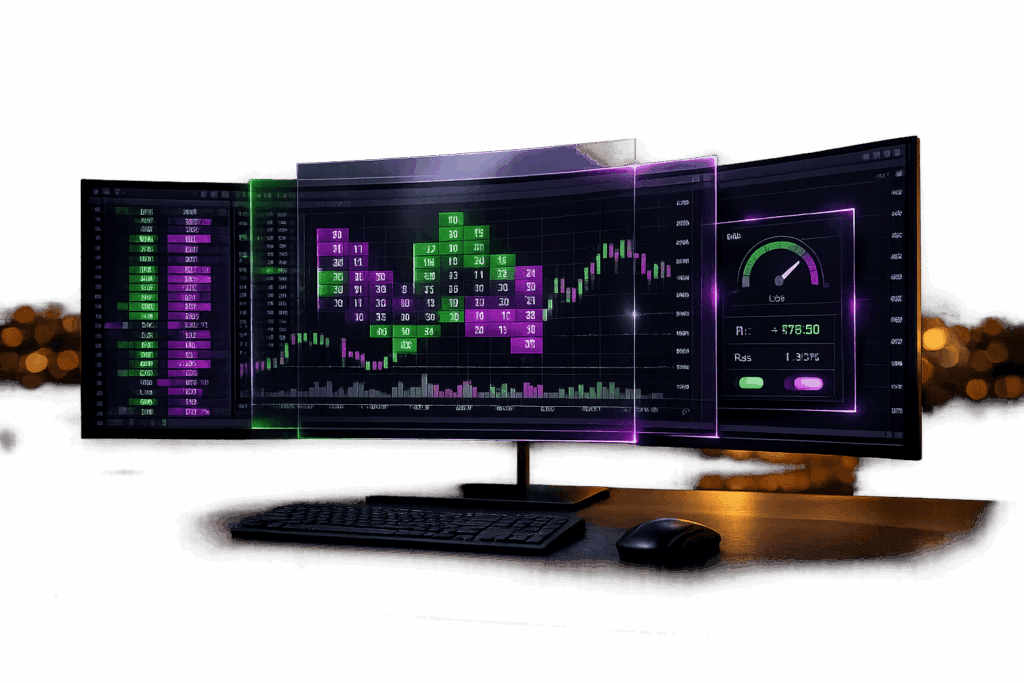
Why Futures Prop Traders Use Bookmap for Order Flow and Liquidity
Bookmap is a specialist order‑flow and heatmap platform built for traders who want to see liquidity, resting orders, and real‑time order book dynamics—not just candles. It has become a go‑to tool for futures scalpers, short‑term index traders, and prop firm traders who care about depth of market and execution quality.
👉 Use coupon code DGT at checkout to save on your Bookmap subscription and data packages.
👇 Watch this Bookmap video to learn how hidden liquidity impacts your trading:
What Is Bookmap and Who Is It For?
Bookmap visualizes market liquidity and order flow in real time using a heatmap view of the order book plus tick‑level prints. Instead of guessing where buyers and sellers might be, you can literally see where large resting orders are sitting, pulling, or getting filled.
Bookmap is best suited for:
-
Futures day traders and scalpers on indices, bonds, metals, and energies
-
Prop firm traders who want more precision around entries, exits, and stop placement
-
Order‑flow and DOM traders who feel limited by standard candlestick charts
If you trade purely off higher‑timeframe swing levels or indicators, Bookmap is “nice to have.” If you scalp futures or care about microstructure, it can become your primary execution screen.
Key Bookmap Features for Futures Traders
Real‑Time Heatmap of Liquidity
Bookmap’s heatmap shows historical and current liquidity levels in the order book, with brighter areas representing larger resting orders.
-
See where large limit orders are stacked above and below price
-
Spot absorption, spoofing, and liquidity pulls that precede big moves
-
Track how liquidity evolves around key levels (RTH open, VWAP, overnight high/low)
This is especially useful for prop firm evaluations where you need to avoid obvious liquidity traps and chase‑entries that get slammed.
Depth of Market (DOM) and Order Book
Bookmap provides a full depth‑of‑market ladder alongside the heatmap, giving you a detailed view of current bids, offers, and their changes.
-
Monitor the inside bid/ask and depth changes in real time
-
Watch large orders appear, move, or cancel as price approaches key levels
-
Combine DOM and heatmap to time entries with better queue priority
For traders coming from traditional DOM platforms, Bookmap adds visual context to the same data.
Volume Bubbles, Delta, and Imbalance
Trade bubbles on the chart show where actual trades occurred and at what size, which helps you see aggressive buyers or sellers hitting the market.
-
Cumulative delta and per‑bar delta highlight who is in control
-
Imbalance tools show one‑sided aggression at specific price levels
-
Large bubble clusters at liquidity walls can signal exhaustion or continuation
This helps futures traders decide whether to fade or join moves based on real participation, not just price bars.
Add‑Ons, Indicators, and MBO Data
Bookmap supports a range of add‑ons and modules, including:
-
Advanced order‑flow indicators (Iceberg tracker, Large Lot Tracker, etc.)
-
Market‑by‑Order (MBO) data on supported feeds, letting you track individual order behavior
-
Custom indicators and third‑party scripts if you want to extend functionality
If you’re deep into microstructure, MBO and advanced add‑ons are where Bookmap pulls away from most retail charting tools.
Bookmap Pricing, Plans, and Coupon Code
Bookmap offers multiple subscription levels, usually split into:
-
A lower‑tier plan with core heatmap and order‑flow tools
-
A higher‑tier plan that unlocks advanced add‑ons and MBO data
-
Optional market data packages depending on the exchanges and instruments you trade
The cost you actually pay depends on:
-
Which plan you choose (core vs advanced feature sets)
-
Whether you need futures data, equities, or both
-
Whether you qualify as a non‑professional or professional trader for data purposes
👉 At checkout, enter coupon code DGT to get a discount on your Bookmap subscription. This code typically applies to new subscriptions and can reduce your first term price significantly.
If you trade primarily futures via prop firm accounts, you can often use the prop firm’s data connection instead of paying full exchange data through Bookmap, depending on how your broker/connection is configured.
Using Bookmap With Futures Prop Firms
Bookmap can be connected to many futures prop firm accounts through supported brokers or infrastructure layers, so you can use prop firm data and capital while trading on Bookmap.
How the Connection Usually Works
Most futures prop firms that support Bookmap do it through one of the following:
-
CQG
-
Tradovate or NinjaTrader infrastructure
-
Other supported FCM/clearing setups
General workflow:
-
Sign up with a supporting prop firm – Choose a futures prop firm whose platform/broker list includes connections Bookmap supports.
-
Get your credentials – Once your evaluation or funded account is active, the prop firm sends you login credentials for their broker or data connection (e.g., Rithmic).
-
Add the connection in Bookmap – In Bookmap, add a new data feed/connection, select the matching broker or API, and enter the credentials from the prop firm.
-
Select the right symbols – Use the correct exchange and symbol format (e.g., ES, NQ, CL) that matches both your prop account and Bookmap’s mapping.
Done right, this lets you trade your prop firm evaluation or funded account from Bookmap while using the firm’s data instead of paying for a separate retail futures data feed.
Pros of Using Bookmap With Prop Firms
-
See true depth and liquidity on the same feed your prop account is using
-
Use advanced order‑flow tools to pass evaluations and manage funded risk
-
Avoid paying twice for data if your prop firm’s connection is accepted by Bookmap
Always confirm with both the prop firm and Bookmap which connections are supported before committing to a specific broker option at signup.
How to Get Started With Bookmap (Step‑by‑Step)
-
Choose your markets and goals
Decide whether you’re primarily trading futures (e.g., ES, NQ, CL, GC) and whether you’re in an evaluation, funded account, or personal account. -
Pick a Bookmap plan
Start with the plan that covers your markets and core features; you can upgrade later once you’re comfortable and want advanced modules. -
Apply the Bookmap coupon code
At checkout, enter DGT in the coupon field to get a discount on your subscription. -
Connect your broker or prop firm
Follow Bookmap’s connection guide for Rithmic, CQG, Tradovate, or whatever your prop firm uses. Test in sim first to ensure orders and data work as expected. -
Build a simple workspace
Begin with one or two heatmap charts (e.g., ES and NQ), DOM side‑by‑side, and basic delta. Don’t overload your screen with every add‑on on day one. -
Integrate Bookmap into your prop firm plan
Make Bookmap the tool you use to refine entries, exits, and risk placement around key levels—don’t let it turn into noise that makes you overtrade.
Bookmap vs Traditional Charting Platforms
Most traders first meet Bookmap coming from platforms like TradingView, NinjaTrader, or standard DOM tools. Here’s how Bookmap fits in.
Most futures prop traders end up using Bookmap alongside at least one traditional charting platform—Bookmap for execution and microstructure, the other for higher‑timeframe context and journaling.
Pros and Cons of Bookmap for Futures Prop Traders
Pros
-
Exceptional visibility into liquidity and order flow
-
Strong DOM + heatmap combo for intraday futures trading
-
Powerful for fine‑tuning entries, exits, and stop placement
-
Can leverage prop firm data feeds instead of separate retail feeds in many setups
Cons
-
Extra platform complexity on top of your prop firm’s base platform
-
Learning curve if you’re new to order flow and depth of market
-
Requires good hardware and stable connection to shine (heatmap can be resource‑intensive)
-
Best value for active intraday traders—not ideal if you only take a few swing trades per month
Who Should Skip Bookmap?
Bookmap might not be worth it if:
-
You trade mostly higher‑timeframe swing setups and rarely look at intraday structure
-
You’re still learning basic futures and risk management and feel overwhelmed by extra data
-
You already have a deep order‑flow platform (like a high‑end DOM/footprint suite) and are happy with it
In those cases, you’re better off putting your budget into evaluations, education, or data before adding another platform.
Bookmap FAQ (2026)
Common questions futures and prop firm traders ask about Bookmap: plans, data feeds, costs, prop firm connections, platform integrations, and how it compares to other order-flow tools.
What is the difference between Bookmap Digital, Global, and Global+?
Which Bookmap plan do I need for futures trading?
Which data feeds and brokers does Bookmap support for futures?
How much does Bookmap really cost per month with data?
Are futures market data fees included in the Bookmap subscription?
Can I use Bookmap with a prop firm account that uses Rithmic or similar feeds?
Does using a prop firm account change my Bookmap data costs?
Can I use Bookmap together with TradingView or other charting platforms?
How is Bookmap different from footprint charts or volume profile tools?
What kind of computer and internet connection do I need for Bookmap?
Can I record or replay Bookmap data for study and backtesting?
Best Futures Prop Firms to Use With Bookmap
Order-flow tools like Bookmap are most powerful when you pair them with a futures prop firm that supports stable connections, clear rules, and enough intraday flexibility to actually use what you see on the heatmap. Bookmap can help you time entries, avoid bad fills, and manage risk more precisely during both evaluations and funded trading, but the prop firm you choose still determines your drawdown, daily loss limits, and payout structure.
Here are some of the best futures prop firms to consider if you plan to trade with Bookmap:
- Apex Trader Funding – One of the largest futures prop firms, with flexible account sizes and up to 20 accounts per trader. Apex is popular with Bookmap users because many of their broker options support deep futures data and active intraday trading styles, making it a strong fit for ES, NQ, and CL scalpers.
- Lucid Trading – Lucid focuses on instant funding and straightforward rules, which pairs well with an order-flow tool like Bookmap. If you already have a scalping or short-term strategy built around liquidity and absorption, Lucid’s direct-to-funded structure lets you put it to work quickly.
- Tradeify – Tradeify offers flexible evaluations and instant funding options that appeal to active futures traders. Combined with Bookmap, Tradeify accounts give you room to lean on liquidity and heatmap signals while still staying inside clear risk parameters and payout rules.
- TradeDay – TradeDay is built for serious futures traders and often emphasizes consistency and disciplined risk management. Using Bookmap with TradeDay can help you avoid emotional entries, focus on genuine order-flow, and meet their evaluation and funded-account criteria more systematically.
- Take Profit Trader –Take Profit Trader’s day-one payout potential and straightforward fee structure make it attractive for scalperswho want to monetize Bookmap-driven setups quickly. The combination works well if you are actively trading intraday levels and want to pull profits frequently.
- Alpha Futures –Alpha Futures is a newer futures prop firm that gives traders flexibility on platforms and connections. That flexibility makes it easier to integrate Bookmap into your setup and tailor your account to the exact futures markets and order-flow style you trade.
Whichever prop firm you choose, the key is to treat Bookmap as a precision tool for execution and risk management, not as a signal generator. Start with one or two futures markets, learn how your prop firm’s rules interact with drawdown and liquidity, and then scale up size once you are consistently reading the heatmap in real time.
Bookmap vs Traditional DOM and Footprint Charts
If you are trading futures with a prop firm, you do not have to choose between Bookmap, a classic DOM, or footprint charts. Each tool shows the market from a different angle, and many serious traders actually stack them together.
| Tool | Best for |
|---|---|
| Bookmap | Visualizing historical and real-time liquidity in the order book, spotting absorption, spoofing, and large resting orders. |
| Footprint charts | Analyzing traded volume and delta at each price level to see where aggressive buyers or sellers actually hit the market. |
| Classic DOM (ladder) | Fast order entry and queue management for scalpers who need precise price selection and quick execution. |
| Level 2 only | Basic depth-of-market information with limited historical context and less detail on how liquidity evolves over time. |
In practice, many futures prop traders use Bookmap alongside a DOM and, sometimes, footprint charts. Bookmap adds the historical context and visual liquidity map that a traditional ladder alone cannot provide, while the DOM remains the fastest interface for placing and managing orders at specific price levels.
Bookmap Discount Code for Futures Traders (Save with Code DGT)
Get the best Bookmap discount code for futures traders and save instantly with code DGT. Bookmap is a leading order flow trading platform that uses a powerful liquidity heatmap to help you visualize market depth, volume, and real-time price action. Whether you’re trading with a prop firm or your own capital, Bookmap gives you a clear edge by showing where large orders are sitting and how the market is reacting. Use code DGT today to access one of the most advanced futures trading tools at a discounted price.
Ready to Use Bookmap and Trade Smarter?
Unlock an exclusive Bookmap discount code for futures traders and start using one of the most advanced order flow trading tools available. Bookmap helps traders visualize liquidity, market depth, and price action in real time. If you are also looking for the best firms to trade with, explore our top-rated futures prop firms and compare the best options in one place.