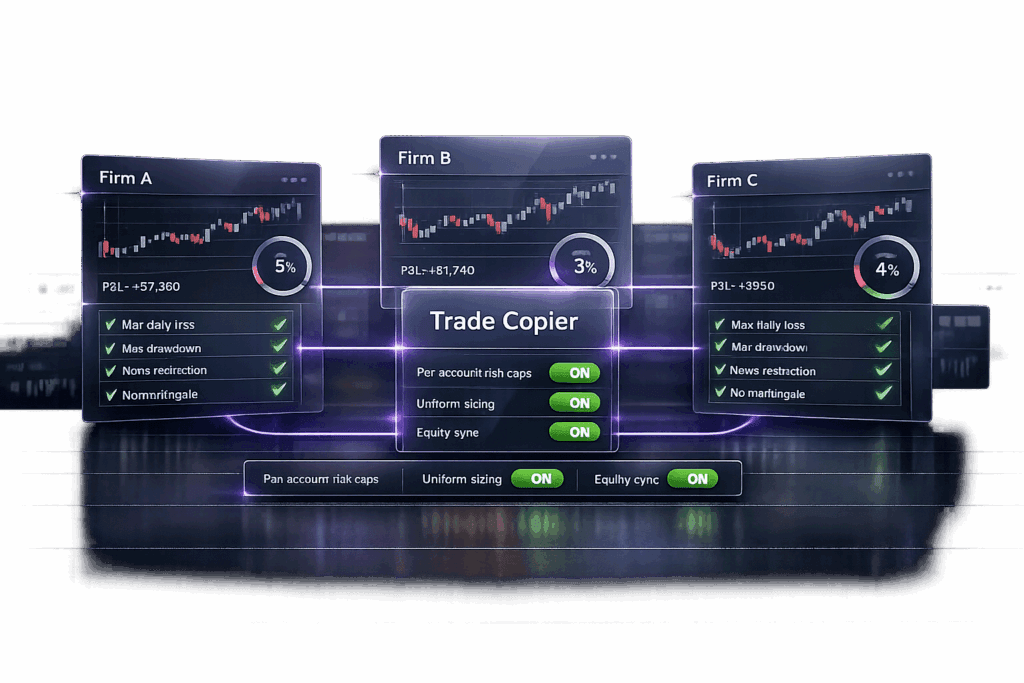
If you’re trading multiple prop firm accounts, the key is simple: treat each account like its own separate business. Every firm has its quirks – trailing drawdowns, consistency rules, hedging bans – and breaking one rule can nuke your account. The goal? Scale your capital without screwing up. I’ll show you how to pick firms that play well together, use top trade copying platforms to stay efficient, and avoid common mistakes that wipe out traders managing multiple accounts. Whether you’re juggling 2 accounts or 10, this guide has you covered. Let’s get into it.
Understanding the Basics of Multi-Firm Trading
Is Multi-Firm Trading Allowed?
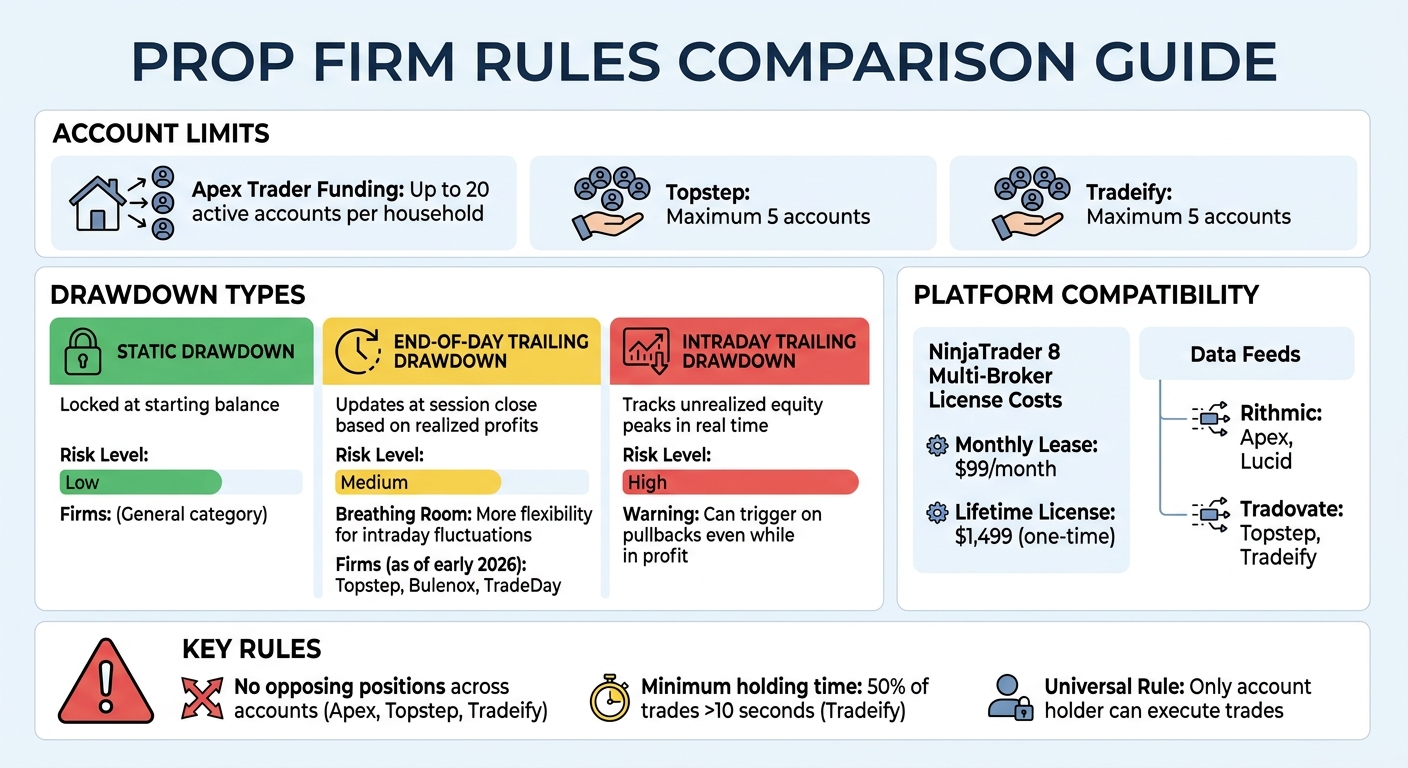
Most prop firms allow multi-firm trading, but the rules vary. For example, Apex Trader Funding lets you run up to 20 active accounts per household, while Topstep and Tradeify cap it at 5 accounts[2]. The main point isn’t how many firms you trade with – it’s about ensuring you’re the one actually trading your accounts and using your own strategies.
Prop firms enforce what they call the "Universal Rule": only the account holder can execute trades. Using third-party signals or copying trades from others is a big no-go. Before scaling up your accounts, dig into each firm’s rules. Some, like Tradeify and Apex, specifically ban holding conflicting positions, like being long in one account and short in another on the same instrument[3].
Understanding these rules is crucial to avoid crossing the line between scaling properly and breaking firm policies.
Key Differences Between Scaling and Rule Violations
Scaling means executing the same strategy across multiple accounts to manage more capital while keeping your risk consistent. Violations happen when you treat multiple accounts as one big pool of funds instead of managing them individually. Each account has its own limits – daily loss caps, drawdowns, and consistency rules – and they need to be respected separately[3].
As Maria, a Professional Futures Trader at EdgeProp, puts it: "Multiple funded accounts do not forgive mistakes – they replicate them."[1]
Here’s the risk: if you’re running ten accounts with the same strategy and take a bad trade, all ten accounts could hit their daily loss limits at once. That’s not diversification – it’s just stacking correlation risk.
To play it smart, manage risk per account rather than lumping it together. For example, if you’ve got a $50,000 account and you’re risking 2% per trade ($1,000), keep that risk isolated to each account. Don’t combine it into a $10,000 total risk across all your accounts. Treat each account as its own entity[6].
sbb-itb-46ae61d
Tradesyncer Tutorial for TradingView | Full Guide to Copy Trade Multiple Prop Firm Accounts ✅
Choosing Prop Firms with Compatible Rules
Prop Firm Account Limits and Drawdown Types Comparison Chart
Evaluating Rule Flexibility
When picking prop firms, understanding their rules – especially around drawdowns – isn’t optional. It’s crucial. Different firms handle drawdowns in their own ways, and if you’re juggling multiple accounts, mismatched drawdown policies can be a headache. Here’s the deal: static drawdowns stay locked at your starting balance, while trailing drawdowns shift upward as your equity grows. Now, if one account uses an intraday trailing drawdown and another uses an end-of-day rule, a simple pullback in your strategy could blow up the intraday account – even if the end-of-day account stays intact[9].
Intraday trailing drawdowns are relentless. They track unrealized equity peaks in real time, so if your equity hits a high and then pulls back, you could hit the drawdown limit and lose the account – even if you’re still in profit overall. End-of-day trailing drawdowns, on the other hand, only update at the session’s close based on realized profits. This gives you more breathing room to handle fluctuations. If you’re trading across multiple firms, it’s smarter to stick with firms offering end-of-day or static drawdowns. As of early 2026, firms like Topstep, Bulenox, and TradeDay fit the bill.
Platform compatibility is another thing you can’t overlook. If you’re managing accounts on NinjaTrader 8, make sure the firms you’re using rely on the same data feed. Mixing data feeds on NinjaTrader requires a paid "Multi-Broker" license, which costs about $99 per month or $1,499 for a lifetime license[4]. Unless you’re okay with shelling out extra cash, stick with firms using the same feed.
Once you’ve nailed down drawdown rules and platform compatibility, it’s time to address position and execution constraints to avoid running into trouble.
Avoiding Rule Conflicts
Hedging restrictions are a big one. Many firms – like Apex, Topstep, and Tradeify – don’t allow you to hold opposing positions across accounts if you’re the account holder[6][7]. That means if you’re long on one account, you can’t go short on another. Simple enough, but easy to overlook.
Another challenge is minimum holding times. For example, Tradeify requires at least 50% of your trades and profits to come from positions held longer than 10 seconds[7]. If you’re using trade copying software like Replikanto or Apex Copier, execution lags can mess this up. A follower account might close a trade a fraction of a second earlier than the master account, putting you at risk of breaking the rule. To stay safe, hold trades on your master account for at least double the required time to account for any delays.
Trade copying policies can be another sticking point. Always check the firm’s FAQ or Terms of Service to see if copying trades is allowed. If it’s not clear, reach out to support for confirmation. Some firms, like Alpha Capital, ban copying trades from other firms, while others, like AquaFunded, are fine with it[4]. Getting clarity upfront ensures you’re not accidentally violating any rules, keeping your multi-firm strategy on solid ground.
Executing Trades Across Multiple Accounts
Using Trade Copying Software
Trying to manually trade across several accounts at once? It’s a recipe for mistakes – missed trades, wrong entries, and inconsistent fills. That’s where trade copying software comes in. It syncs trades from your main "master" account to multiple "follower" accounts in milliseconds, keeping everything aligned.
Here’s how it works: you pick one account as the leader, place trades there, and the software mirrors those trades across your other accounts. It’s fast – modern copiers can replicate trades in under 2 milliseconds, which is a lifesaver if you’re scalping[3]. Let’s say you’re managing five accounts: two with Apex, two with Topstep, and one with Tradeify. You execute a trade on your Apex master account, and the copier instantly duplicates it across the rest.
Some copiers even handle position sizing automatically. For instance, if your master account is $150,000 and you trade two contracts, the copier might scale that down to one contract for a $50,000 follower account[4]. This ensures smaller accounts don’t get over-leveraged and helps you stay within each firm’s drawdown rules. You can also set up unique settings for each account to match their specific limits and rules.
One pro tip: stick to market orders when copying trades. Limit orders can lead to partial fills, creating mismatched positions across accounts. Market orders might cost you a tick or two in slippage, but they ensure all accounts are filled at the same time.
Setting Up for Platform Compatibility
With your trade copier ready to go, you’ll need to make sure your trading platform can handle it. Compatibility is key to keeping your multi-account strategy running smoothly. For example, NinjaTrader 8 is a popular choice, but you’ll need to manage data feed differences. Apex and Lucid use Rithmic, while Topstep and Tradeify rely on Tradovate. To run both feeds on NinjaTrader simultaneously, you’ll need a multi-broker license, which costs $99 per month or a one-time fee of $1,499[4]. Without it, you’d have to manually switch between connections – far from ideal.
A Virtual Private Server (VPS) is another must-have. A VPS near CME data centers in Chicago ensures 99.9% uptime and lightning-fast execution, protecting you from local internet or power outages. Look for a VPS with at least four cores, 8–16 GB of RAM, and SSD storage. Expect to pay between $30 and $80 per month[4].
To avoid headaches, test everything thoroughly before going live. Run your copier on simulation accounts for a week to catch any issues like ghost orders or mismatched positions. If you’re trading with firms that don’t allow overnight holds, configure your copier to automatically flatten positions at the end of each session. And make sure your software has an emergency "Flatten All" button to close all positions instantly during volatile markets. This setup will keep your multi-account trading smooth and compliant.
Scaling Accounts Gradually
Starting with One Firm
Start with just one account to get a grip on execution and risk management. Stick to trading a single funded account for at least three months to confirm your trading edge. If you’re consistently pulling in 2–5% monthly returns over that period, it’s a good sign your strategy is solid.
This phase isn’t just about hitting profit targets. It’s your chance to get comfortable with the firm’s platform – how fast orders execute, the margin requirements, and how they calculate drawdowns. Plus, it’s crucial to test their payout process. Don’t even think about adding a second firm until you’ve received at least two payouts from your first account [6]. That way, you’ll know the withdrawal process works and that your strategy holds up beyond just one payout cycle.
As SyncFutures Blog puts it, "The problems you have with one account will multiply when you have ten" [2].
Take this time to refine and document your trading plan, as highlighted by the Prop Firm App Team [6]. Starting with one account builds the foundation you need to confidently expand into more accounts later. Scaling slowly means you’re less likely to trip over firm-specific rules when managing multiple accounts.
Reinvesting Profits for Growth
Once you’ve proven yourself with one account, use your profits to fund new evaluations. This way, you’re not dipping into your savings, and you avoid the stress of trading with "scared money" [6]. Let’s say you’re earning $1,000 per payout on a $50,000 account with a 90% profit split (which means generating $1,111 in profit) [2]. You can take that first payout and reinvest it into evaluations with one or two additional firms.
Follow a phased plan: add 2–3 accounts during months 4–6 to test how well you can handle multiple accounts, then scale up to 6–10 accounts by months 7–12 using trade copying tools like TradeSyncer [2]. This gradual approach helps you catch any mental fatigue or execution issues before they spiral out of control. If done right, scaling to 10 accounts could turn a $900 monthly income into $9,000 – without changing your strategy or putting in extra effort [2]. But remember, none of this works without a rock-solid foundation in place first.
Maintaining Compliance with Firm-Specific Rules
Tracking Individual Firm Requirements
When you’re juggling multiple accounts, keeping track of each firm’s rules manually becomes a headache fast. You need a system that shows you everything at a glance – daily loss limits, trailing drawdowns, position size caps, all of it. Forget spreadsheets; they’re prone to breaking as your data grows. A centralized dashboard, organized by account, is way more reliable.
Label your accounts clearly and stick to a simple daily routine:
- Pre-market: Check each account’s drawdown and available loss for the day.
- During trading: Stop trading immediately if you hit 50% of any account’s daily loss limit.
- End-of-day: Review your P&L and flag any accounts that are close to their limits.
As Gary M., founder of Traders Second Brain, says: "If your daily account monitoring takes more than 5 minutes, your tracking system is too complicated" [5].
Here’s the kicker: every firm calculates drawdowns differently. Treat each account like its own rulebook. For instance, FTMO has a 5% daily loss limit, plus a consistency rule that limits how much profit you can make in one day (you can use a prop firm consistency calculator to stay within these bounds). TopStep uses an end-of-day trailing drawdown that adjusts with your equity. Meanwhile, The5%ers are known for their tighter drawdown rules, usually between 3–6% [5]. To make life easier, keep a quick-reference guide handy with clear dollar amounts (e.g., "$2,500 daily loss max") instead of just percentages.
Once your tracking system is dialed in, the next move is automating your risk management.
Automating Risk Management
Manual monitoring is fine to start, but it falls apart when you’re managing multiple accounts. That’s where automation saves the day. Server-side tools like CrossTrade Account Manager, Replikanto, and SyncFutures enforce limits automatically. They can manage daily loss caps, trailing drawdowns, and individual risk settings for each account, even flattening positions before you can make an emotional mistake [3][8][9].
Set these tools up with ratio-based scaling. For example, if your master account is $100,000, a $50,000 follower account would use a 0.5× multiplier to keep risk proportional [3][8]. Also, configure auto-flatten to trigger 15 minutes before the firm’s cutoff time (e.g., 4:45 PM ET for a 4:59 PM rule). This gives you a buffer for any server delays [9].
One rookie mistake? Running the same aggressive strategy across all accounts without considering each firm’s rules.
As Trinity Trading puts it, "Running the same aggressive strategy across all accounts without checking each firm’s rules is how people lose multiple evaluations simultaneously" [4].
To avoid this, stagger your entry times by five minutes across accounts. This reduces the chance of correlated drawdowns where all accounts hit their daily loss limits at once [5]. Lastly, always test your copier settings in live conditions to make sure stop losses and profit targets sync properly [3][8].
Using Trading Platforms for Multi-Account Management
Once you’ve got your risk automation and trade copying in place, the next step is making sure your trading platform can handle multiple accounts efficiently. Proper setup is key when trading across several prop firms.
Getting the Most Out of NinjaTrader

With a free NinjaTrader license, you’re limited to one broker connection. To connect with firms using different data feeds, you’ll need to upgrade to either the Lease plan ($99/month) or the Lifetime license ($1,499) [4][11].
Pair NinjaTrader with a trade copier like Replikanto or Copilink to mirror trades across accounts in under 2 milliseconds. These copiers let you apply a ratio multiplier – for instance, if your master account is $100,000 and a follower account is $50,000, set the multiplier to 0.5× to keep the risk balanced [3].
When trading with Rithmic-based firms like Apex or Lucid, enable "Plugin Mode" in RTrader Pro (go to Settings → Enable Plugin Server) to avoid connection errors [11]. For extra safety, set your copier to auto-flatten any account that gets close to 85–90% of its daily loss limit. This creates a buffer to account for slippage. To maintain uptime and fast execution, run NinjaTrader on a Chicago-based VPS (4 cores, 8–16 GB RAM, SSD; $30–$80/month) close to CME data centers [4][3].
These adjustments help you navigate platform limitations and stay compliant with firm requirements.
Dealing with Platform Limitations
Even with these upgrades, some platform restrictions need creative solutions. For instance, Rithmic accounts only allow one connection unless Plugin Mode is enabled. If you’re using a free NinjaTrader license, you can run one instance on your local machine and another on a VPS, then sync trades between them with a copier like Replikanto [4].
Apex has a new rule requiring OCO (One Cancels Other) bracket orders for every trade. This means every trade must include both a stop loss and a take profit – plain market or limit orders will get rejected [12]. Make sure your copier is set to always submit OCO brackets. Before going live, test everything on a demo account. Duplicate orders can lead to dangerous mismatches, and you don’t want to find that out the hard way [4].
Diversifying Payouts and Risk Strategies
Once you’ve got a solid multi-account setup and some risk automation in place, it’s time to take things further by diversifying your payout schedules and risk strategies. This extra layer of planning helps protect your capital and smooth out your income.
Staggering Payout Timelines
Mixing firms with different payout schedules – daily, weekly, bi-weekly, or on-demand – can create a steady cash flow throughout the month. For example, you might pair Apex Trader Funding’s on-demand payouts with a firm like ThinkCapital or AquaFunded, which operate on bi-weekly cycles [13][14][10].
Gary M., Founder of Trader’s Second Brain, sums it up perfectly: "Spreading across two or three firms is insurance. If all your funded capital sits at one firm and that firm closes, your income goes to zero overnight" [5].
We’ve seen this happen before – firms shutting down and leaving traders stranded [5]. By staggering payouts, you not only stabilize your monthly income but also reduce the risk of being too dependent on any one firm.
Minimizing Reliance on a Single Firm
Diversifying across multiple firms shields you from unexpected issues like rule changes, tech failures, or even a firm going under. Surveys reveal that traders diversify accounts almost equally to reduce risk and to grow their capital [4]. Another benefit? Different firms use different drawdown models. For instance, Topstep has a trailing drawdown, while Apex uses an end-of-day model. This means a single bad trade is less likely to wipe out your accounts across the board [2][10].
If you’re just starting, focus on one firm and aim to collect at least two payouts before adding another. Space out adding new accounts by a month or two – this gives you time to spot and fix any strategy issues early on [6][10]. To stay organized, keep a spreadsheet tracking each firm’s payout history and responsiveness. This will help you figure out which firms are worth scaling with long-term [10].
FAQs
Can I trade different prop firms at the same time?
Yes, you can trade with multiple prop firms at the same time since most firms allow it. Just make sure you stick to each firm’s specific rules, like their risk limits and platform guidelines, to avoid breaking any policies. To keep things smooth, use tools or systems to monitor and manage your accounts. Staying organized and disciplined is the real key to pulling off trading with multiple firms successfully.
How do I avoid breaking hedging or “opposing positions” rules across accounts?
To stay clear of breaking hedging or opposing position rules when trading across multiple prop firm accounts, make sure your trades follow each firm’s specific guidelines. Pay close attention to rules about position direction and risk management. Automated trade copying tools can help, but configure them carefully to avoid taking long and short positions on the same instrument at the same time. Keep an eye on your compliance regularly and use filters to block conflicting trades across accounts. This way, you’ll stay in line with each firm’s rules.
What’s the safest way to copy trades across multiple accounts without slippage issues?
The best way to copy trades across multiple accounts is with automated trade copying tools. These tools replicate trades in real-time, keeping latency low and sticking to the rules set by your prop firm. Make sure to configure the copier to minimize delays, set execution parameters correctly, and watch out for any rule violations like position limits. Platforms like NinjaTrader or Rithmic are solid options, offering reliable automation to ensure trades are copied accurately with minimal slippage or mistakes.