Copy trading for Apex accounts simplifies managing multiple accounts by automatically duplicating trades from a master account to follower accounts. Here’s what you need to know:
- What It Does: Copy trading software mirrors trades, including entries, stop losses, and profit targets, across up to 20 Apex accounts in under 200 milliseconds.
- Why It’s Useful: It eliminates manual effort, reduces errors, and ensures compliance with Apex’s trading rules, like the 30% consistency rule and daily loss limits.
- How It Works: Tools like Tradovate’s built-in Groups feature or third-party software like TradeSyncer allow traders to automate trades, monitor risks, and stay aligned with Apex’s guidelines.
- Setup Tips: Start with demo mode to test your configuration, use quantity multipliers to balance risk, and monitor compliance with Apex’s rules to avoid penalties.
Benefits of Copy Trading for Apex Accounts
Managing Multiple Accounts
Apex Trader Funding allows traders to manage up to 20 accounts simultaneously. Handling trades manually across so many accounts isn’t practical. The risk of price slippage rises as you switch between accounts, re-enter the same trade details, and face changing market conditions before completing all orders.
Copy trading simplifies this process by treating multiple accounts as one unified system. As Copilink puts it:
"The complexity of managing five accounts doesn’t have to feel like managing five accounts – it should feel like managing one account that happens to be generating five times the payout potential."
When you place a trade on your primary account, the copier instantly mirrors it across all connected accounts. This includes entries, stop losses, and profit targets. Your earnings then grow with the number of funded accounts you manage, without the need for extra manual effort.
This seamless integration lays the groundwork for even more time-saving benefits, which are explored further in the next section.
Automation and Time Efficiency
Automated copy trading removes the repetitive task of entering trades for each account individually. Instead of recalculating position sizes for every account, you can set up quantity multipliers at the start. For instance, a $50,000 account might use a 0.5x multiplier, while a $150,000 account could use a 1.5x multiplier, automatically aligning risk levels without extra calculations.
With these routine tasks automated, you can dedicate your energy to analyzing markets and refining strategies. Trader Mark Naugle highlights the benefit:
"Trading grouped accounts… was very tedious, and now with the Apex Trade Copier, it really is a breeze to trade several accounts at once, and the nice thing about that is you’re not spending the emotional capital like you do trading multiple contracts with one account."
Cloud-based copy trading tools take this a step further by functioning even when your local computer is turned off. This means you don’t have to worry about hardware failures or maintaining a constant internet connection.
Beyond saving time, automation helps you stay compliant with Apex’s strict trading guidelines, as discussed below.
Following Apex’s Trading Rules
Apex enforces a 30% consistency rule during the funded stage. Many advanced copy trading tools monitor this percentage in real time and send alerts as you approach the limit.
Additional safeguards, like follower guards, help prevent violations by tracking each account’s intraday trailing drawdown. If an account nears its limit, these systems automatically flatten positions to avoid breaching rules. As Copilink warns:
"The daily loss limit on account three doesn’t care that you were focused on account one when the drawdown happened. Violated is violated."
Manual trading often leads to errors like different fill prices, missed entries, or forgotten stop losses, especially during volatile markets. Automated tools eliminate these risks by ensuring all accounts execute trades consistently and in sync.
sbb-itb-46ae61d
How To Copy / Group Trade With Apex (Tradovate)

Copy Trading Software for Apex Accounts
Now that we’ve covered the perks of copy trading for Apex accounts, let’s dive into the software options that make it all possible. These tools simplify managing multiple accounts while keeping everything in line with Apex’s rules.
Tradovate’s Group Copier Feature
Tradovate includes a built-in "Groups" feature that lets you copy trades across multiple accounts without needing extra software. You can access this feature by clicking your account number in the top-right corner of the Tradovate interface and selecting "Manage Groups." From there, you can add accounts with a simple drag-and-drop system – the first account you add becomes the master. When placing trades, just choose the group option in the order ticket instead of a specific account.
This feature supports advanced order types, including ATM strategies and bracket orders, and is designed for accounts in Demo/Simulation mode.
Third-Party Copy Trading Solutions
If you’re looking for more advanced features, several third-party tools are available. These include options like follower guards, ATM strategies, and VPS-based setups. Running a local copier on a VPS – such as QuantVPS – ensures consistent uptime and low latency, which is critical for smooth trade replication. Before going all in, it’s a good idea to test synchronization using micro contracts like MES instead of ES. This way, you can confirm trade ratios and execution accuracy without exposing yourself to significant risk.
TradeSyncer by DamnPropFirms
TradeSyncer is a cloud-based copy trading tool that doesn’t require a VPS or any local installation. Because it’s cloud-powered, your computer doesn’t need to stay on for trades to sync. It also supports cross-platform syncing across Rithmic, Tradovate, NinjaTrader, and TradingView, making it a great choice for traders juggling accounts on different platforms.
The software executes trades in under 100 milliseconds on average and has already copied over 1,000,000 trades. It also includes built-in risk management features like daily loss limits, account lockouts, and drawdown alerts, all of which help traders stay compliant with Apex’s rules. Trader Kevin Bryan Mecija shared his thoughts on TradeSyncer:
It’s the most seamless so far. Glad to stumble upon this and will keep using since I’m a fan of new platforms that offers better solutions.
TradeSyncer offers a 7-day free trial with no credit card required and has earned a 4.5/5 star rating on Google Reviews. Users praise its ability to manage over 40 Tradovate accounts with one click, and its unified dashboard makes it easy to monitor open positions, PnL, and win rates across all connected accounts.
How to Set Up Copy Trading on Apex Accounts
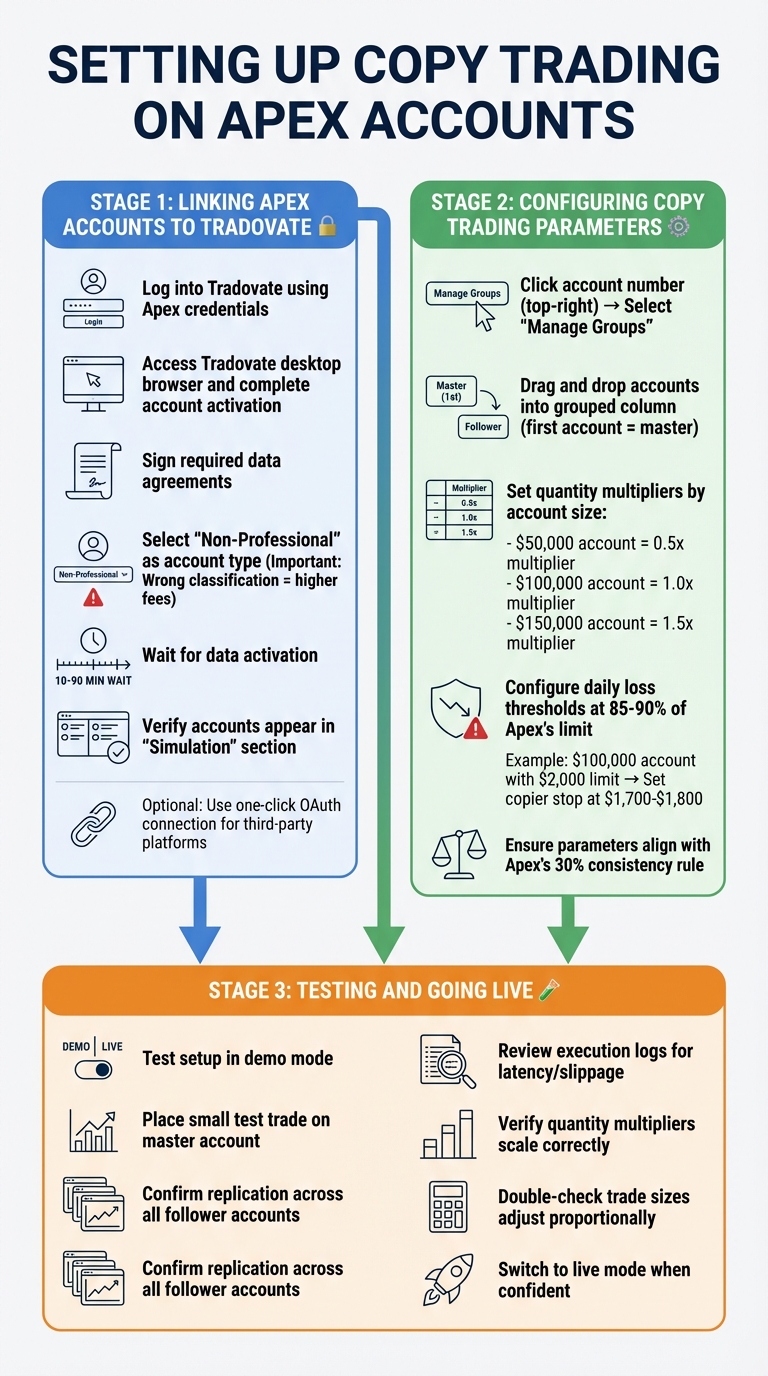
How to Set Up Copy Trading on Apex Accounts: Step-by-Step Guide
Connect your Apex accounts to the copy trading software of your choice and configure the settings to match your trading goals.
Linking Apex Accounts to Tradovate
Start by logging into Tradovate using your Apex credentials. After accessing the Tradovate desktop browser, complete the account activation steps. During this process, you’ll need to sign the required data agreements and select "Non-Professional" as your account type. Be careful with this step – choosing the wrong classification could result in higher fees and compliance issues.
Once the agreements are signed, data activation will begin. This typically takes anywhere from 10 to 90 minutes. Avoid reaching out to support until at least 90 minutes have passed. When the process is complete, your Apex accounts will appear in the "Simulation" section of the Tradovate dashboard. For those using third-party platforms, many offer a simple one-click OAuth connection. This feature allows you to automatically sync your Apex accounts from Tradovate into a centralized dashboard.
After your accounts are visible, you can start configuring your trade replication settings.
Setting Up Copy Trading Parameters
If you’re using Tradovate’s Groups feature, click on your account number in the top-right corner and select "Manage Groups." Drag and drop your accounts into the grouped column, keeping in mind that the first account added will serve as the master account. When placing trades, ensure you select the specific "Group" in the order ticket. This ensures trades replicate across all linked accounts.
Next, adjust quantity multipliers based on account size to scale your funded accounts. For example, a $50,000 account might use a 0.5x multiplier, while a $150,000 account could be set to a 1.5x multiplier. It’s also a good idea to configure daily loss thresholds at 85–90% of Apex’s limit to account for potential slippage. For instance, if your $100,000 account has a $2,000 daily loss limit, you could set your copier to stop trading at $1,700–$1,800.
Additionally, make sure your parameters align with Apex’s 30% consistency rule.
Once your settings are in place, the next step is to test your configuration.
Testing and Going Live
Before jumping into live trading, test your setup in demo mode. Place a small test trade on your master account and confirm that it replicates correctly across all follower accounts. Review the execution logs to check for latency or slippage and verify that quantity multipliers are scaling as expected.
Double-check that trade sizes adjust proportionally across all accounts. Once you’re confident that everything is functioning as intended and all compliance settings are in order, you can switch to live mode and begin replicating trades across your Apex accounts.
Copy Trading Best Practices for Apex Accounts
Fine-tuning your copy trading setup is crucial for better trade execution and staying compliant with regulations. These best practices focus on managing position sizes, adhering to rules, and leveraging data to improve performance.
Setting Position Sizes
Position sizing is all about maintaining proportional risk across accounts. You can set multipliers based on account balances. For instance, if a master account with $100,000 trades 2 contracts, a $50,000 account should use a 0.5x multiplier (1 contract), while a $150,000 account would use a 1.5x multiplier (3 contracts). As account balances grow or shrink, adjust these multipliers accordingly. For example, a $50,000 account that grows to $75,000 should have its multiplier recalculated to ensure consistent risk exposure.
Apex applies a contract scaling rule that limits traders to half their maximum allowed contracts until the account reaches the "Safety Net" (initial balance + drawdown limit + $100).
"Position sizing is the glue that holds together a sound trading system. It ensures you don’t over-leverage or under-commit in any single trade, helping you stay in the game long enough to let your edge play out over a series of trades." – Brijesh Bhatia, Equity Capital Market Analyst, Definedge
Avoid erratic sizing practices, like switching between maximum contracts and micros, just to meet daily trading requirements. Apex founder Darrell Martin highlights that the firm rewards traders who stick to a consistent plan in size, stops, and targets.
Tracking Rule Compliance
Staying compliant with Apex’s rules is non-negotiable. For example, the formula Highest Profit Day ÷ 0.3 helps determine the minimum total profit needed before requesting a payout. If your best day netted $900, you’ll need at least $3,000 in total profit to meet the 30% consistency rule.
Apex tracks intraday trailing drawdowns using peak equity throughout the session – not just end-of-day figures. To avoid violations, use software that monitors drawdowns in real time and set alerts at 85–90% of the maximum drawdown limit.
Every trade must follow a 5:1 risk-to-reward ratio, meaning your stop loss can’t exceed five times your profit target. For example, if you’re targeting 10 ticks, your stop loss should be no more than 50 ticks. Additionally, Apex’s 30% Negative P&L (MAE) rule caps unrealized losses on a single trade to 30% of your starting daily profit balance. Configuring your copy trading software to enforce these parameters automatically can save you from costly mistakes.
Traders must meet a minimum of 8 trading days, with at least 5 days showing $50+ in profit, before requesting withdrawals. Keep these metrics separate for each account to ensure compliance.
Using Data to Improve Results
Analyzing execution data can reveal inefficiencies in your copy trading setup. Regularly audit execution logs to spot slippage patterns between master and follower accounts. Aim for replication speeds under 200 milliseconds. If certain accounts consistently experience worse fills, latency or connectivity issues might be the culprit. In such cases, switching to a low-latency VPS, like QuantVPS, which reports execution speeds under 0.52ms, could improve performance.
Compare metrics like win rates, average win/loss ratios, and profit factors across accounts. If one account underperforms despite receiving identical trade signals, the issue likely lies in execution quality rather than the strategy itself. Keeping a detailed trading log can help you identify which strategies work best under specific conditions, such as market volatility or time of day. Since only about 5% of traders in funded programs achieve consistent profitability, using this data wisely is essential.
Finally, monitor your progress toward Apex’s profit milestones. The firm allows traders to keep 100% of the first $25,000 in profits per account, followed by a 90% profit split. Knowing where each account stands relative to this threshold can help you plan withdrawals more effectively.
Conclusion
Copy trading on Apex accounts revolves around three key elements: choosing the right software, following Apex’s rules to the letter, and establishing a dependable technical setup. Since Apex Trader Funding allows traders to manage up to 20 accounts, automation becomes a necessity for scaling efficiently.
Start small by testing your setup on just 2–3 accounts before expanding. Use position multipliers to balance risk management essentials across accounts of different sizes, and always test your copier in demo mode for an entire trading session. This step helps you catch potential issues like incorrect position sizing or missed stops before they lead to costly errors.
A strong technical foundation is critical. A low-latency setup, whether through a VPS or cloud-based solution, ensures smooth execution and minimizes downtime during active trading hours. This reliability is essential for managing multiple accounts simultaneously.
Equally important is strict compliance with Apex’s rules. Configure your copier to automatically close and lock accounts when they approach 85–90% of the daily loss limit. This precaution helps you stay within Apex’s guidelines, such as the 30% consistency rule and the intraday trailing drawdown limits, which apply individually to each account. Remember, traders keep 100% of the first $25,000 in profits per account – violating a single rule could mean losing out on significant earnings.
As Copilink aptly states:
The copier is infrastructure, not strategy.
FAQs
Will copy trading cause rule violations on any Apex account?
Copy trading can lead to rule violations with Apex Trader Funding if it includes activities like account sharing, providing false details, or engaging in manipulative behavior. That said, using approved trade copiers while sticking to their specific guidelines is allowed and won’t break the rules. To stay on the safe side, always review Apex’s policies carefully and ensure you’re only using tools they permit.
How do I pick contract multipliers for different account sizes?
When selecting contract multipliers for Apex Trader Funding accounts, begin with smaller contract sizes that align with your account balance. Gradually increase these as you meet Apex’s scaling thresholds. Start by adhering to their 50% initial contract limit, and adjust your multipliers in line with your profit targets and risk management strategies. Make sure to review Apex’s scaling guidelines carefully to stay compliant and adjust your approach based on your account size and trading progress.
Do I need a VPS, or is cloud copy trading enough?
When deciding between a VPS and cloud-based copy trading, it all boils down to your trading priorities. A VPS (Virtual Private Server) is perfect if you need ultra-low latency, stable connections, and a setup that minimizes interruptions during crucial trades. This is especially important for strategies where speed and reliability can make or break your results.
On the other hand, cloud-based solutions might work well for beginners or those with less time-sensitive approaches. However, keep in mind that these can sometimes be more vulnerable to internet-related disruptions. Ultimately, your choice should align with how critical speed and stability are to your trading strategy.