TradeLocker, launched in 2022, has grown to over 2.5 million active users by 2026. This platform integrates TradingView charts directly into its trading interface, saving users $15–$60 monthly on separate subscriptions. It offers features like drag-and-drop on-chart trading, a risk calculator for precise position sizing, and an AI tool for creating trading bots without coding. Key highlights include:
- Execution Speed: Average 0.4 seconds under normal conditions; slower (up to 2.4 seconds) during high volatility.
- Risk Management: Tools like trailing stop-losses and visual risk–reward overlays.
- Automation: AI-assisted bot creation and strategy backtesting across 500+ instruments.
- Device Support: Fully functional mobile and desktop apps with synced layouts.
- Prop Firm Compatibility: Works with firms like FunderPro and Alpha Capital Group but supports CFDs, not exchange-traded futures.
While ideal for swing and day traders, its slower execution during volatile markets and lack of support for CME futures make it less suitable for scalpers or traders needing direct market access.
TradeLocker App Review 2025 | Pros and Cons – Honest & Unbiased 📲📈
sbb-itb-46ae61d
Main Features of TradeLocker
TradeLocker stands out with its seamless TradingView integration, which eliminates the hassle of switching between charting tools and execution platforms. With access to over 100 indicators, advanced drawing tools (like Fibonacci retracements and pitchforks), and customizable timeframes, it ensures a smooth trading experience. Plus, all your chart templates and watchlists are saved in the cloud, syncing effortlessly across all your devices. Let’s dive into the platform’s standout features in charting, risk management, and automation.
TradingView Integration and Charts

TradeLocker’s on-chart trading lets you manage trades directly from the price chart using simple drag-and-drop actions. Need to set a pending order quickly? Just click the "+" icon on the price axis, which is especially handy during fast-moving events like NFP releases. Stop-loss and take-profit levels are visually represented as draggable red and green lines, making it easy to plan your exits while keeping your analysis and execution in one place.
Risk Management Features
The platform includes a risk calculator that simplifies position sizing. By entering your account balance and preferred risk percentage, it calculates the ideal lot size, minimizing manual errors. You can even specify your dollar or percentage risk before placing a trade. A risk–reward overlay on the chart highlights green and red zones, giving you an instant visual of whether a setup aligns with common target ratios, like the 2:1 ratio favored by many prop traders. Additionally, a trailing stop-loss automatically adjusts as the market moves in your favor, helping you lock in gains without constant monitoring. These tools are tailored to meet the demands of futures prop firms with precision and efficiency.
Backtesting and Automated Strategies
With TradeLocker Studio, you can create trading bots using plain English prompts. For example, you could type, "Buy when RSI crosses above 30 and close when it reaches 70," and the AI will generate the necessary code. The platform supports backtesting across 500+ instruments, offering key performance metrics like ROI, win percentage, and maximum drawdown. Strategies are stored locally for privacy, and there’s even a marketplace where you can explore community-created bots complete with performance stats. For professional traders, metrics like a Profit Factor above 1.5 and a Sharpe Ratio over 1.0 are typically used to validate automated strategies.
"TradeLocker Studio transforms your English prompts into live trading bots – no coding needed." – TradeLocker
Performance and Prop Firm Compatibility
Execution Speed and Stability
TradeLocker delivers an average execution time of 0.4 seconds under normal conditions, making it a practical choice for swing and day traders [2]. Its web-based design allows trading directly through a browser, maintaining consistent performance.
However, during periods of high market volatility, execution times can increase to around 2.4 seconds [2]. This delay makes the platform less ideal for ultra-high-frequency scalping strategies, where millisecond-level execution is crucial. For traders focused on such strategies, desktop platforms are better suited, as they avoid the minor latency associated with web-based systems [1].
To ensure optimal stability, it’s recommended to use a VPS with at least 2GB of RAM (4GB or more for trading bots) located near broker servers in hubs like New York, London, or Tokyo [2].
These performance traits are a key factor in determining how well TradeLocker meets the needs of futures prop traders.
Integration with Futures Prop Firms
TradeLocker’s compatibility with major futures prop firms adds to its appeal. Some of its prominent partners include FundingPips, FunderPro, Blue Guardian, DNA Funded, and Alpha Capital Group [2][1]. This integration ensures the platform aligns with the trading limits and requirements of these firms, including strategies to pass prop firm challenges.
The platform’s efficient execution speeds and automated risk management tools make it well-suited for the rigorous demands of futures prop trading. However, there’s an important limitation to consider: TradeLocker is primarily a CFD platform. It does not support direct trading of exchange-traded futures like CME ES or NQ contracts [1]. Instead, it offers CFD versions of indices and commodities. Traders should confirm that their chosen prop firm allows CFD trading, as some require direct connectivity to futures exchanges via platforms like NinjaTrader or Tradovate.
TradeLocker has garnered a 4.5/5 rating on Trustpilot from over 2,100 reviews, with many users highlighting its execution speed [1]. Verified user Remmyboi shared:
"Its exceptional speed and reliability ensure seamless execution of trades" [3].
With a user base exceeding 2.5 million as of early 2026 [1], TradeLocker has demonstrated its effectiveness for funded account trading. However, scalpers should carefully test the platform’s performance during volatile news events before committing to live trading evaluations.
User Experience and Device Support
Mobile App and Multi-Device Access
TradeLocker works seamlessly across all browsers and offers native desktop and mobile apps for both iOS and Android. This versatility means you can manage trades on the move with your phone or dive into detailed analysis at your desk.
One standout feature is the mobile app, which doesn’t skimp on functionality. It includes TradingView indicators, a risk calculator, one-click trading, and full position management. As Matthew Hinkle, Lead Writer & Full-Time Retail Trader at NYCServers, puts it:
"The mobile experience is one of the platform’s genuine strengths, offering full trading functionality including chart analysis and order management." [2]
Another plus? The platform syncs your watchlists, layouts, and chart templates across devices. However, there’s a known issue as of 2026 – custom templates may occasionally reset when switching between desktop and mobile. If you often switch devices, it’s a good idea to test your saved templates on a demo account before making live trades.
For traders who use multiple monitors, the web version lets you open separate browser windows on different screens. The desktop app also supports multi-window setups, though it might feel less smooth when handling complex multi-monitor configurations.
While the mobile app offers convenience on the go, TradeLocker’s desktop version provides a highly customizable interface. Let’s take a closer look at its design and personalization features.
Interface Design and Customization
The desktop interface, built around its TradingView integration, is designed for clarity and efficiency. It offers a clean, modern workspace that avoids unnecessary clutter, letting you focus on what matters most – your trades.
Customization is a key strength here. You can tweak candlestick colors, background shades, grid visibility, and chart layouts to suit your trading style. Charts can be dragged and resized, allowing you to monitor multiple instruments at once. These layouts can also be saved for future use, making it easy to switch between setups.
For added convenience, watchlists can be organized by categories like Forex, Metals, or Crypto, ensuring quicker access to the markets you follow most. And with TradingView baked into the platform, you get access to over 100 indicators and advanced tools like Fibonacci retracements. Want to speed up your workflow? Save your preferred setups – like a “Swing Setup” or “Intraday Setup” – as chart templates for quick loading.
The interface doesn’t just stop at TradingView’s features. It adds even more flexibility, including a customizable floating panel for full-screen trading. This setup gives you an unobstructed view for in-depth technical analysis, while keeping order placement tools within easy reach.
Strengths and Weaknesses of TradeLocker
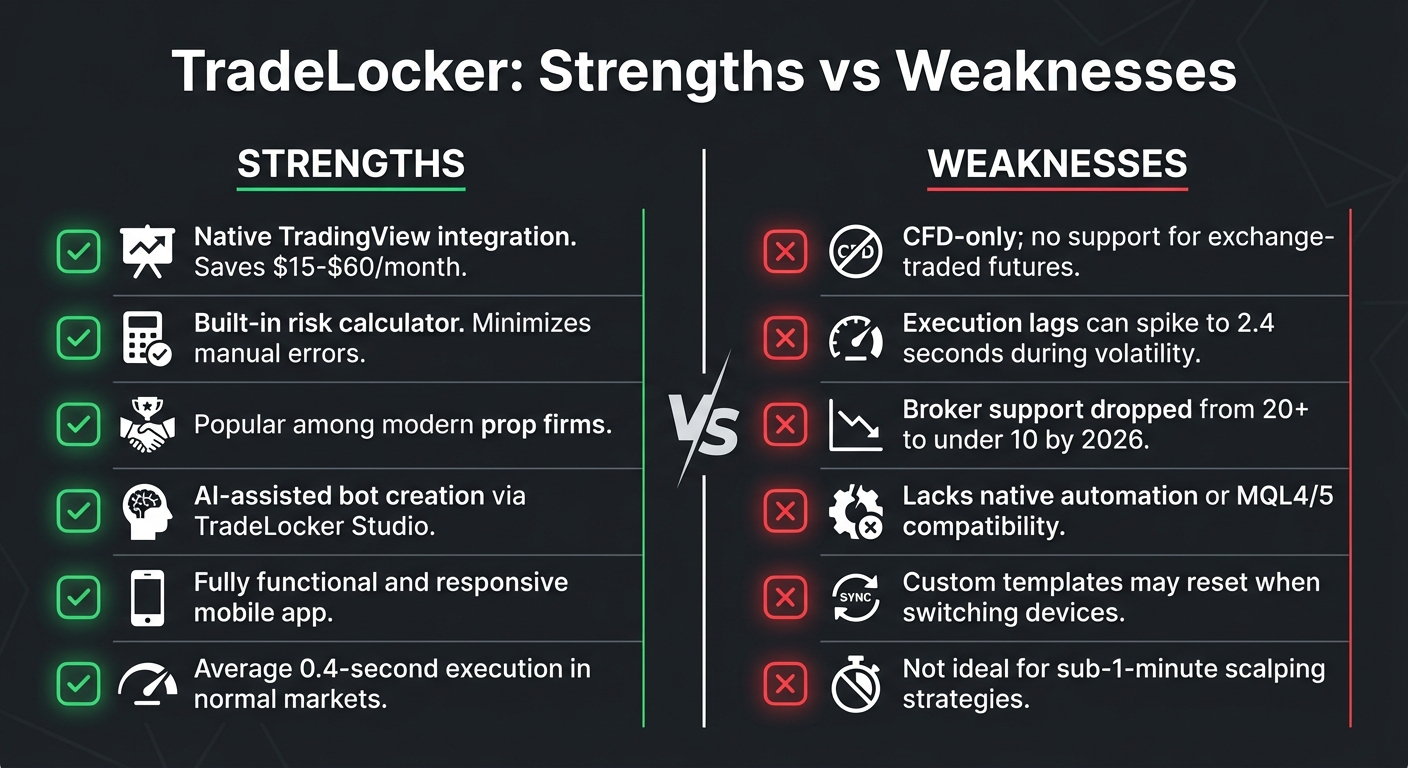
TradeLocker Strengths vs Weaknesses Comparison Chart
TradeLocker stands out among futures prop traders thanks to its impressive features, though it does come with some clear limitations.
One of its key highlights is the native TradingView integration, which eliminates the need for additional subscriptions while offering professional-grade charting tools. With over 100 indicators built directly into the platform, it’s a powerful resource for traders [1]. Another standout feature is the built-in risk calculator, which automatically sizes positions based on your account balance and desired risk percentage. This helps minimize the risk of manual calculation errors. As TeoBVrs puts it:
"Placing a stop loss before entering and seeing exactly how much you are risking is a game changer!" [3]
Modern prop firms like DNA Funded, FunderPro, and Blue Guardian have embraced TradeLocker for its streamlined functionality, and the mobile app further enhances the experience with advanced charting and efficient order management [2].
However, TradeLocker does have its downsides. For one, it is a CFD-only platform, meaning it doesn’t support exchange-traded futures like CME products [1]. Execution speeds, while typically solid, can slow down during volatile market conditions. According to Matthew Hinkle, execution times can reach up to 2.4 seconds during high-volatility events, which could be a dealbreaker for scalpers and news traders [2].
Other limitations include a reduction in broker support – from over 20 brokers in 2025 to fewer than 10 by early 2026 – and the lack of native automation tools or scripting languages like MQL4/MQL5 [2].
Comparison Table: Strengths vs. Weaknesses
Here’s a quick breakdown of TradeLocker’s main strengths and weaknesses:
| Strengths | Weaknesses |
|---|---|
| Native TradingView integration saves $15-$60/month [1] | CFD-only; no support for exchange-traded futures [1] |
| Built-in risk calculator minimizes manual errors [1] | Execution lags can spike to 2.4 seconds during volatility [2] |
| Popular among modern prop firms [2] | Broker support dropped from 20+ to under 10 by 2026 [2] |
| AI-assisted bot creation via TradeLocker Studio [2] | Lacks native automation or MQL4/5 compatibility [2] |
| Fully functional and responsive mobile app [2] | Custom templates may reset when switching devices [2] |
| Average 0.4-second execution in normal markets [2] | Not ideal for sub-1-minute scalping strategies [2] |
Final Verdict: Should Futures Prop Traders Use TradeLocker?
TradeLocker stands out as a solid option for swing and position traders who value modern charting tools and effective risk management. The platform’s integration with TradingView provides a seamless analytical experience, while its built-in risk calculator helps traders adhere to strict prop firm daily loss limits of 3–4% [4].
However, it’s less ideal for scalpers and news traders. Under typical conditions, TradeLocker offers an average execution time of 0.4 seconds. But during high-volatility events, like NFP releases, delays can jump to as much as 2.4 seconds, which can be a significant drawback for those relying on split-second decisions [2]. As Matthew Hinkle from NYCServers points out:
"That’s a significant gap that scalpers and news traders should take seriously" [2].
Another limitation is that TradeLocker primarily supports CFDs rather than exchange-traded futures, which might restrict traders who need direct market access.
One of TradeLocker’s highlights is its focus on automation. The AI-assisted bot creation feature in TradeLocker Studio makes it easier for non-coders to automate their strategies. However, since the ecosystem is still developing, traders looking to automate are advised to use a VPS located near the broker’s server to ensure consistent uptime and low latency [2].
FAQs
Does TradeLocker support CME futures like ES and NQ?
TradeLocker doesn’t offer direct support for trading CME futures like ES and NQ. Instead, the platform operates through broker connections and lacks direct integration with exchanges for advanced futures trading.
Is TradeLocker fast enough for scalping during news?
TradeLocker’s execution speed clocks in at an average of 0.4 seconds under normal market conditions. While this is generally fast enough for most trading activities, it might feel a bit slower for scalpers during high-volatility news events, where split-second order execution can make all the difference.
What VPS setup is best for TradeLocker bots?
The ideal VPS setup for running TradeLocker bots is a dedicated Windows server specifically designed for trading purposes. For the best performance, choose a server located close to key trading hubs like Chicago or Aurora. This proximity ensures sub-millisecond routing to CME, which is crucial for maintaining stability, maximizing uptime, and managing risks effectively during periods of market volatility.