Average trade duration tells you how long your trades stay open, not whether those holds make money. I’d use it to check execution discipline, not to force every trade onto the same timer. A six-minute scalp and a 40-minute trend trade need different yardsticks.
This guide shows you how to clean up fill timestamps, handle partial exits, and compare hold times by setup, session, and contract. If you are trading through a funded account like The Futures Desk, tracking these metrics is vital for maintaining your funding status. You’ll also see why the median matters: one long hold can drag the average away from your typical trade.
My rule: <u>check the trade mix before changing your exits</u>. Shorter holds aren’t progress if commissions climb or net expectancy drops.
What Average Trade Duration Measures
Average trade duration measures how long your trades keep exposure open, not whether you used that time well. The result rests on two choices: what counts as a trade and which timestamps you use.
Judge holding time against your setup, session, risk, and planned exit. Keep scalps separate from trend trades. Pooling them hides whether your holding time fits the setup.
Trade Duration Formulas
Flat-to-flat duration = final exit fill timestamp − opening fill timestamp.
Average duration = total completed-trade duration ÷ completed-trade count.
Canceled and rejected orders add no duration. Only filled quantity counts. Leave open positions out of the completed-trade average and track their current age separately.
Define What Counts as 1 Trade
Set your counting rule before comparing results. A flat-to-flat episode starts when exposure moves from zero to nonzero and ends when it returns to zero. Additions and partial exits belong to that same episode.
A reversal closes the old direction and starts a new episode, even if one execution handles both.
| Reporting method | Counting and duration | Scaling treatment | Main limitation |
|---|---|---|---|
| Position-level | One completed episode; first opening fill to final exit | Additions and partial exits remain one trade | Hides individual lot holding times |
| Matched-leg level | Each matched entry–exit allocation is a record; exit time minus matched entry time | Match exited quantity to entry fills using a fixed rule, such as FIFO | Record count and durations depend on matching rules |
| Hybrid report | Position-level summary plus a separate matched-leg report | Keeps both views without pooling records | Needs clear labels to prevent double-counting |
Keep these averages separate. Quantity-weighted holding time answers a different question:
Quantity-weighted holding time = Σ(matched quantity × holding time) ÷ Σ(matched quantity).
That gives you average holding time per unit of quantity, not the ordinary mean across completed position episodes.
Time Zones and Overnight Holds
Store timezone-aware timestamps on a single time basis, such as UTC, and use it to calculate elapsed time. When displaying local time, handle daylight saving correctly. A fixed offset won’t do that.
Include entry and exit dates for overnight holds. Flag trades that cross maintenance breaks or session boundaries.
Use elapsed clock time as the default because exposure stays open during market closures. If you also track active-market time, label it separately and spell out which closures you exclude.
With the timestamp rule set, log the fields needed to repeat the calculation.
sbb-itb-46ae61d
Fields and Tags for Your Futures Journal
Fields Needed to Calculate Duration
Keep the fields needed for duration separate from optional performance data.
| Field | Purpose | Requirement level |
|---|---|---|
| Trade ID | Groups fills into one position episode | Required for duration |
| Opening Fill Timestamp | Marks when position exposure starts | Required for duration |
| Final Exit Timestamp | Marks when position exposure ends | Required for duration |
| Status (Open/Closed) | Keeps open trades out of the average | Required for duration |
| Instrument / Symbol | Identifies the market for baseline comparison | Required for duration |
| Contract Month / Year | Keeps rollovers and expirations separate | Required for duration |
| Direction | Records whether the position is long or short | Required for duration |
Optional fields for analysis:
- Quantity and entry / exit prices: Calculate P&L and check fills.
- Fees / commissions: Calculate net P&L and cost drag.
- Realized net P&L: Compare holding time with P&L.
- MFE / MAE: Measure favorable and adverse excursion during the hold.
- Market condition: Compare holding times across volatility regimes.
Fields supply the duration math. Tags group trades for analysis.
Tags for Duration Analysis
Tag trades before you know the outcome to avoid hindsight bias. Use session, setup / strategy, and timeframe tags to compare holding times. The timeframe tag should record the chart interval used for the setup. Keep session boundaries and their time zone consistent.
At exit, record the reason: target, price stop, time stop, or manual early exit.
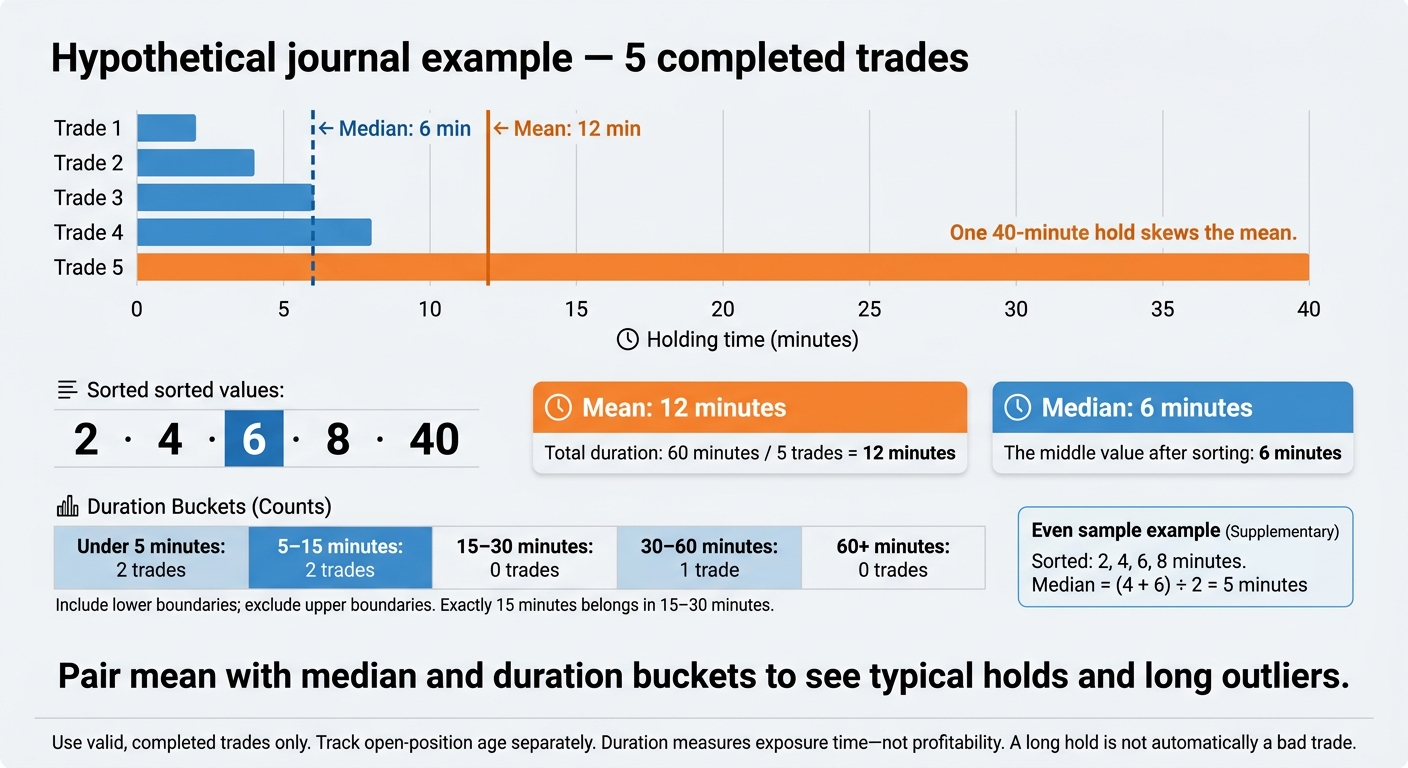
Use separate duration buckets: under 5 minutes, 5–15 minutes, 15–30 minutes, 30–60 minutes, and 60+ minutes. Include each lower boundary and exclude each upper boundary. A trade held for exactly 15 minutes belongs in the 15–30-minute bucket, not both.
Add contract-type and management-style tags if they help your analysis.
Import and Check Execution Data
Clean your raw fills before calculating anything. Bad fill data means bad duration averages.
Reconcile fills to closed positions, fees, and realized P&L using one consistent fee rule. Check for duplicates, missing exits, timestamp consistency, contract identifiers, and time zones before trusting the numbers.
Keep account-level results separate from strategy-level observations. Track executions from trade copying platforms at the account level first so you don’t count the same strategy trade more than once.
Calculate Mean, Median, and Duration Distribution
Average Trade Duration: Mean vs. Median
Once your fills are clean, turn them into summary stats.
Calculation Example and Spreadsheet Formulas
Hypothetical journal example: Five completed trades last 2, 4, 6, 8, and 40 minutes. Their total is 60 minutes, so the mean is 60 ÷ 5 = 12 minutes. The median is 6 minutes, the middle value after sorting. With an even sample – 2, 4, 6, and 8 – the median is (4 + 6) ÷ 2 = 5 minutes. One 40-minute hold skews the mean. [1][2]
In Excel or Google Sheets, use =(C2-B2)*1440 to calculate minutes. Format the result as Number or General, not Time. Flag missing timestamps and negative durations for correction. Don’t replace them with zero.
If E2:E6 contains only valid, closed-trade durations, use =AVERAGE(E2:E6) and =MEDIAN(E2:E6). Leave open trades out of these calculations. [1][2]
Then check whether your hold times cluster together or a few long trades pull the average up.
Compare Duration Statistics
The mean doesn’t tell the whole story. Pair it with the median and a duration-bucket chart to see clustered holds and long outliers. Percentile methods can produce different cutoffs, especially with small samples. [2][4]
| Statistic | Definition | What it reveals | Outlier sensitivity and limitation |
|---|---|---|---|
| Mean | Total minutes ÷ trade count | Average hold time | High sensitivity; hides the distribution |
| Median | Middle value after sorting | A more typical hold | Low sensitivity; hides the extremes |
| Minimum / maximum | Shortest / longest hold | Observed range | Defined by extremes; shows no frequency |
| Percentiles | Duration cutoffs at selected percentages | Typical and longer hold ranges | Small samples can move percentile cutoffs |
| Standard deviation | Spread around the mean | Holding-time variation | High sensitivity; spread alone doesn’t prove poor management |
A long hold isn’t automatically a bad trade. Check its setup and exit reason before calling it a management problem. [2]
Put these stats in a dashboard, split by setup, instrument, and session.
Build a Duration Dashboard
Show trade count, mean, median, min, max, and duration buckets or percentiles. Include the trade count beside every result and each setup, instrument, and session segment. [1][2]
Use rolling 20-, 50-, or 100-trade windows alongside monthly or quarterly views. Label segments with small samples preliminary, and track open-position age separately from completed-trade durations. [1][2]
Check whether hold times match your setup and exit style. Compare ES, NQ, CL, and MNQ contract specs separately.
Compare Duration Across ES, NQ, CL, and GC
Set a separate duration baseline for each instrument. Volatility, liquidity, and setup behavior differ. A 10-minute hold in ES isn’t the same as a 10-minute hold in NQ, CL, or GC. Check CME Group’s trading-hours calendar for holiday exceptions before setting session boundaries. [3] Use these contract specs and journal labels to keep your comparisons clean.
| Instrument | Tick value per standard contract | Journal session labels | Tags |
|---|---|---|---|
| ES | $12.50 | RTH, ETH; cash window 9:30 AM–4:00 PM ET | RTH, ETH, Opening Range, Trend, Range |
| NQ | $5.00 | RTH, ETH; cash window 9:30 AM–4:00 PM ET | RTH, ETH, Midday, High Volatility |
| CL | $10.00 | Maintenance break; tag inventory windows separately | Inventory-Event, Pre-Event, Post-Event, Roll Period |
| GC | $10.00 | Maintenance break; tag regional windows separately | Asian Session, London, London/New York Overlap, DST Transition |
The 9:30 AM–4:00 PM ET equity cash window isn’t the full futures session. If your journal calls that window “RTH,” document that convention. Label the rest of the tradable period ETH. Don’t leave it unclassified. [3]
ES and NQ: Use Separate Baselines
Split RTH from ETH, opening-range trades from midday trades, and trend setups from range setups. Session choice changes what your duration data tells you.
Keep ES/MES and NQ/MNQ separate, too. Mixing them puts different position sizing and risk profiles into the same baseline.
CL: Track Inventory Events and Contract Month
Inventory timing matters for hold-time comparisons. Record the session, how close the trade was to an inventory release, and whether you used a time stop.
Verify each release time. Don’t assume the same weekly schedule. Apply consistent pre-event, event-window, and post-event boundaries.
Compare contract months separately. Flag roll periods and trades that cross maintenance breaks, but keep elapsed holding time intact.
GC: Define Sessions and Overlap Windows
For gold, session overlap matters. Define Asian, London, London/New York overlap, and US windows as journal conventions, with explicit start times, end times, and time zones. Use Europe/London and America/New_York where appropriate.
Their daylight saving transitions don’t always line up. A fixed, year-round ET label for the overlap can put trades in the wrong window.
Compare those windows against trend, range, news-window, and overnight holds. Pair duration with movement in both ticks and dollars. [2]
Use Holding Time to Review Trading Results
Use mean, median, and distribution to review trade quality, not just how long you held. Compare like-for-like trades only: same setup, instrument, session, volatility state, and rule set.[2][3]
Compare Winners, Losers, and Exit Reasons
Classify winners, losers, and breakevens by net P&L after commissions and fees, with slippage reflected in execution prices. Apply the same breakeven tolerance throughout. Tag planned targets, price stops, time stops, manual early exits, and manual hold extensions separately.[2]
Then split holding time by outcome and exit reason. Check whether your time in the trade matched the plan.
| Observed pattern | Likely explanation | Evidence to check |
|---|---|---|
| Short winners, long losers | Planned fast targets or drifting from the plan | Planned risk and objectives, actual exit timing, stop changes, and MAE/MFE |
| Long winners, short losers | Trend-following rules or stops triggering too soon | Target logic, stop placement, average win vs. average loss, and how much of the favorable move you kept |
| Clusters of quick breakevens | Valid scratches or too much intervention and churn | Net costs, trade frequency, early-exit tags, and whether trades closed before reaching targets |
MAE/MFE helps you review risk and opportunity. It doesn’t prove a perfect exit was available. Before blaming a long loser on stop-widening, check planned versus actual exit timestamps and MAE.[2]
Track Changes in Mean and Median
For each review window, check for changes in instruments, sessions, setup versions, volatility, or management rules.[2][3]
| Mean/median pattern | Possible interpretation | Required checks |
|---|---|---|
| Mean rises; median stays stable | A few unusually long holds | Inspect the longest trades and verify timestamps |
| Both rise | Holding times increased across trades, or the trade mix changed | Compare setup mix, volatility, sessions, and exit rules |
| Both fall | Faster exits or more short-duration setups | Check whether turnover and commission drag are increasing |
| Median falls; mean stays stable | Faster typical trades offset by long holds | Review extreme holds separately from typical trades |
Test Time Stops Without Curve-Fitting
If holding time keeps pointing to the same issue, test a time stop. Don’t guess.
Set the setup, time limit, and exit priority before testing. Replay the rule using timestamped intratrade prices, realistic fills, slippage, and commissions. Final holding time and aggregate MAE/MFE can’t reconstruct intratrade prices or tell you which exit would have triggered first.
Compare the original and proposed rules on net expectancy, drawdown path, tail risk, MAE/MFE, and exposure time. Validate the proposed rule on untouched data or forward-test data before using it.[2]
Use the checklist below to keep each review consistent.
Duration Review Checklist
Run these checks before you trust the stats.
- Normalize timestamps. Use execution timestamps in a single time zone, accounting for daylight saving time changes.[2]
- Define one trade. Decide whether that means a full position, matched lots, or a quantity-weighted hold. Document how you count scale-ins and scale-outs.[2]
- Audit fills and session breaks. Check that every record has precise timestamps, gross P&L, commissions, fees, slippage, and net P&L. Keep open trades out of closed-trade stats. Flag maintenance breaks, session boundaries, and contract rollovers.[1][2]
- Check your tags. Record the instrument (ES, NQ, CL, or GC), contract month, RTH/ETH session, setup version, and exit reason.[2][3]
- Compare duration stats and net results. Compare the mean, median, and percentiles within matching trade groups, alongside net results.[1][2]
- Validate before changing duration rules. Change one rule at a time and save the original version. Test on untouched data before forward-testing. A shorter average means nothing without better net results. Keep a duration-based change only when the evidence supports better net results without unacceptable damage elsewhere.[1][2]
FAQs
How many trades do I need for a reliable duration baseline?
Use rolling windows of 20 or 50 closed trades to track duration trends instead of leaning on one average. These are review windows, not minimum trade counts that guarantee reliable results.
Group trades by strategy, setup, instrument, and exit reason to compare like with like. Track the median and percentiles alongside the average so a few unusually long or short trades don’t distort the picture.
How can I tell if I’m exiting trades too early?
Tag each exit in your futures journal as planned or rule violation. Compare rolling windows by strategy/setup version, instrument (ES, NQ, CL, GC), direction, and session (RTH vs. ETH).
Calculate average trade duration = total holding time ÷ number of closed trades. Use consistent entry and exit timestamps from an authoritative source. Check the median and percentiles alongside the average, since a few long trades can skew it. Include costs when judging results.
When should I update my holding-time benchmarks?
Keep your definitions and calculation rules the same when comparing holding-time benchmarks across time windows. Average trade duration = total holding time ÷ number of closed trades. Use reliable entry and exit timestamps, and apply the same rules to open trades and breakeven trades in every window.
Track the median and percentiles alongside the average. A few long holds can skew the average and hide how long most trades last. Break down results by strategy, setup version, instrument (ES, NQ, CL, or GC), and session (RTH vs. ETH).