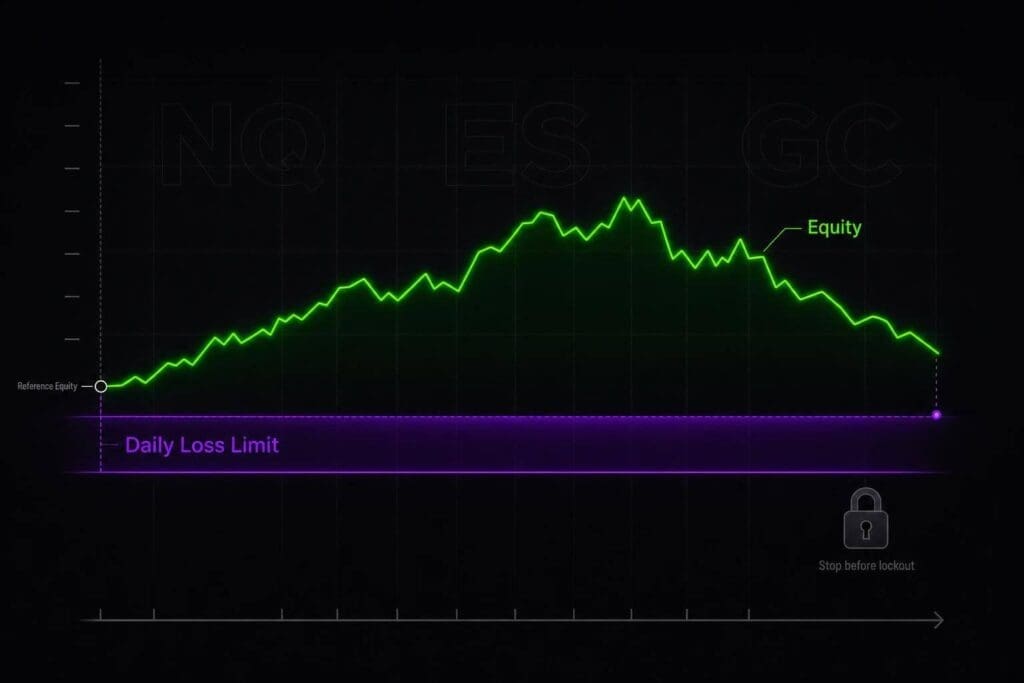
A daily loss limit is your hard stop for the session. It tells you the exact dollar amount you can lose before you’re done for the day, whether you like it or not. If you’re trading futures in a prop setup, this rule matters because one oversized trade, one dumb add-on, or one ignored fee line can shut you down fast.
I’m keeping this simple. You’ll get what a DLL is, what usually counts toward it, how the math works, and how to keep from tripping it by accident. The short version: know your floor before the open, track live equity all day, and stop before the platform stops you.
The Secret to Avoid Over-Trading with Personal Loss Limits 🛑
sbb-itb-46ae61d
What Is a Daily Loss Limit in Futures Trading?
A daily loss limit (DLL) is the most your account can lose in a single session before you get cut off.
That cap resets at the start of the next trading day. If you breach the DLL, your session is done, then you start fresh the next day. It does not keep following the account the way a drawdown violation does.
How It Differs From Trailing Drawdown and Max Account Loss
The table below lays it out cleanly. A DLL is a session rule. A trailing drawdown moves up with the account’s high-water mark, so the floor gets tighter after new equity highs [1][4]. A max account loss, also called a static drawdown, stays tied to the starting balance and doesn’t move [4].
| Metric | Daily Loss Limit | Trailing Drawdown | Max Account Loss (Static) |
|---|---|---|---|
| Reset / Movement | Resets every session | Floor moves up with new highs | Fixed |
| Calculation Basis | Higher of the previous day’s closing balance or closing equity | Account’s highest equity | Initial starting balance |
| Breach Consequence | Session lockout | Account termination | Account termination |
What Counts Toward the Limit
This is the part that trips people up. What matters is what the firm counts in real time.
Most firms calculate DLL using equity, which means realized PnL, unrealized PnL, commissions, and fees can all count toward the limit [1][2][3]. Some firms use balance-based rules and only count closed trades. But a lot of modern prop firms monitor equity because it tracks live risk more closely [3].
That one detail changes everything. If your DLL is equity-based, you can breach the cap before you flatten the trade. So if you’re not sure how your firm handles it, check the rulebook or help center before you place anything.
Why Futures Prop Traders Need a Daily Loss Limit
Once you know the cap, the next part is what it does to you during the session. A daily loss limit puts a hard stop in place before frustration turns a bad day into a train wreck. Without that stop, it’s easy to keep firing after an early loss, bump size up, and dig a much deeper hole.
Why Prop Firms Use a Daily Cap
Prop firms use a daily cap to stop one trader from taking a huge hit in a single session [5]. It also helps protect the progress you’ve already made in an evaluation or funded account [3]. One ugly day can lead straight to revenge trading, oversizing, and chasing junk setups. And if the firm tracks equity, open P&L can trip the cap before you even flatten [3][8].
How It Changes Intraday Decisions
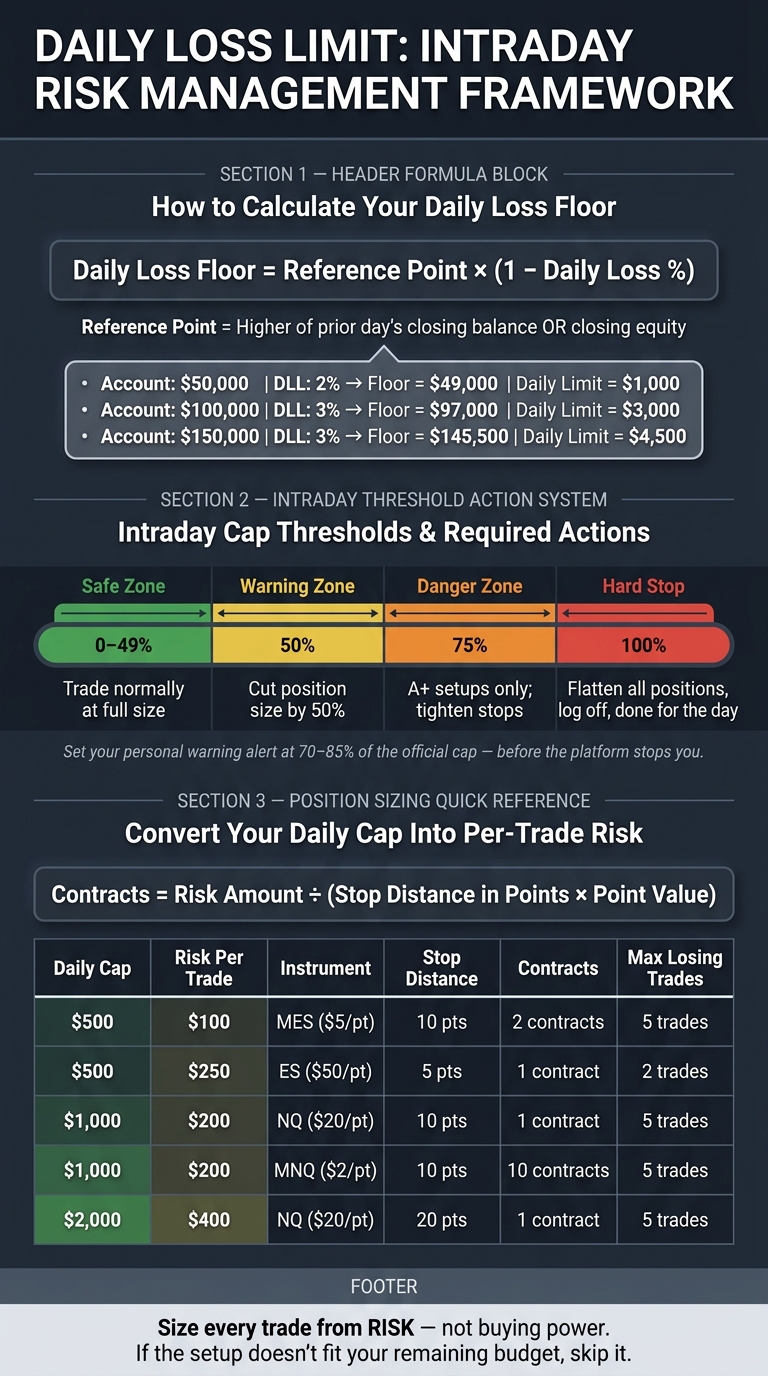
The rule below is the one that matters in practice: at 50%, cut size in half; at 75%, only take your best setups and tighten stops; at 100%, flatten and you’re done for the day [2].
When you’re already down, the room left on the cap often isn’t enough to handle a normal full-size loss. That’s why passing on mediocre setups is the right move. Your daily allowance is shrinking, and your risk has to shrink with it. Next, turn that daily cap into per-trade risk so you can size positions around it.
How to Calculate Your Daily Loss Limit
Daily Loss Limit: Intraday Risk Management Framework for Futures Traders
Know your cap in dollars before the open. That’s the number that keeps you from getting clipped by a lockout mid-session, a common rule at The Futures Desk and other prop firms. Once you have it, every trade has to fit inside the room you still have left. Keep these four inputs ready:
- starting equity
- daily loss percentage
- contract point value
- commission rate
Set your DLL before the session starts and treat it like a hard stop. No excuses. Then turn that cap into a live floor you can watch intraday.
The Basic Daily Loss Formula
Start with the higher of the prior day’s closing balance or closing equity, then multiply by your daily loss percentage.[1] That gives you the dollar amount you can lose for the day. From there, your floor is the minimum equity allowed during that session:
Daily Loss Floor = Reference Point × (1 − Daily Loss %)
where the Reference Point is the higher of the previous day’s closing balance or closing equity.[1]
Track equity as realized P&L + open P&L – fees and commissions.[1][2] That’s the part traders screw up. They watch realized P&L and ignore open loss or fees, then wonder why the account gets hit. If equity drops below the floor, you’ve breached the cap, even if the trade is still open.[1][3] Tick-by-tick movement matters once you’re near the line.
Example Calculations With ES, NQ, and MNQ
Point value decides how fast you burn through the cap. With a $1,000 daily cap, one ES contract gives you about 20 points of room, one NQ contract gives you about 50 points, and one MNQ contract gives you about 500 points.[5][9] Same cap. Very different margin for error.
On a $50,000 account with a 2% daily cap, the floor is $49,000 and the daily limit is $1,000.
Table: Daily Loss Limit Calculation Examples
The table below shows how live equity stacks up against the floor across three account sizes and cap percentages.[1][2]
| Reference Point | DLL % | Daily Loss Floor | Open P&L | Fees/Commissions | Current Equity | Result |
|---|---|---|---|---|---|---|
| $50,000 | 2% | $49,000 | −$400 | −$10 | $49,590 | ✅ Active |
| $100,000 | 3% | $97,000 | −$2,950 | −$60 | $96,990 | ❌ Breached |
| $150,000 | 3% | $145,500 | +$1,200 | −$25 | $151,175 | ✅ Active |
That $100,000 example is the one to pay attention to. The trader is right near the limit, then fees push current equity under the floor. That’s all it takes. Fees count, so include them before you put on the next trade.[1][2]
Once the floor is set, the next piece is how traders still manage to hit it during the session.
How a Daily Loss Limit Gets Triggered During the Session
The cap is enforced in real time. If your equity drops below the floor, the breach happens right then. No grace period. That’s why the trigger type matters as much as the dollar amount.
Realized Loss vs. Unrealized Loss Triggers
Most prop firms watch live equity, not just closed trades. So an open red trade can trip the limit before you ever hit flatten. When that happens, the system can auto-liquidate the position and lock the account for the rest of the session.[2][3][8]
How Traders Breach the Cap After an Early Green Session
Here’s the part that catches people off guard. A trader starts the day with a $49,000 floor on a $50,000 account. They make $600 early. Later, they hold an ES trade that goes to a -$1,300 floating loss. Current equity drops to $48,900, the account breaches, and the platform liquidates the trade.[2][3][1]
That early green session doesn’t move the floor up. You don’t get extra room just because you were up earlier. Add fees and commissions, and the cushion gets even tighter. A small extra loss can be enough to put you over the line.[1][2]
The trigger type decides when the breach hits:
- Realized loss: only closed trades count
- Unrealized loss: open P&L counts too
- End-of-day: only the closing balance at session close counts
Table: Common Trigger Types and Next-Session Reset
| Trigger Type | Calculation Basis | Resets For Next Session | Behavior on Breach |
|---|---|---|---|
| Realized Loss | Closed trades only | Yes | Account locked for the rest of the session |
| Unrealized (Equity) | Closed P&L + floating P&L | Yes | Automatic liquidation during the active trade |
| End-of-Day (EOD) | Closed balance at session close | Yes | Intraday swings are ignored; only the closing value matters |
Most U.S. futures platforms reset the daily loss counter at the next session open, so you need to know the exact reset time before holding anything overnight.[1][7]
Next, use Tradovate or NinjaTrader PnL tools to spot the breach before it happens.
How to Track Daily PnL in Tradovate and NinjaTrader

Once your cap is set, put live P&L right in front of your face. That’s the whole point. You want to see a problem before it turns into a lockout. Tradovate and NinjaTrader can both show your numbers in real time, but that only helps if you set everything up before the open.
Using Tradovate PnL Displays and Alerts
Start with the account dashboard. Then add alerts.
Tradovate shows your live P&L on the account dashboard, so keep that window visible the whole session. Don’t bury it behind charts. Set visual warnings at a loss level below the hard cap so you’ve got some room to react before the day gets away from you. [2]
Using NinjaTrader Account Monitoring and Daily-Loss Controls
Same deal in NinjaTrader. Keep live equity visible, and use bracket orders on every entry.
NinjaTrader’s Account Monitoring tools can track live P&L, including open risk. [6][7]
It also supports ATM brackets, so your stop and target can go in with the trade. That’s non-negotiable for a lot of traders. In risk management setups, platforms can also reject new orders or lock the session after a daily loss threshold gets hit. [6][7][9]
Set a Personal Warning Level Below the Official Cap
The firm’s cap is the hard stop. Your own warning line should hit sooner, usually around 70% to 85% of the official limit. That buffer gives you time to flatten, cool off, and check what you’re doing before the platform shuts you down. [2]
| Threshold | Action |
|---|---|
| 50% of daily cap | Cut position size by 50% |
| 75% of daily cap | Take only A-grade setups |
| 100% of daily cap | Close everything, log off, done for the day |
Set those alerts before the session starts. Making that decision while you’re already tilted and down on the day is how dumb mistakes happen. [2]
How to Size Positions So You Do Not Hit the Cap
Once your warning level is set, turn the room you have left into a per-trade risk number before you place anything.
Convert the Daily Cap Into Per-Trade Risk
Think of the daily cap as your session risk budget. If your daily limit is $1,000 and you want enough room for five losing trades, your max risk per trade is $200. That’s simple math: $1,000 ÷ 5 = $200 per trade. [2]
That number matters more than margin. Margin tells you what the broker will let you open. Your daily cap tells you what you can afford to lose without getting shut down for the day. Mix those up, and you can blow through the cap fast. [5]
So size every trade from risk, not buying power.
Match Contract Size to Stop Distance
After you know your dollar risk per trade, work backward into size. The formula is simple:
Contracts = Risk Amount ÷ (Stop Distance in Points × Point Value)
This is where instrument choice starts to matter. A lot.
Say your per-trade risk budget is $200 and your stop is 4 points on ES. One ES contract risks $200 because 4 points × $50/point = $200. That means one contract uses the full budget right away, and even a little slippage can put you over. Move to MES, and the same 4-point stop risks $20 per contract because 4 points × $5/point = $20. Now you can trade 10 MES contracts for the same $200 risk and get a lot more room to fine-tune size. [5]
If volatility makes you widen the stop to double the distance, cut your size in half so your dollar risk stays the same. [6]
Table: Position Sizing vs. Distance to Daily Cap
| Daily Cap | Risk Per Trade | Instrument | Stop Distance | Contracts | Approx. Losing Trades Before Cap |
|---|---|---|---|---|---|
| $500 | $100 | MES ($5/pt) | 10 pts | 2 | 5 |
| $500 | $250 | ES ($50/pt) | 5 pts | 1 | 2 |
| $1,000 | $200 | NQ ($20/pt) | 10 pts | 1 | 5 |
| $1,000 | $200 | MNQ ($2/pt) | 10 pts | 10 | 5 |
| $2,000 | $400 | NQ ($20/pt) | 20 pts | 1 | 5 |
Micros give you tighter control when the daily cap is small. Standard contracts can chew up a big chunk of your room fast. [5]
If the next setup doesn’t fit inside your remaining risk budget, skip it. Then stop for the day.
A Stop-Trading Routine for Red Days
Once your per-trade risk is set, turn that into a hard stop-trading routine for red days.
Keep it simple. You need one checkpoint before the open and one during the session. That’s it. No fancy system. Just rules you can follow when your head’s not in the best place.
Pre-Session Checklist
Before you place a trade, confirm these four things:
- Write your daily loss floor on your session sheet before the open.
- Confirm your alerts and max-loss controls are active before the open.
- Set a hard max contract size for the session.
- Review your risk budget so every trade fits inside the room you have left.
What to Do When You Reach Your Warning Level
When the warning line hits, the response should be automatic.
| Threshold | Action |
|---|---|
| 50% of daily cap | Cut position size by half |
| 75% of daily cap | A+ setups only; consider stopping |
| 100% of daily cap | Close all positions, log off, and switch to review-only mode |
| Post-session | Review the day later, after emotions cool |
At 75%, stop taking low-quality setups. No boredom trades. No revenge entries. If it’s not clean, leave it alone.
At 100%, flatten everything and log off. Done for the day.
Do not review trades while emotional.
Bottom Line
Once the cap is set and tracked, your only job is to protect the session. A daily loss limit is a hard stop. Set it before the open and treat it as non-negotiable. Know the exact dollar amount before your first trade. Size every position off that cap, not off available margin. Keep PnL visible in Tradovate or NinjaTrader, and set your own warning level below the firm’s limit so floating losses and fees don’t shove you into a breach before you can react. At 50%, cut size. At 75%, trade only A setups. At 100%, stop and log off. [2]
That discipline keeps a bad day from turning into a breach.
FAQs
Does the daily loss limit include open losses and fees?
Yes. A daily loss limit is usually based on equity, not just closed P&L. That means it looks at your account right now, including any open loss on the screen.
So if you’re down on an open position, that floating loss still counts. You don’t need to close the trade for it to hit the limit.
Commissions, fees, and swap-related costs can count too, since they cut into equity. If the rule is equity-based or mark-to-market, those costs matter along with open P&L.
The practical takeaway is simple: an open trade can trip the daily loss limit before you exit it.
What happens if I breach the daily loss limit mid-trade?
If you hit your daily loss limit while the trade is still open, your session is done. Stop right there. Don’t try to squeeze in one more trade. A lot of systems will block new orders, and the risk circuit breaker can kick in fast.
Also, watch the fine print: many platforms count unrealized/open P&L toward the daily loss. That means you can blow the limit before you even close the position. Brutal, but that’s how the rule works.
After that, do a quick postmortem. Figure out whether the loss came from valid trades that just didn’t work, or from sloppy execution and rule-breaking. Log it in your journal. And don’t jump back in at full size like nothing happened.
How do I set a personal warning level below the cap?
Set your own warning levels under the daily loss cap. Keep them simple. For a $1,000 cap, a $500 warning is a good spot to cut size. At $750, you should be down to A+ setups only. Hit $1,000, and you’re done.
Pick those dollar levels before the session starts. Keep your real-time P&L on screen. Then use alerts or platform max-loss settings so the platform handles it for you, not your emotions in the heat of the session.