The short version: the month letter in a futures symbol tells you the expiration month, but that alone doesn’t tell you which contract you should trade. You also need the product’s listing cycle and the current front month. That’s where people screw it up.
I’ll keep this simple. If you’re trading ES or NQ, think quarterly: H, M, U, Z. If you’re trading CL, think all 12 months. If you’re trading GC, think staggered months, not every month. As of July 16, 2026, the front month for ES and NQ is September 2026. For crude and gold, don’t guess off the calendar alone. Check volume, open interest, and the dated contract before you send an order.
Futures Contract Specs
sbb-itb-46ae61d
Introduction
Every futures symbol uses the same basic format: root code + month letter + two-digit year. That part is simple. What trips people up is the next part: not every market lists the same contract months.
Contract months change by market, so you need to know the listing cycle for the product you’re trading. The front month is the nearest active contract before expiration. It’s usually the one with the most volume and the tightest spreads. Pick the wrong month and you can mess up liquidity, get worse fills, and make execution harder than it needs to be.
As expiration gets closer, traders roll into the next contract. That one becomes the new front month.
This guide shows you how to read the symbol, match it to the right market cycle, and check the active contract before you place a trade.
Table of Contents
- What Are Futures Contract Months?
- How to Read a Futures Symbol Like ESM26 or CLZ26
- Which Contract Months Are Listed for ES, NQ, CL, and GC?
- What Is the Front Month in Futures Trading?
- When Do Traders Roll to the Next Futures Contract?
- How to Confirm Which Futures Contract Is Active Right Now
- Common Mistakes Traders Make When Selecting Contract Months
- Contract Month Examples for ES, NQ, CL, and GC
- Bottom Line
Use the table of contents to jump to the part you need.
What Are Futures Contract Months?
The month letter in a futures symbol tells you when that contract expires. A futures contract month is simply the expiration month. Some contracts settle by delivery. Others settle in cash. That’s separate from the trade date.
The last trading day lands inside that contract month and marks the exact cutoff. A futures symbol puts the pieces together with the root, month code, and year, like ESH26 [1]. After that, you need to match the month code to the market’s listing cycle.
Why Contract Months Exist
Futures use set contract months to standardize delivery or settlement. That gives producers, hedgers, and speculators a clean way to price ideas at different points in the future [1].
The Standard CME Month Codes
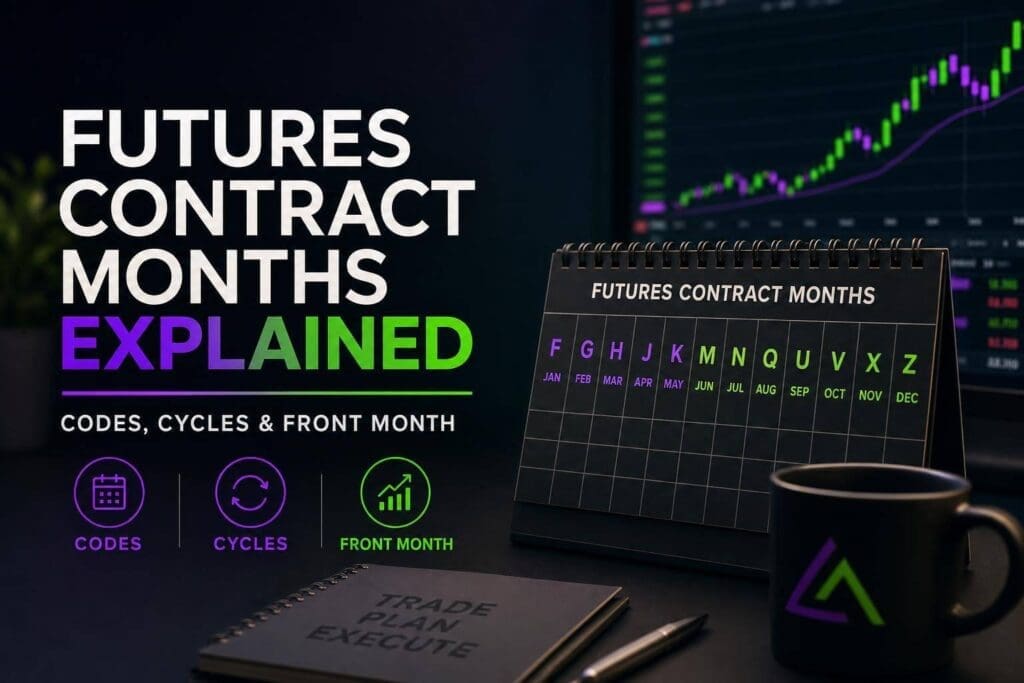
CME month codes use 12 letters for the 12 contract months. In equity index futures, the ones you’ll see most are H for March, M for June, U for September, and Z for December.
| Code | Month | Code | Month |
|---|---|---|---|
| F | January | N | July |
| G | February | Q | August |
| H | March | U | September |
| J | April | V | October |
| K | May | X | November |
| M | June | Z | December |
Once you know the code, the listing cycle tells you which contracts are actually live and worth watching.
How to Read a Futures Symbol Like ESM26 or CLZ26
Now that the month codes are out of the way, reading a futures symbol gets pretty simple.
Symbol Format Broken Down
A futures symbol has three parts:
- The root is the product code, usually one to three letters.
- Then you get one letter for the expiration month.
- The last one or two digits are the year.
So ES means E-mini S&P 500. CL means WTI crude oil. Add the month letter and year, and you’ve got the full contract.
ESM26 breaks down like this: ES (E-mini S&P 500) + M (June) + 26 (2026) = E-mini S&P 500, June 2026 contract.
CLZ26 means: CL (Crude Oil) + Z (December) + 26 (2026) = WTI crude oil, December 2026 contract.
Some platforms show the year with one digit, while others use two. So ESM6 and ESM26 point to the same contract.
Symbol Examples for ES, NQ, CL, and GC
Use these examples to connect the ticker to the actual contract month fast.
| Symbol | Product Code | Month Code | Year | Contract |
|---|---|---|---|---|
| ESM26 | ES – E-mini S&P 500 | M – June | 2026 | E-mini S&P 500, June 2026 |
| NQU26 | NQ – E-mini Nasdaq-100 | U – September | 2026 | E-mini Nasdaq-100, September 2026 |
| CLV26 | CL – WTI Crude Oil | V – October | 2026 | WTI crude oil, October 2026 |
| GCZ26 | GC – Gold | Z – December | 2026 | Gold, December 2026 |
Some platforms also show synthetic continuous symbols like @CL.1 or CL=F. Those are fine for charts, but they’re not order-entry symbols. If you’re placing an actual futures order, use the dated contract symbol, like CLV26.
Which Contract Months Are Listed for ES, NQ, CL, and GC?
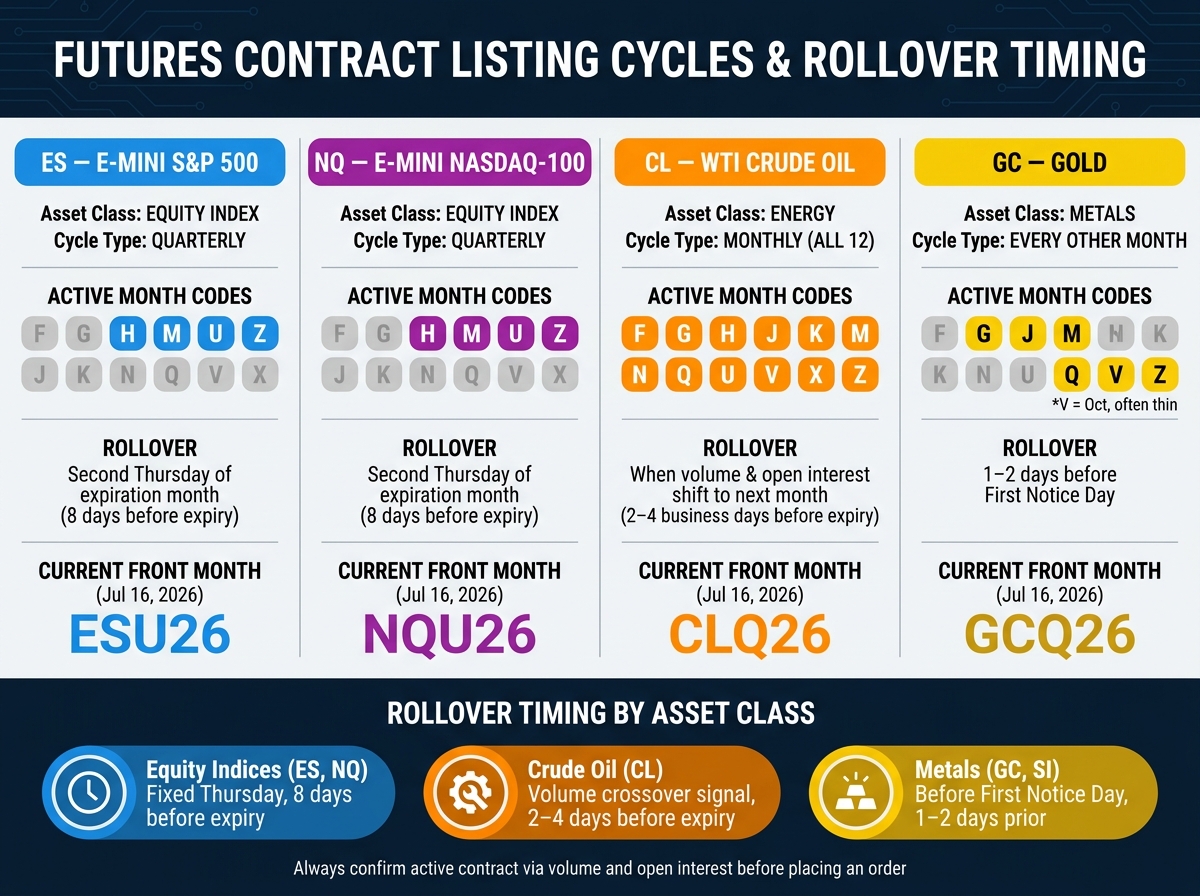
Futures Contract Month Cycles: ES, NQ, CL & GC Compared
Now that the month codes are clear, the next step is knowing which months each market actually lists.
Not every futures product uses the same listing cycle. Equity index futures stay on a clean quarterly schedule. Commodities don’t. You need to watch them more closely, especially if you care about where the volume is.
Quarterly Cycle for Equity Index Futures
ES and NQ trade on a quarterly cycle: H, M, U, Z. Traders usually roll around the second Thursday of the expiration month. [1]
Monthly Listings for Commodity Futures
CL lists a contract for every month of the year, so you’ll see all 12 standard month codes on your platform. GC lists every other month: February (G), April (J), June (M), August (Q), October (V), and December (Z). October (V) is listed, but it’s often thin. [1]
CL doesn’t have one fixed roll date. Most traders switch when volume and open interest move to the next month. [1]
Listing Cycle Comparison Table
| Product | Asset Class | Listing Cycle | Primary Month Codes | Rollover Timing |
|---|---|---|---|---|
| ES | Equity Index | Quarterly | H, M, U, Z | Usually the second Thursday of the expiration month [1] |
| NQ | Equity Index | Quarterly | H, M, U, Z | Usually the second Thursday of the expiration month [1] |
| CL | Energy | Monthly | F, G, H, J, K, M, N, Q, U, V, X, Z | When volume and open interest shift to the next month [1] |
| GC | Metals | Every other month | G, J, M, Q, V, Z | 1–2 days before First Notice Day [1] |
October (V) is listed but often thinly traded. [1]
These listing cycles decide which contract becomes the front month.
What Is the Front Month in Futures Trading?
Once you know the listing cycle, the next step is finding the front month. The front month is the nearest active contract before it expires, and it’s usually the one you want to trade. It leads the market price and tends to have the tightest bid-ask spreads, which helps keep execution costs down [5][2]. In markets like ES and NQ, the front month rolls on the quarterly cycle. In CL and GC, it changes more often.
Here’s the practical difference between front and back months.
Front Month vs. Back Month
Back months are later-expiring contracts. Traders use them more for longer-term hedging or for betting on where price might go later on [4]. As you move away from the front month, fills usually get worse [2][4]. For day traders and scalpers, the front month is usually the smart pick.
| Feature | Front Month | Back Month |
|---|---|---|
| Liquidity | Highest; volume and liquidity concentrate here | Lower; can be illiquid for certain commodities |
| Bid-Ask Spread | Tightest; helps reduce execution costs | Wider; can increase the cost of entry and exit |
| Volume | Most active; leads price discovery | Thin and often fragmented across months |
| Primary Users | Day traders, scalpers | Hedgers, long-term speculators, spread traders |
| Slippage Risk | Lower during active sessions | Higher; large orders can move price against you |
Why the Front Month Matters on Prop Firm Platforms
On futures prop firm accounts, thin back months can hurt you fast. Wider spreads, worse slippage, and weaker fills can eat into your drawdown before the trade idea even has a chance to work. That’s why you should stick to the front month and confirm it by checking which contract has the highest daily volume and open interest [1].
The next step is confirming which contract is actually active right now.
When Do Traders Roll to the Next Futures Contract?
Rollover follows liquidity, not the expiration date on paper. In plain English: traders move when volume and open interest move to the next month, and that usually happens before the last trading day [1].
Rollover Timing vs. Expiration Date
For equity index futures like ES and NQ, the rollover date is fixed. It happens 8 calendar days before expiration, and it’s always a Thursday [1]. That’s clean and easy.
Deliverable contracts are a different animal. With markets like Gold (GC), you need to roll before First Notice Day if you don’t want delivery risk hanging over the trade [1].
| Asset Class | Typical Rollover Timing | Key Driver |
|---|---|---|
| Equity Indices (ES, NQ) | 8 calendar days before expiration (Thursday) | Fixed exchange calendar |
| Crude Oil (CL) | 2–4 business days before expiration | Volume crossover |
| Metals (GC, SI) | 1–2 days before First Notice Day | Delivery avoidance |
Rollover Examples for ES and CL
For ES, if June (M) is the front month, the move to September (U) happens on the second Thursday of June. By the Globex open, most of the volume has usually already moved. So if you’re opening new trades that day, use ESU, not ESM [1].
CL doesn’t work like that. There’s no fixed Thursday and no neat calendar shortcut. Traders switch when the next month starts putting up higher daily volume than the expiring month, and keeps doing it [1].
Next, confirm the active contract by checking volume and open interest.
How to Confirm Which Futures Contract Is Active Right Now
Most charts default to a continuous series. That’s fine for looking at price history, but it’s not the thing you can trade. Before you place an order, check the dated symbol.
Check Volume, Open Interest, and Expiration Status
Once you know the listing cycle, confirm the front month with volume first, then open interest. In markets that don’t have a fixed rollover date, the cleanest tell is when volume shifts from one contract month to the next. That’s usually your signal that the active month has changed [1].
For ES and NQ, rollover usually happens on the exchange’s fixed Thursday before expiration [1]. For CL, don’t guess. Roll when volume moves into the next month [1].
If you’re trading a deliverable contract, add one more check: First Notice Day. Get out before FND if you don’t want delivery exposure. Some brokers will liquidate positions to avoid delivery risk [1].
Chart Symbols vs. Order Symbols
After you’ve confirmed the active month, make sure the symbol on your chart matches the one in your order ticket. This is where platforms trip people up. A chart can show a synthetic symbol that looks fine on screen but has nothing to do with the contract you’re about to trade.
Continuous symbols like CL=F, @CL.1, and USOIL are synthetic series used for charting only, not tradable futures contracts [3]. When you place an order, use the dated contract symbol.
| Provider | Symbol Style | Type |
|---|---|---|
| Yahoo Finance | CL=F |
Continuous front-month (synthetic) [3] |
| CNBC | @CL.1 |
Shorthand for most active front-month [3] |
| TradingView | USOIL |
Derived quote, not a futures contract [3] |
| Broker platform | ESH26 |
Specific dated contract (March 2026) [3] |
Use the dated symbol in order entry.
Common Mistakes Traders Make When Selecting Contract Months
Knowing the month code isn’t enough. The real screw-up is entering the wrong active contract. Most contract selection mistakes come from three things: the wrong letter, a stale contract, or a chart and order ticket that don’t match.
Picking the Wrong Month Code
One bad letter can move you from the front month into a thinner back month. Type CLV26 instead of CLZ26, and you’re in the October crude oil contract instead of December. That can mean wider spreads, less depth, and more slippage. Same story with GC if you land in a thinner month by mistake. Stick with the liquid months, and check that letter before you hit send.
Also, update the year suffix when the calendar flips. Old digits can route you into an expired contract or one that’s about to die. Then you get the next problem: hanging onto that contract too long.
Staying in an Expiring Contract Too Long
Even the right contract turns into the wrong one when liquidity moves. Volume often shifts into the next contract before the last trading day, and the old one can lose depth fast. If you wait for expiration, you can end up trading a thinner contract with worse fills.
CL and GC can bring delivery risk after First Notice Day. ES and NQ don’t have delivery the same way, but liquidity still moves early.
Pre-Order Checklist for Contract Selection
Before you place any futures order, run through this list. Do it every time, especially when contract months are rolling.
- Root symbol – Is the base product correct: ES, NQ, CL, or GC?
- Month code – Does the letter match the active front month? For index futures, that’s often H, M, U, Z. For commodities, check volume.
- Year digit – Is the year suffix current, like 26 for 2026?
- Liquidity check – Does this contract have the highest volume and open interest, and is it still in the active window?
- Chart-to-order match – Does the dated symbol match exactly on both screens?
Contract Month Examples for ES, NQ, CL, and GC
Use these examples to match the month code to the active contract before you place an order. Get this part wrong and you’re trading the wrong market month. Simple as that.
ES and NQ Examples
As of Jul. 16, 2026, the front-month examples are ESU26 and NQU26. On rollover day, switch to the new contract.
CL and GC Examples
As of Jul. 16, 2026, CLQ26 and GCQ26 are the examples shown here.
Commodities follow different listing rules, so the symbols change more often. Gold (GC) uses a staggered cycle, not monthly or quarterly. The main active months are G (February), J (April), M (June), Q (August), and Z (December), while the October (V) contract can be thin [1].
| Contract | Symbol (Jul. 16, 2026) | Cycle |
|---|---|---|
| E-mini S&P 500 | ESU26 | Quarterly (H, M, U, Z) |
| E-mini Nasdaq-100 | NQU26 | Quarterly (H, M, U, Z) |
| Crude Oil (WTI) | CLQ26 | Monthly (all 12) |
| Gold | GCQ26 | Every other month (G, J, M, Q, Z) |
Bottom Line
Futures month codes don’t mean much on their own. You have to match the code to the product’s listing cycle and the active front month. Once volume moves to the next contract, that’s the one you should be trading. Simple as that.
For deliverable markets like CL and GC, there’s one more rule that matters: get out before First Notice Day so you don’t walk into delivery risk [1][2].
So yeah, check the active contract before every order. Trade the one with the most liquidity.
FAQs
How do I know which futures month to trade?
You’ll usually want to trade the front month contract, the one closest to expiration. That’s where you’ll usually find the most volume, the best liquidity, and the tightest spreads. For most traders, that’s the contract that gives you the cleanest fills and the least friction.
Futures symbols are read in three parts: the root, the month code, and the year digit. So ESZ25 means:
- ES = E-mini S&P 500
- Z = December
- 25 = 2025
As expiration gets close, roll out of the expiring contract and into the new front month. Don’t wing it. Check rollover dates on CME Group or inside your brokerage platform so you’re not stuck trading a dead contract.
What is the difference between a front month and a back month?
The front month is the futures contract closest to expiration. It usually has the most volume and the best liquidity. That matters because tighter markets usually mean less slippage and cleaner fills. If you’re trading intraday or just want to follow where the action is, this is the contract most people watch to read market tone.
Back months, also called deferred months, expire later. They usually trade thinner, so spreads can be wider and fills can get a little messier. Still, they have a job. They’re useful if you want longer-dated exposure or need to hedge farther out before you roll into the next contract.
Why can’t I trade the symbol shown on my chart?
You probably can’t trade it because that futures contract has expired. Once a contract month is done, it’s no longer active.
If you’re looking at an older month, roll to the current front-month contract with the most liquidity. Check the exchange’s contract specs page to confirm the expiration date and status. For stuff like ES, NQ, CL, and GC, that usually means CME Group.