Roll before the old contract turns into a trash fire. That’s the whole job. For ES and NQ, the handoff usually hits on the Thursday before expiration week. For CL and GC, I’d watch CME dates first, because blowing past First Notice Day or getting too close to Last Trade Day is how traders end up with dumb problems they didn’t sign up for.
You’re in the right place if you want the short version: when to switch, what to check, and what can screw up your fills. I’m not going to rehash the whole rulebook. I’ll keep it tight and focused on what matters when you’re staring at the DOM and trying not to trade the dead month.
Understanding Futures Expiration & Contract Roll
sbb-itb-46ae61d
Table of Contents
- What Is a Futures Rollover and Why Does It Matter?
- When to Roll ES, NQ, CL, and GC
- How to Confirm the Next Contract Is the New Front Month
- How to Roll Your Contract in Tradovate, NinjaTrader, and TradingView
- What Can Go Wrong Around Rollover?
Introduction
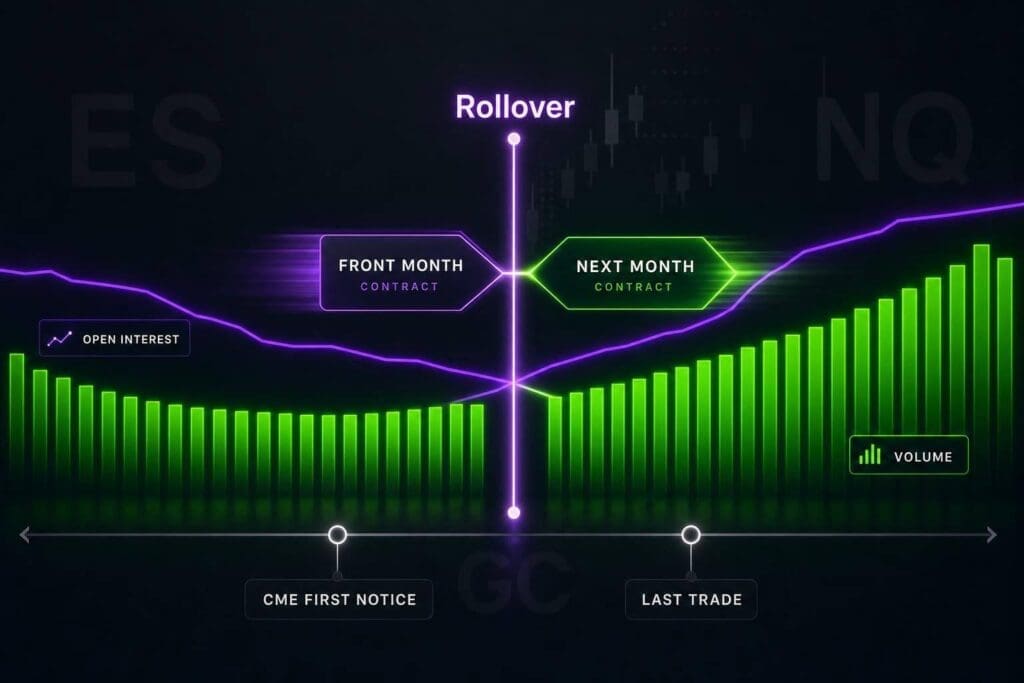
As expiration gets close, the market starts to rotate. Volume moves into the next contract, spreads often widen, and fills usually get worse in the contract that’s about to expire. That old contract can turn thin and jumpy fast. When that happens, your execution slips, and the price action may stop lining up with the most liquid month. That’s why you need to know which contract is the front month.
For prop traders, this matters right away. Miss the rollover and you can get hit with slippage, messy price action, or even broker liquidation before First Notice Day on deliverable contracts like CL and GC. In some expiring contracts, delivery rules can also trigger sharp, local price moves.
Next, we’ll define the terms that decide when a contract becomes the front month and when you should roll. Then we’ll get into when to roll ES, NQ, CL, and GC, how to confirm the new front month, and how to place the roll in your platform.
What Is a Futures Rollover and Why Does It Matter?
A futures rollover means you close the expiring contract and reopen the same position in the next active month.
Front Month vs. Contract Month
The front month is the contract with the most liquidity. A contract month is a specific expiry, like ESU2026 or ESZ2026. When the next expiry takes over as the most active contract, it becomes the new front month. That’s the switch that tells you it’s time to roll, and the next section gets into the timing for ES, NQ, CL, and GC.
ES and NQ use quarterly expiries: March, June, September, and December. CL and GC expire every month.
Expiration, Last Trade Day, Settlement, and Rollover Defined
- Last Trade Day: the final day you can trade that contract.
- Settlement: how the contract ends, either in cash or through delivery.
- Rollover: your decision to exit the expiring contract and move into the next one before liquidity dries up.
For those looking to pass prop firm challenges, the date on the contract isn’t the whole story. What matters is when liquidity moves to the next month.
Why Prop Traders Roll Early
Prop traders roll early for a simple reason: bad liquidity wrecks execution. Thin depth and wider spreads can mess up fills fast. On deliverable contracts, holding too long can also leave you with exposure you don’t want. The key moment is when the next month becomes the front month, and that’s what the next section covers.
When to Roll ES, NQ, CL, and GC
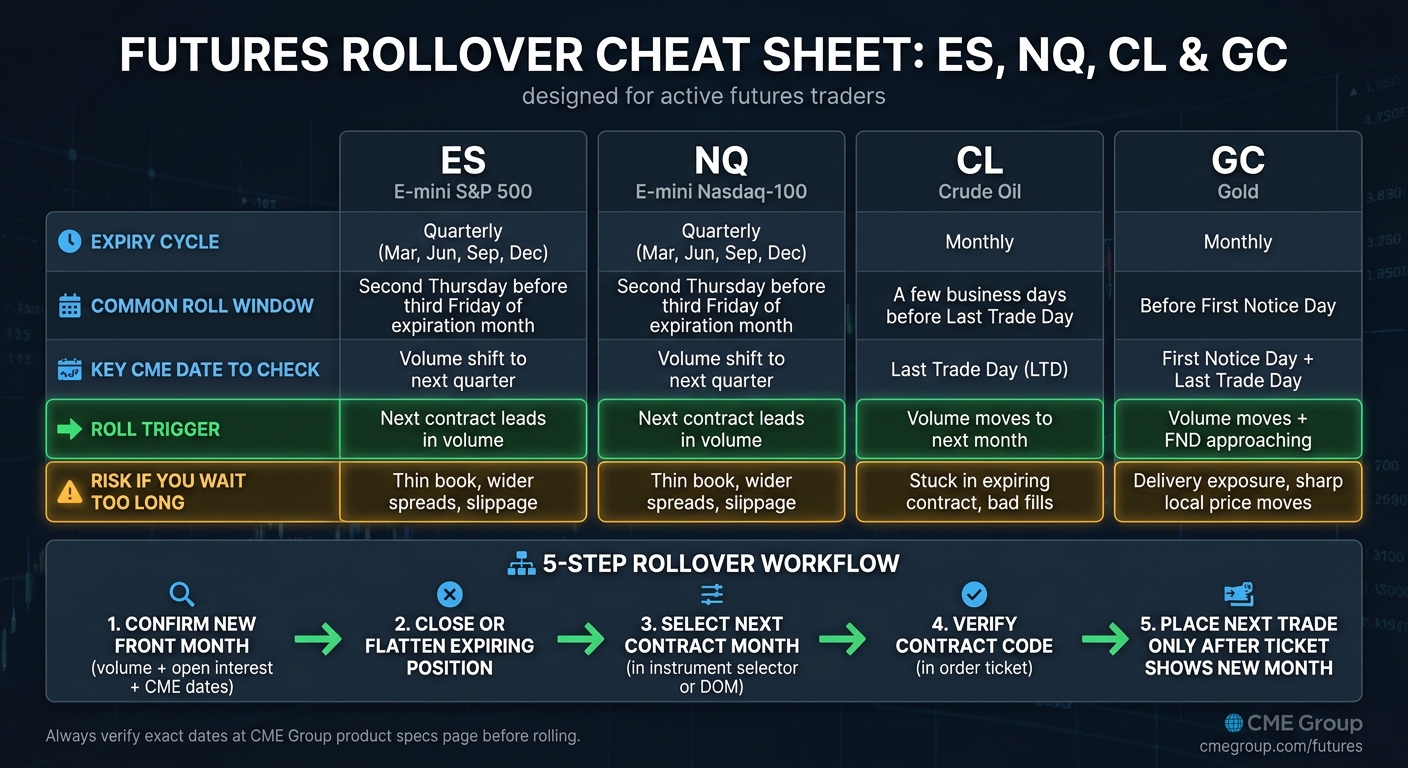
Futures Rollover Cheat Sheet: ES, NQ, CL & GC
Roll when the next contract becomes the front month. Don’t guess. Check volume, open interest, and the CME calendar to confirm the switch. Start with the contract you trade, because the roll window is not the same across markets.
ES and NQ Rollover Timing
ES (S&P 500 futures) and NQ (Nasdaq-100 futures) run on a quarterly cycle: March (H), June (M), September (U), and December (Z). The usual roll date is the second Thursday before the third Friday of the expiration month. That’s when volume tends to move from the expiring contract into the next quarter.
Your main trigger is simple: when the next contract takes over in volume, roll.
CL and GC Rollover Timing
Monthly contracts need more date discipline than ES and NQ.
Crude oil (CL) rolls every month, so you’ll deal with it a lot more often. Most traders move to the next month a few business days before Last Trade Day (LTD) so they’re not stuck trading into thin liquidity. Before you roll CL, check Last Trade Day on CME. No shortcuts here.
For GC, check First Notice Day and Last Trade Day on CME before you roll. Gold can punish lazy date handling.
Rollover Cheat Sheet by Contract
Use the table below for the fastest contract-by-contract check.
| Contract | Expiry Cycle | Common Roll Window | CME Check |
|---|---|---|---|
| ES (S&P 500) | Quarterly (Mar, Jun, Sep, Dec) | Second Thursday before third Friday expiration | Volume shift to next quarter |
| NQ (Nasdaq-100) | Quarterly (Mar, Jun, Sep, Dec) | Second Thursday before third Friday expiration | Volume shift to next quarter |
| CL (Crude Oil) | Monthly | A few business days before Last Trade Day | Verify Last Trade Day |
| GC (Gold) | Monthly | Before First Notice Day | Verify First Notice Day and Last Trade Day |
Use CME Group contract specs for exact dates.
How to Confirm the Next Contract Is the New Front Month
Once you know the usual roll window, check the data and make sure the switch has actually happened. Don’t trust the chart label by itself. Chart labels don’t route live orders. Use volume, open interest, and CME dates to confirm the front month so you don’t end up trading a thin book, eating wider spreads, or firing an order into the expiring contract by mistake.
Check Volume and Open Interest First
Volume and open interest are your confirmation signals. When the next month takes the lead in both daily volume and open interest, that’s your green light to roll. If the next contract is leading on both and the spread is tighter, switch.
This part matters because one metric alone can fake you out. Volume might jump for a day, but if open interest hasn’t moved with it, the handoff isn’t clean yet.
Use CME Dates to Confirm Last Trade Day and First Notice
Volume shows you where traders are going. CME dates tell you when you’re out of runway. Before every roll, check Last Trade Day and First Notice Day on CME Group’s product specs page.
That’s the hard deadline. Don’t wing it.
Continuous Charts Are Not Live Order Routing
Continuous charts are for analysis only. Live orders follow the contract month in your order ticket or DOM. A chart can roll on screen while your order ticket is still set to the expiring month. That’s how bad fills and dumb mistakes happen.
After a roll, make sure the month in your order ticket or DOM matches the new front month. Once you’ve confirmed the front month, update it in your platform before you place the next trade.
How to Roll Your Contract in Tradovate, NinjaTrader, and TradingView
Once the next contract becomes the front month, switch your symbol before liquidity dries up in the old one. If you trade the wrong month, you’re asking for bad fills or, worse, getting stuck in the expiring contract.
The 5-Step Rollover Workflow
Keep it simple:
- Confirm the new front month with volume, open interest, and CME dates.
- Close or flatten the expiring position.
- Pick the next contract month in the instrument selector or DOM.
- Check the contract code in the order ticket.
- Only place the next trade after the ticket shows the new month.
Rolling in Tradovate and NinjaTrader
Tradovate: Open instrument search, pick the next contract month, then double-check the symbol in the order ticket before you send anything.
NinjaTrader: Change the contract month in the order entry panel or instrument list before placing a new order.
Changing the Symbol in TradingView
TradingView: Change the symbol to the next contract month in the chart search bar. If your orders route through a linked broker, make sure the broker’s order ticket also shows the new month before you trade.
Before the next order, make sure the ticket, DOM, and chart all match the same contract month.
After the switch, pay attention to price gaps, wider spreads, and thinner depth around the handoff.
What Can Go Wrong Around Rollover?
Even if you roll on time, the switch can still mess with your fills and what you see on the chart. Most rollover screwups come from waiting too long. In a prop eval, that can cost you fast.
Price Gaps Between Contract Months
When the front month changes, you can get a price gap between the old contract and the new one. That’s normal. The two months don’t always trade at the same price, so your chart can reprice after the roll.
The part that matters most is execution. Not theory. If you’re looking at one contract and trading another, or you roll after the market has already shifted, your entries and exits can get sloppy.
Liquidity Drop-Offs, Wider Spreads, and Slippage
As expiration gets closer, volume and open interest move into the next contract month. That leaves the expiring contract with a thinner book and fewer resting orders. Once that happens, spreads usually get wider and fills get worse.
That’s where traders get clipped. A setup might still look fine, but if the book is thin, you can eat extra slippage on both entry and exit. In a prop eval, that kind of dumb friction adds up.
Bottom Line
Roll before liquidity gets thin. Then trade the active month only.
FAQs
What if volume shifts before the usual roll date?
If volume shifts to the new contract before the usual rollover date, follow the liquidity. Not the calendar.
Once traders pile into the new month, the old contract usually gets worse to trade. Spreads widen, depth gets thin, and slippage starts to bite.
Watch volume and open interest every day during the rollover window. For most contracts, the switch makes sense when the next month keeps printing higher volume and shows stronger participation for more than a day or two.
Can I hold ES or NQ until expiration?
Technically, yes. But for active traders, it’s usually a bad move.
As expiration gets close, liquidity shifts to the next active contract. The expiring month starts to dry up. Spreads often get wider, market depth gets thinner, and that usually means worse fills and more slippage. Simple as that.
With ES and NQ, there’s no physical delivery risk because they’re cash-settled. So you won’t wake up owning a pile of anything. But that doesn’t make holding to the end a smart idea. If you wait too long, your position can get closed automatically at the final settlement price, and that price might be nowhere near the exit you had in mind.
Most traders roll about eight days before expiration.
Why does the new contract show a different price?
The new contract can print a different price because futures contracts are separate instruments. Each one has its own expiration date, its own order flow, and its own pricing tied to carry and market expectations. That gap between the old contract and the new one is called the roll spread.
When you roll, you’re not sliding over to the same thing with a new label. You’re switching into a contract with a different future date, so the market prices that contract on its own terms. In contango, the new contract trades higher. In backwardation, it trades lower.