I’d choose Rithmic for a custom execution stack and Tradovate for a REST/WebSocket bot with app-based monitoring. The first decision isn’t speed, though. It’s whether your futures prop account permits the API connection you plan to use.
Here’s how I’d sort the two: check development requirements, account permissions, and disconnect recovery before writing order logic. A working platform login doesn’t mean your bot has API access. And neither route gets a pass on duplicate-order checks or position reconciliation.
Before scaling, I’d start with 1 micro contract and verify order routing, cancellation, and manual flattening. <u>Choose the connection your account allows and your code can recover safely.</u> API style comes second to that.
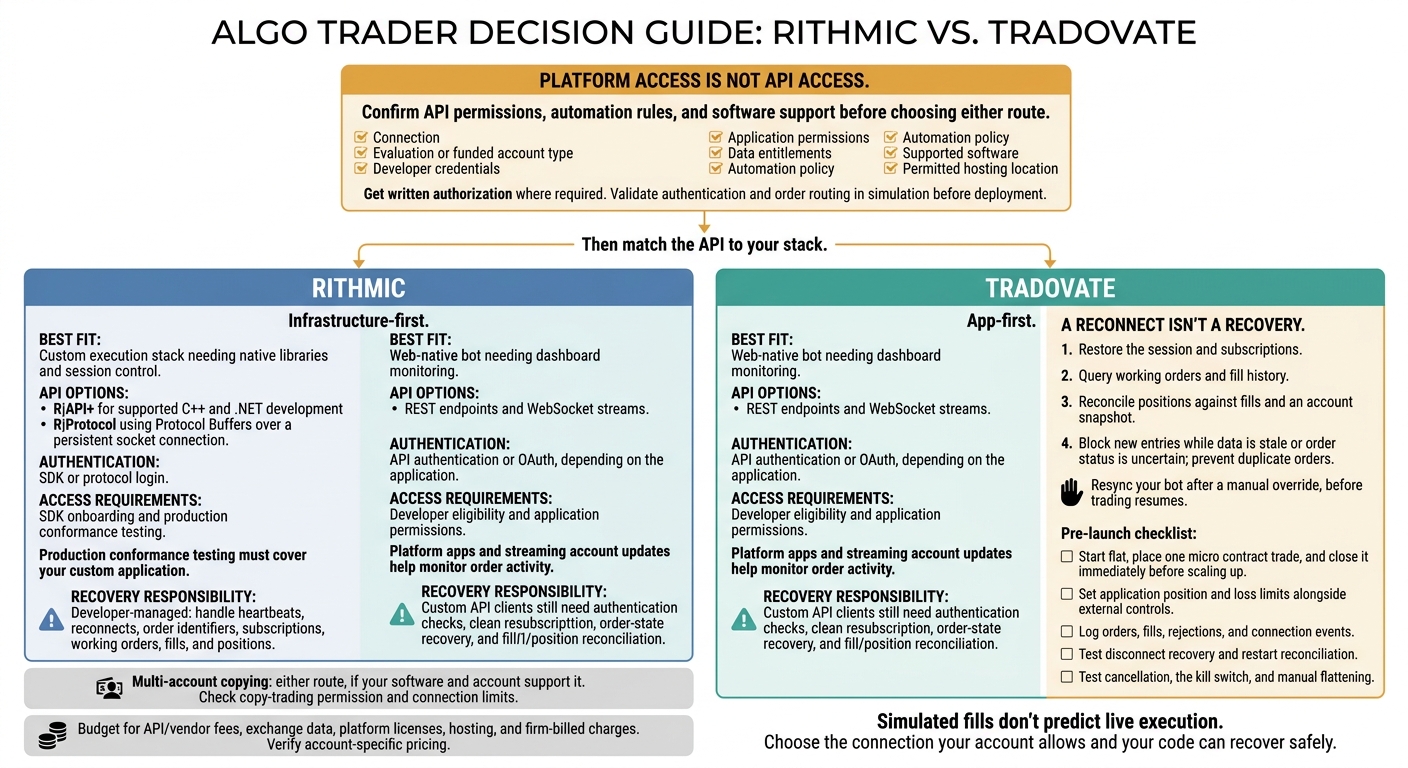
Rithmic vs Tradovate: Prop Firm Algo Decision Guide
How to Set Up Tradesea Rithmic (Lucid Trading & Tradeify) | Full RTrader Pro + Copy Trading Guide
sbb-itb-46ae61d
API Access and Development Options
Rithmic is infrastructure-first; Tradovate is app-first. Use Rithmic to build a custom execution stack. Use Tradovate to connect an algo through APIs while monitoring it through the platform.[3][5]
| Area | Rithmic | Tradovate |
|---|---|---|
| API model | Native C++/.NET libraries or Protocol Buffers over a persistent socket | REST endpoints and WebSocket streams |
| Authentication | SDK or protocol login | API authentication or OAuth, depending on the application |
| Order handling | Order submission, execution reports, and account updates | Account/order operations with streaming updates |
| Approval | SDK onboarding and production conformance testing | Developer eligibility and application permissions |
That split carries through to API access, order handling, and monitoring.
Rithmic APIs and SDKs
Rithmic has stricter requirements, but it gives you deeper control over execution. Rithmic offers R|API+ for supported C++ and .NET development and R|Protocol using Protocol Buffers over a persistent socket connection.[3]
Your client must handle heartbeats, reconnects, and order identifiers without blindly resending orders. Confirm deployment requirements and SDK access with Rithmic before building around it. Production conformance testing must cover your custom application, not just the front end you already use.[3]
Tradovate REST and WebSocket APIs
Tradovate is the simpler route for standard web-style authentication and streaming updates. Tradovate provides REST endpoints for authentication and account/order operations, plus WebSockets for streaming account events and market data.[3][5]
Before sending live orders, set up authentication, finish contract mapping, and reconcile order updates. Your algo needs to target the intended contract and track the actual order state.
Prop Account Access Checks
Platform access is not API access. Before committing to either route, check your connection, evaluation or funded account type, developer credentials, application permissions, data entitlements, automation policy, supported software, and permitted hosting location.[1]
Get written authorization where required. Then validate authentication and order routing in simulation before deployment.
Execution Flow and Order Handling
Execution speed depends more on routing, risk checks, and liquidity than on the API brand. Simulated fills don’t predict live execution. They happen in the platform or risk layer, not the matching engine.[2][5]
Once connected, the difference is how each stack handles fills, disconnects, and position recovery.
| Execution detail | Rithmic | Tradovate |
|---|---|---|
| Order-state tracking | Developer tracks streamed order and fill updates | Order state is integrated into platform apps and API streams |
| Disconnect recovery | Developer restores the session and re-queries working orders | Apps manage continuity; custom API clients still need recovery logic |
| Fill reconciliation | Developer reconciles fills and positions after a gap | Integrated account updates help you monitor activity; API clients must still reconcile after a gap |
Don’t assume every prop login enables every feature in these execution paths.[2][3][5]
How Rithmic Handles Orders
Rithmic recovery is developer-managed. After a disconnect, your code must log back in, resubscribe, and re-query working orders.[3] Reconciling fills and working orders is the step you can’t skip after a connection drops.
How Tradovate Handles Orders
Tradovate keeps order state in one integrated stack. Its apps provide execution reports, while API clients receive streaming updates.[5] That makes order activity easier to monitor, but it doesn’t replace your algo’s recovery logic.
Multi-account execution still depends on the account’s group-trade and order-mode settings, similar to how traders compare Replikanto vs Apex Trade Copier for NinjaTrader setups. Group Trade doesn’t support bracket or ATM orders.[2]
Platforms and Third-Party Software
Third-party tools add convenience – and another layer of permissions to check.
Here’s how the common tools connect, where automation runs, and what you need to verify.
Platforms That Connect to Rithmic
NinjaTrader connects to both Rithmic and Tradovate. Use Bookmap for liquidity heatmaps and Sierra Chart for advanced order-flow analysis.
| Tool or route | Connection | Main function | Where automation runs | Account restrictions and verification |
|---|---|---|---|---|
| Custom Rithmic client | R|API+ or R|Protocol | Custom order logic | Your application, locally or on a VPS | Production access requires Rithmic conformance testing.[3] |
| NinjaTrader | Rithmic or Tradovate | Charting and execution | Desktop app | Rithmic allows one active connection at a time; Tradovate supports several independent connections.[2] |
| Sierra Chart | Rithmic | Advanced order-flow tools | Platform | Check the vendor’s latest connection docs. |
| Bookmap | Rithmic | Liquidity heatmaps | Desktop app | Companion charting tool. |
| Custom Tradovate client | REST and WebSocket | Custom order logic | Your application, locally or on a VPS | Verify API entitlement.[3] |
| TradingView bridge | Tradovate | Charts and alerts | Cloud alerts routed through a bridge | Verify support for your exact bridge setup.[1] |
| R|Trade Copier / Tradovate Group Trade | Trade copying platforms | Multi-account order replication | Built-in tool or service | Rithmic copier requires firm enablement; Group Trade runs under one login.[2] |
Tradovate Integrations and Manual Controls
A custom Tradovate bot runs in your application. TradingView-style setups send alert-based orders through a separate bridge.
Resync your bot after a manual override, before trading resumes.[3] That’s the step where login failures, disconnects, and position mismatches usually show up.
Setup Issues and Running Costs
Once execution is wired up, the work shifts to recovery, keeping account state in sync, and paying to keep the bot running.
Budget for the bot, not just access. Rithmic leaves more SDK and session-management work to you. Tradovate makes API development simpler, but you still need infrastructure, monitoring, and recovery logic.[5]
| Setup or cost item | Rithmic route | Tradovate route |
|---|---|---|
| Development and recovery | Allow time for SDK integration, production conformance testing, session handling, and recovery. | Allow time for REST integration, API authentication, WebSocket stream management, and recovery. |
| Recurring costs | API/vendor fees, exchange data, platform license, and hosting. | API/vendor fees, exchange data, platform license, and hosting. |
| Common failure points | Wrong environment, lost sessions, missing subscriptions, and incomplete fill recovery. | Authentication failures, lost streams, rejected requests, and stale local account state. |
Cost check: The supplied documentation doesn’t establish a universal prop-account API rate. Keep vendor/API charges, exchange data, platform licenses, hosting, and firm-billed charges as separate budget lines. Verify the subscriptions your account needs directly. Retail pricing isn’t an account-specific quote.
Login Failures, Disconnects, and Position Mismatches
A reconnect isn’t a recovery. Restore subscriptions, then reconcile positions against fills and an account snapshot before allowing new entries. On Rithmic, heartbeat handling is part of session recovery.[3] On Tradovate, verify the login state and resubscribe cleanly before trading again. For either route, reject stale data and make sure your bot distinguishes rejected orders from partial fills.
After a disconnect, query working orders and fill history before sending any new order.[3]
Pre-Launch Safety Checklist
Run these checks before going live. The bot needs to block stale state, handle reconnect failures, and prevent duplicate orders.
- Start flat, place one micro contract trade, and close it immediately before scaling up.[2]
- Set application position and loss limits alongside external controls.
- Log orders, fills, rejections, and connection events.
- Test disconnect recovery and restart reconciliation. Confirm that stale state or uncertain order status blocks new entries.
- Test cancellation, the kill switch, and manual flattening before launch.[4]
Which Route Fits Your Trading Setup?
Match the API to your stack, then confirm your account allows it.
| Your setup | Best fit | Required checks |
|---|---|---|
| Custom execution stack needing native libraries and session control | Rithmic, if you can maintain the integration | Production access and conformance testing. [3] |
| Web-native bot needing dashboard monitoring | Tradovate, if developer access is enabled | API eligibility for your account stage. [1] |
| Multi-account copying | Either, if your software and account support it | Copy-trading permission and connection limits, not just extra logins. [6] |
The trade-off is infrastructure control versus a lighter integration.
Rithmic for Custom Infrastructure
Use Rithmic when you need custom infrastructure and can handle the maintenance. Those needs can justify the integration work. Speed hype alone doesn’t.
Tradovate for REST/WebSocket Access and Manual Oversight
Use Tradovate for lighter bot integration with manual oversight, but confirm your prop account permits it first. [1]
Confirm API permissions, automation rules, and software support before choosing either route.
FAQs
Can I move my bot between Rithmic and Tradovate?
Your connection choice is usually locked at purchase. Don’t assume you can move an existing prop firm account between Rithmic and Tradovate.
Go with Rithmic for desktop platforms, raw tick data, and third-party order-flow tools. Choose Tradovate for browser-based account management, TradingView, and mobile access.
Before running your bot, check your firm’s help center for its automation policies.
Will my API access change when I get funded?
Check your firm’s current API and automation rules before assuming the same access carries over once you’re funded. Your Rithmic or Tradovate choice at purchase is usually permanent. Automation rules vary by firm and change often.
Before you build your algo, check the requirements in the firm’s official help center and confirm that your preferred execution platform is supported.
How do I prevent duplicate orders after a timeout?
The provided answer compares Rithmic and Tradovate connectivity, platform support, and API access. It doesn’t explain how to prevent duplicate orders after a timeout. Adding that procedure would require information outside the original answer.