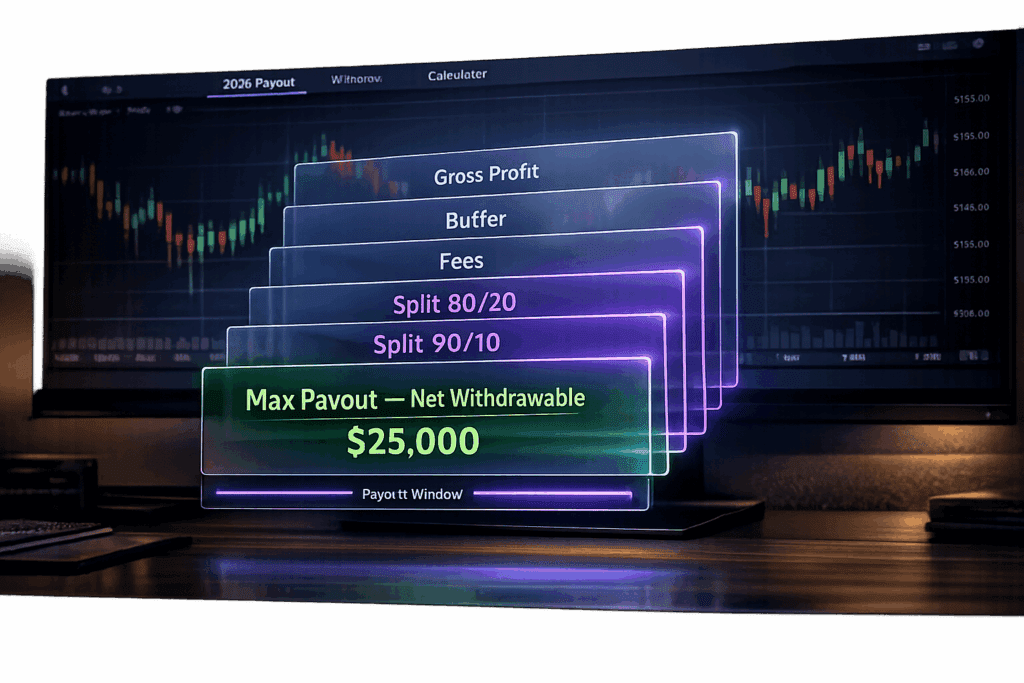
Take Profit Trader has no maximum payout. Once a PRO account is above its buffer you can withdraw any amount, as often as every day, starting on day one. What decides how much you take home is the buffer (starting balance plus max drawdown), the profit split (80% in PRO, 90% in PRO+) and a $50 fee on wallet withdrawals of $250 or less. Our Take Profit Trader review covers the full rulebook.
Quick example: on a $50,000 PRO account the buffer is $52,000. Grow the account to $55,000 and $3,000 is withdrawable. At the 80/20 split you receive $2,400. PRO+ accounts have no buffer and pay 90%.
Below is how the buffer, the split, the fees and the payout timeline work, with the numbers for every account size. Every figure comes from Take Profit Trader’s own rules pages, checked in October 2026.
| Payout rule | PRO account | PRO+ account |
|---|---|---|
| Maximum payout | None | None |
| First payout | Day one, once you are above the buffer | Day one |
| How often | Daily | Daily |
| Buffer | Starting balance + max drawdown | None |
| Profit split | 80/20 | 90/10 |
| Consistency rule | None | None |
| Withdrawal fee | $50 at $250 or less, free above $250 | $50 at $250 or less, free above $250 |
Take Profit Trader’s Payout Structure Explained
What "Max Payout" Means
There is no cap. Take Profit Trader puts no limit on how much you can withdraw from a funded account, and the rest of the payout policy is just as short:
- Withdraw from day one in PRO.
- No minimum number of profitable days.
- No consistency rule on funded accounts.
- No payout windows to wait for.
- No scaling plan on any account.
- No maximum withdrawal amount.
The one condition in a PRO account is the buffer. Profit above the buffer is yours to withdraw whenever you want, in whatever amount. We have been paid by Take Profit Trader ourselves: see our Take Profit Trader payout proof.
How the Buffer Works
The buffer equals the max drawdown on your account. Your balance has to reach the starting balance plus that amount before you can withdraw. On a $50,000 account with a $2,000 max drawdown, that is $52,000. If the account grows to $55,000, you can withdraw $3,000.
Profit inside the buffer stays in the account while it is active. The only way to take it is to close the PRO account, which is covered in the profit split section below.
PRO+ accounts have no buffer at all. You can withdraw from the first dollar of profit.
How Payout Rules Affect Your Trading
A PRO account uses an intraday trailing drawdown that counts unrealized profit and stops trailing once it reaches your starting balance. By the time you have built the buffer, the floor sits at the starting balance, so the buffer is your whole cushion.
That matters when you withdraw. Take everything above the buffer on a $50,000 account and you are left with exactly $2,000 of room. If you then lose money and drop below $52,000, the account stays open, but you cannot withdraw again until the balance is back above the buffer. The account only closes if the balance reaches the minimum balance.
So leave room that matches how you trade. If a normal losing day for you is $400, keep at least that much above the buffer instead of withdrawing down to the dollar.
A payout also depends on keeping the account. The PRO rules that end accounts most often:
- No bots or algos. Every trade is placed by hand.
- Be flat, with no working orders, from one minute before to one minute after FOMC statements, NFP and CPI. Details in Can You Trade News at Take Profit Trader?
- Trade at least one day in every calendar week.
- Exit before a market hits its price limit.
- No positions held from one session to the next.
Profit Splits: Your Share of the Earnings
PRO Account: 80/20 Split
In a PRO account you keep 80% of what you withdraw. The profit split is taken automatically when you move money from the account to your wallet: you enter the amount, Take Profit Trader’s 20% is subtracted, and the screen shows the amount you get.
Example: a $50,000 account at $55,000 has $3,000 above the buffer. Withdraw it and $2,400 lands in your wallet.
Profit inside the buffer follows a different rule. You can only take it by closing the PRO account, and what you receive depends on how long the account was traded:
- 60 trading days or fewer: 50% of the profit inside the buffer.
- More than 60 trading days: 80%.
A closed PRO account cannot be reactivated or reset, so this is a one-way door.
PRO+ Account: 90/10 Split
PRO+ raises your share to 90%. It is a live account: orders route to the exchange through Tradovate. It has no buffer and uses an end-of-day drawdown.
You cannot buy or apply for PRO+. Take Profit Trader sends an invitation by email after reviewing your PRO trading as a whole: consistency, risk management, execution and discipline over time. The firm says there is no single profit threshold that triggers it.
When you move up, the PRO account goes on hold and $5,000 of its profit is frozen while the PRO+ is active. Anything above that $5,000 can be withdrawn right away at the PRO split. The PRO+ account starts at a $0 balance with an end-of-day drawdown equal to your PRO drawdown, and if it ends with a negative balance, that amount comes out of the frozen $5,000.
On $2,000 of profit, PRO pays you $1,600 and PRO+ pays you $1,800.
How to Withdraw Your Profits
A withdrawal has two steps: move the money from your trading account to your TPT Wallet, then send it from the wallet to your bank, Wise or PayPal.
Step 1: PRO Account to TPT Wallet
- Log in, select the account and open the Control Center.
- Click Withdraw and enter the amount.
- Check the amount you get (80% in PRO) and click Confirm & Withdraw.
You must be flat with no working orders at the moment you submit. On a Tradovate PRO account this step is automated and takes 5 to 10 seconds. Rithmic PRO accounts and PRO+ accounts are reviewed manually.
The dashboard balance updates once a day, between 8 and 9 PM ET. Profit you made at 3 PM can be in your wallet that same evening.
An automated request can be denied for four reasons: not enough funds, open positions or working orders, Tradovate maintenance, or a Tradovate connection problem. Fix the issue and you can resubmit immediately.
Step 2: Wallet to Your Bank
- Open the wallet under your user icon, enter the amount and click Withdraw.
- Wait for approval. Take Profit Trader says this takes up to 12 business hours and is usually a lot faster.
- Click Proceed. On your first payout you sign a tax form in a pop-up window, so allow pop-ups for the site.
- Choose how you get paid: Plaid for US bank accounts, Wise or PayPal for everyone else.
Requirements for Your First Withdrawal
- A PRO balance above the buffer (PRO+ has no buffer).
- No open positions or working orders when you submit.
- A signed tax form before the first payout is released.
- A bank, Wise or PayPal account in the same name as your Take Profit Trader account. A mismatch gets the payout delayed for review or denied.
How Long Payouts Take to Process
| Step | Timing |
|---|---|
| PRO account to wallet (Tradovate PRO) | Automated, 5 to 10 seconds |
| PRO account to wallet (Rithmic PRO, PRO+) | Manual review |
| Wallet payout approval | Up to 12 business hours, usually faster |
| Plaid to a US bank | Usually real time; 1 to 2 business days at some banks |
| Wise or PayPal | Within 12 business hours |
Take Profit Trader’s own site says payouts typically arrive within one business day. It does not guarantee a same-day bank deposit.
Account Size and Buffer Zone Rules
The buffer is set by account size and never changes while the account is active.
Buffer and Max Payout Examples by Account Size
| Account size | Max drawdown | Buffer balance | Example balance | Withdrawable | You receive (80%) |
|---|---|---|---|---|---|
| $25,000 | $1,500 | $26,500 | $28,000 | $1,500 | $1,200 |
| $50,000 | $2,000 | $52,000 | $55,000 | $3,000 | $2,400 |
| $75,000 | $2,500 | $77,500 | $81,000 | $3,500 | $2,800 |
| $100,000 | $3,000 | $103,000 | $108,000 | $5,000 | $4,000 |
| $150,000 | $4,500 | $154,500 | $162,000 | $7,500 | $6,000 |
The example balances are illustrations. There is no ceiling: whatever sits above the buffer balance can be withdrawn.
Fees, Payment Methods, and Other Costs
Fees That Cut Into Your Payout
- Withdrawal fee: wallet withdrawals over $250 are free. A withdrawal of $250 or less costs $50, deducted automatically. Batch small amounts into one request above $250.
- Activation fee: $130 one time when a passed Test becomes a PRO account. It is waived when you sign up with code DGT. See the Take Profit Trader discount code page.
- Monthly fee: none once you are in PRO.
- Commissions: $4.50 per round trip per contract and $1.50 per round trip per micro on Test and PRO accounts. PRO+ accounts pay the broker’s own rates.
- PayPal: PayPal may take its own fee out of the payout.
Payment Methods
- Plaid: US bank accounts only. Paid in real time or by ACH, depending on your bank.
- Wise: international bank transfers.
- PayPal: available for international traders.
- LLC payouts: sent through Wise, or through PayPal if the LLC has its own PayPal account.
Money in your wallet can also pay for anything Take Profit Trader sells, such as a new Test or a reset, as long as the wallet covers the full price.
Taxes
Take Profit Trader is a US company. You sign a tax form before your first withdrawal and receive a tax document after the end of each calendar year. How you report that income is up to you and your tax professional.
Sources: Take Profit Trader’s help center, including PRO Account Profit Split & Withdrawal Rules, Speed of Payouts Update, How to Withdraw from the Wallet and Withdrawal Fees.
FAQs
Is there a max payout at Take Profit Trader?
No. Take Profit Trader has no maximum withdrawal amount on PRO or PRO+ accounts. In a PRO account you can withdraw everything above the buffer, daily, from day one.
How do I calculate my buffer on a PRO account?
Add the max drawdown to your starting balance. A $50,000 account with a $2,000 max drawdown has a buffer balance of $52,000. The buffer balances are $26,500 on the 25K, $52,000 on the 50K, $77,500 on the 75K, $103,000 on the 100K and $154,500 on the 150K.
How much should I leave above the buffer before withdrawing?
There is no required amount. If you withdraw down to the buffer, one losing trade puts you below it and you cannot withdraw again until you are back above. Leaving at least one normal losing day above the buffer avoids that.
What happens if I withdraw and later fall below the buffer?
The account stays open and you keep trading. You cannot make another withdrawal until the balance is above the buffer again. The account only closes if the balance reaches the minimum balance set by the trailing drawdown.
How long does a Take Profit Trader payout take?
Moving profit from a Tradovate PRO account to your wallet takes 5 to 10 seconds. The wallet payout is approved within 12 business hours, usually faster. Plaid payouts to US banks are usually real time, and Wise and PayPal payouts are processed within 12 business hours.
Can I withdraw on day one?
Yes. PRO accounts allow withdrawals from day one, as soon as the balance is above the buffer. There are no minimum profitable days and no consistency rule on funded accounts. PRO+ accounts have no buffer.
Is there a minimum withdrawal at Take Profit Trader?
Take Profit Trader does not list a minimum, but a wallet withdrawal of $250 or less costs a $50 fee. Withdrawals over $250 are free.