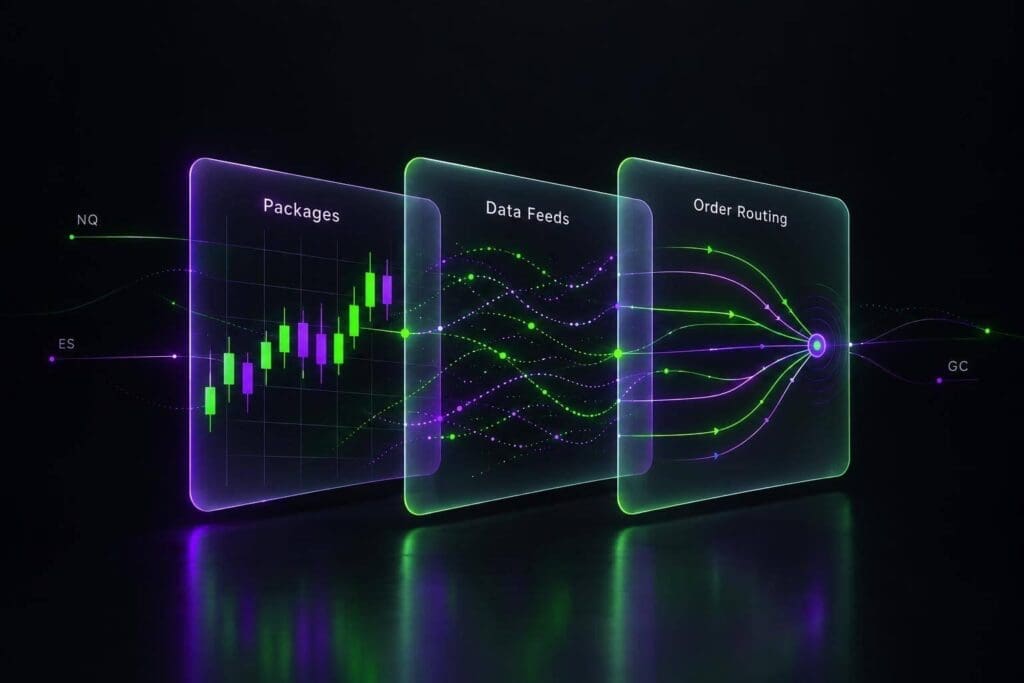
My take: choose Sierra Chart by your routing connection first, your charting tools second. Paying for more studies won’t fix a connection your futures prop firms don’t support.
I’ll break down the 5 packages, what separates Standard from Advanced, and where Denali data fits into the bill. Package 10 targets integrated charting and DOM trading; Package 11 adds advanced order-flow tools; Package 12 adds Market by Order support.
<u>The subscription price isn’t your total trading cost.</u> Data, exchange fees, routing, and commissions need their own budget. Exact current prices aren’t listed in the supplied source, so check Sierra Chart’s rates before paying. Start with account compatibility, then buy the tools you’ll actually use.
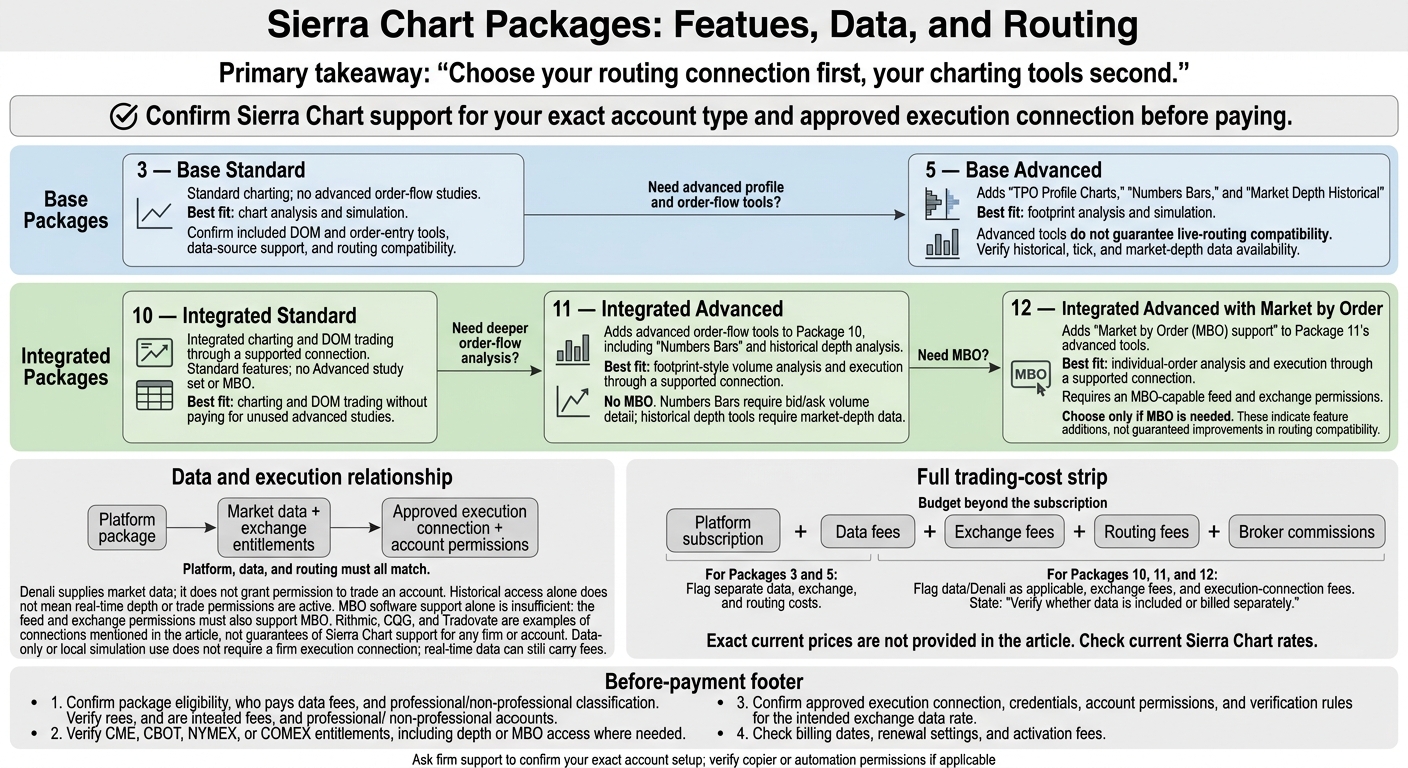
Sierra Chart Packages: Features, Data, and Routing
1. Package 3 – Base Standard
Total Monthly Cost
Check the current Package 3 subscription price before you subscribe. Data fees are separate. Then check which tools the package includes.
Charting and Order-Flow Features
Confirm which charting, DOM (Depth of Market), and order-entry tools you get with Package 3.[1]
Market-Data Requirements
Platform access does not include real-time futures data.[1]
Prop-Firm Routing Compatibility
Check that Package 3 supports your firm’s required routing service before you subscribe.[1] If it doesn’t, compare Package 5 next.
sbb-itb-46ae61d
2. Package 5 – Base Advanced
Total Monthly Cost
Check the current Package 5 subscription price, then add up the full monthly cost: platform fee, data fees, exchange fees, routing fees, and broker commissions.[1]
Charting and Order-Flow Features
Package 5 adds TPO Profile Charts, Numbers Bars, and Market Depth Historical Graph if Package 3’s basic charting doesn’t give you enough profile and order-flow detail.
These tools support discretionary futures trading and closer analysis of trade execution. But they need the right feed quality and routing compatibility to be useful.[1]
Market-Data Requirements
Confirm that your feed supplies the historical, tick, and market-depth data these tools need.
Prop-Firm Routing Compatibility
Package 5 is still a Base package. Before subscribing, check that your firm supports the required data feed and routing connection. Treat these as two separate compatibility checks.[1]
If you need integrated routing, compare Package 10 next.
3. Package 10 – Integrated Standard
Total Monthly Cost
Package 10 adds integrated trading access through a supported connection when the Base packages don’t offer the routing access you need. You get charting and order entry on one platform. Data, exchange, and routing fees are still separate.[1]
Charting and Order-Flow Features
Choose Package 10 for integrated charting and DOM trading with Standard features. Don’t assume it includes Package 5’s advanced order-flow tools.[1]
Market-Data Requirements
Check that your feed delivers the data, depth, and update speed your tools need. Confirm whether exchange fees apply, too.[1]
Prop-Firm Routing Compatibility
Many top futures prop firms require a specific routing connection. Check futures prop firm reviews for supported setups and related fees before subscribing.[1] If Package 10 doesn’t support that connection, compare the next integrated package. Confirm compatibility before paying.
4. Package 11 – Integrated Advanced
Total Monthly Cost
Move to Package 11 if Package 10 has the routing you need but falls short on order-flow detail. Package 11 adds advanced tools to Package 10. Budget for Denali data and exchange fees, too.[1]
Charting and Order-Flow Features
Package 11 adds Numbers Bars and historical depth analysis alongside charting and order entry. You get footprint-style volume analysis and a view of historical liquidity in the same trading workflow. It’s the first integrated option for traders who need those deeper volume and liquidity readouts.[1]
Market-Data Requirements
Numbers Bars need bid/ask volume detail. Historical market-depth tools need market-depth data, not just last-trade prices. Check that Denali and your account permissions cover both bid/ask volume and depth data. Your user classification determines the exchange fees.[1]
Prop-Firm Routing Compatibility
The right data won’t fix an unsupported routing connection. Package 11 does not guarantee prop-firm support. Before subscribing, confirm that your firm allows Sierra Chart, supports the required routing connection, and grants the account permissions you need.[1]
5. Package 12 – Integrated Advanced with Market by Order
Use Package 12 only if you need Market by Order (MBO) data beyond what Package 11 supports.[1]
Total Monthly Cost
The source doesn’t list Package 12’s monthly price or how much more it costs than Package 11. Before subscribing, check the platform subscription cost, any separate data-feed fees, and the exchange permissions you need for MBO.[1]
Charting and Order-Flow Features
Package 12 adds MBO support to Package 11’s advanced tools. That’s the reason to choose it. The software supports MBO, but your data feed and exchange permissions must support it too.[1]
Market-Data Requirements
Check that your feed supplies MBO for the markets you trade and that your exchange permissions cover it. If your feed doesn’t supply it, you may need separate Denali access and extra data fees. MBO data alone won’t let you place trades; you still need a supported order-routing connection.[1]
Prop-Firm Routing Compatibility
Ask your firm whether your account can trade through Sierra Chart using the firm’s supported connection. For example, firms like Tradeify offer specific connection protocols for futures traders. Chart access doesn’t mean live order routing is enabled.[1]
Denali Data and Exchange Fees
Once you choose a package, add up the full bill: platform, data, exchange fees, routing, and commissions.[1] Check Denali’s latency and reliability, plus whether exchange access is included or costs extra.[1]
Before you pay, confirm that the feed works with your firm’s routing setup and that Sierra Chart supports the connection your prop firm uses. If you are new to this model, it helps to understand how futures prop firms work before committing to a data plan. Platform, data, and routing must all match. Funded accounts often use Rithmic, CQG, or Tradovate.[1] Denali historical access alone doesn’t mean real-time depth or trade permissions are active.[1]
Package Pros, Cons, and Best Uses
Choose the package that fits your workflow, not the highest tier.
With features and fees laid out, focus on the charting tools you’ll use and the connection you need.[1]
| Package | Main strength | Limits and trade-offs | Best-fit workflow | Costs beyond the subscription |
|---|---|---|---|---|
| 3 – Base Standard | Standard charting | No advanced order-flow studies; check connection support | Chart analysis and simulation | Data, exchange, and routing fees |
| 5 – Base Advanced | Order-flow tools, including Numbers Bars | Advanced tools don’t guarantee live-routing compatibility | Footprint analysis and simulation | Data, exchange, and routing fees |
| 10 – Integrated Standard | Integrated charting | No Advanced study set or MBO | Charting and DOM trading through a supported integrated routing connection | Denali, exchange, and execution-connection fees |
| 11 – Integrated Advanced | Integrated order-flow tools | More tools, but no MBO | Numbers Bars and execution through a supported integrated routing connection | Denali, exchange, and execution-connection fees |
| 12 – Integrated Advanced with MBO | Advanced tools plus MBO support | Highest subscription tier; needs compatible data and permissions | Individual-order analysis and execution through a supported integrated routing connection | Denali, exchange, and execution-connection fees |
Check your firm’s supported connection before paying. Denali supplies market data. It doesn’t give you permission to trade the account.[1]
Package 10 keeps you from paying for advanced studies you won’t use. Pick Package 11 for integrated order-flow analysis and execution. Pay for Package 12 only if you need Market by Order (MBO).[1]
Before buying, verify your Denali setup, exchange fees, and routing compatibility.
Before You Pay: Check Prop-Firm Compatibility
Check your account’s connection, not just the firm’s supported connections list. Support for Rithmic, CQG, or Tradovate doesn’t automatically mean you can use Sierra Chart.[1]
Once you choose a package, match it to the exact connection your firm permits. Data access and permission to execute trades are separate. Check both.
| Setup | What to verify | Costs and trading permissions |
|---|---|---|
| Firm-provided data and routing | The firm permits Sierra Chart execution for your account type. | Check whether data is included or billed separately. Get approved credentials and execution permissions. |
| Denali data + a separate approved execution route | Your package supports both the data setup and the firm-approved execution connection. | Denali provides market data, not permission to trade. Verify exchange entitlements separately. |
| Data-only or simulation account | Your package supports the data source and studies you need. | Local simulation doesn’t need a firm execution connection. Real-time data can still carry fees. |
Before-payment checklist:
- Confirm package eligibility, who pays the data fees, and your professional/non-professional classification.
- Verify exchange entitlements for CME, CBOT, NYMEX, or COMEX, including depth or MBO access.
- Check the approved execution connection, credentials, and verification rules for your intended exchange data rate.
- Check billing dates, renewal settings, and activation fees.
Ask firm support to confirm your exact setup and account type. If you’ll use trade copying platforms or automation, get those permissions confirmed too.
FAQs
Can I change Sierra Chart packages mid-subscription?
The search results don’t confirm whether Sierra Chart lets you change packages mid-subscription. Check Sierra Chart’s official documentation or contact its support team to confirm the policy.
Can I use Denali data with my prop firm’s routing?
Generally, no. Funded accounts typically require the firm’s specified data feed and order-routing connection, such as Rithmic or CQG. Your account is tied to a specific broker and clearing setup. You need the firm’s connection to route trades correctly and manage margin.
Before paying for a subscription, check your firm’s help center for platform and data-feed requirements. A feed the firm doesn’t support can leave you unable to execute trades.
How do I qualify for non-professional exchange fees?
You must meet the exchange’s non-professional criteria. That generally means you don’t use market data for business, professional, or institutional trading. When you set up your feed, you’ll typically need to complete a non-professional subscriber agreement through your data provider or broker.
Each exchange sets its own definition. Check your eligibility before paying for data, either with your broker or through the exchange’s official documentation.